AI Clip Tool for Podcasters: How to Keep Unreleased and Sensitive Episodes Private
Where a podcast episode travels before it becomes clips, what recording and editing tools say about training AI on your content, guest releases that cover clips, and a private clipping workflow.
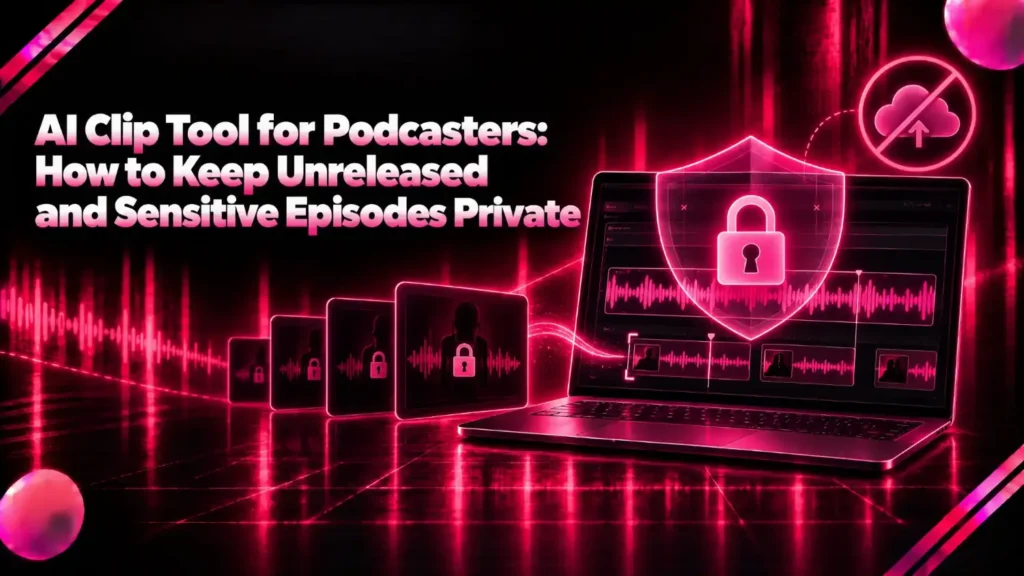
An AI clip tool for podcasters finds the strongest moments in an episode and turns them into short vertical clips. For a podcast with unreleased episodes, private guests or sensitive topics, the question is where the recording goes while that happens.
This guide is for podcast hosts and producers who want AI clips without handing an unreleased episode, or a guest’s voice and face, to more companies than they need to.
It covers why podcast privacy is different from other video, every step where an episode can leave your control, what recording and editing tools say about training AI on your content, guest releases, and a private clipping workflow.
The short answer: the clipper is usually not the first company to hold your episode, because cloud recording studios already have it. Check each tool’s own terms, get a guest release that names clips and AI tools, and clip locally if the episode should not travel. Klyply is an AI clip tool for podcasters that runs on a Windows PC and uploads nothing.
Key takeaways
- A podcast recording carries other people’s voices and faces, not just yours, which raises the stakes when it is uploaded.
- Riverside’s privacy policy says personal data in recordings may be used to train Riverside’s own AI, unless a Business-plan customer has opted out in a written agreement.
- Descript says its production AI models use no user data, and in-house research models only use data from users who opted in.
- Podcasts about health, faith, sexuality or politics can reveal what the UK GDPR calls special category data about guests.
- Klyply finds, frames and captions podcast clips on your own PC, so an unreleased episode never leaves the computer.
Why podcast privacy is different from other video
Podcast privacy is different because a podcast recording is a conversation: it holds a guest’s voice, face and opinions, often before the episode is public, and sometimes about the most personal parts of their life.
Unreleased episodes
An unreleased podcast episode is the one most likely to be clipped and the one with most to lose if it leaks, because clips are cut before launch to promote it.
An interview held for a book launch, a product announcement or a news embargo is worth less the moment it appears early. Every copy uploaded before release is one more place it could come from.
Guests who agreed to a podcast, not to AI tools
A guest who agreed to appear on your podcast did not necessarily agree to their voice and face being processed by every tool in your workflow.
Recording consent and clip consent are different things. Zoom’s page on consenting to be recorded asks participants to agree when recording starts, and that covers the recording, not what is later cut from it.
Most guests will not mind. Some will, especially public figures careful about their likeness, people who spoke off the record for part of the conversation, and anyone sharing a personal story.
Podcasts about sensitive topics
A podcast about health, faith, sexuality, politics or similar subjects can reveal personal data that data protection law treats as especially sensitive.
The UK Information Commissioner’s Office lists the special categories of personal data under the UK GDPR. They include data revealing racial or ethnic origin, political opinions, religious or philosophical beliefs and trade union membership, and data about health, sex life and sexual orientation.
A guest describing their diagnosis or their faith on your show is sharing exactly that kind of data. Outside the UK the law differs, but the care it calls for does not. This is not legal advice; for a show built around sensitive stories, ask a data protection adviser.
Where your episode travels before it becomes clips
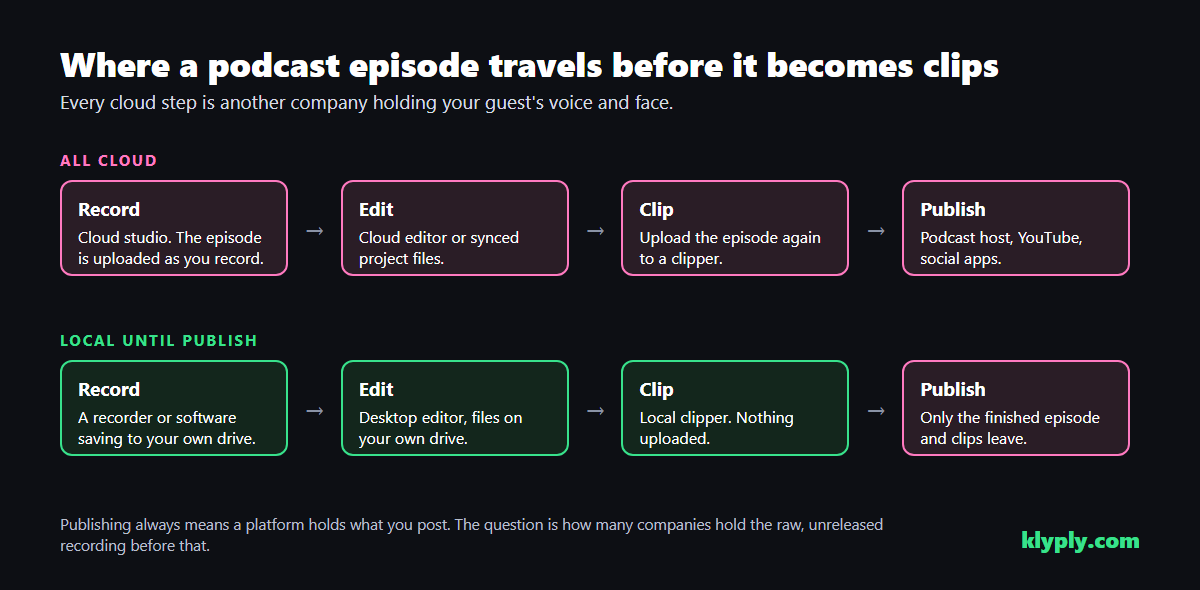
A podcast episode can pass through four sets of hands before its clips go out: the recording studio, the editor, the clipper and the publishing platforms.
The recording studio may already have it
If you record remote interviews in a cloud studio, the episode is already on that company’s servers before you think about clips, and its terms decide what happens to it.
Riverside is a widely used example. Its privacy policy defines Content Data as personal data in recordings made on its platform, including transcripts and other content derived from them, and says that in some situations Content Data may be used to train Riverside’s own AI and machine learning models.
The same policy says Content Data does not include the content of Business-plan customers who have opted out of AI training in a written agreement with Riverside.
Riverside’s AI help page adds that its third-party AI sub-processors do not use customer data to train their own models. It also lists Made for You, the suite that generates Magic Clips of 30 to 90 seconds from your recording, as a built-in feature that Business users can disable.
None of this means Riverside is a bad choice. It means the recording studio, not the clipper, is often the first and biggest privacy decision in a podcast workflow.
The editor
Editing tools that sync projects to the cloud hold a copy of the episode too, and their AI training rules vary.
Descript’s help page on account data and privacy says its current production AI models use no user data, and that internal research models only use data from users who opted in to data sharing. You choose at onboarding and can switch it off under App Settings, Profile, Share data with Descript.
That is a clear, user-controlled setting. Check it once for every account on your team.
The clipper
A cloud AI clip tool for podcasters needs the whole episode uploaded again, and keeps it for as long as its plan and policy say.
Storage periods and training terms for the best-known cloud clippers, OpusClip and Vizard, are compared in our guide to offline video clipping software, with links to each company’s own pages.
Publishing
Publishing always hands what you post to a platform. The difference is that by then the episode is meant to be public, and only the finished version travels.
What to check in any podcast tool’s terms
Before you put an unreleased podcast episode into any AI clip tool for podcasters, or any other tool, read its privacy policy and terms for six answers.
- Can it train AI on your content? Look for “train”, “improve our services” and “machine learning”.
- Who can opt out, and how? A setting you control is different from a clause only enterprise customers can negotiate.
- Does it cover guests? Check whether recordings of people without an account are treated the same way.
- How long is it kept? Including after you cancel or delete a project.
- Who else processes it? Most tools list their sub-processors, and the good ones say those cannot train on your data.
- Which features run automatically? Some tools generate clips, summaries or transcripts without a click.
Policies change, so note the date you read them. A tool that was fine for last year’s season may not be fine for this one.
A podcast guest release that covers clips and AI
A podcast guest release should say, in plain words, that the conversation may be cut into short clips and processed by AI tools, so nobody is surprised later.
Templates are easy to find; the useful part is what to make sure yours covers:
- Clips, not just the episode. Short clips on YouTube, Instagram, TikTok and LinkedIn are a different use from the full show.
- Editing. A clip lifts a moment out of context, so say that you may cut and caption it.
- AI processing. Name transcription, captioning and clip selection, and say whether recordings go to third-party tools.
- No synthetic likeness. Say you will not use their voice or face to generate new content without asking again.
- Off the record. Agree how anything said off the record is marked and removed before editing.
- Take-downs. Say how a guest can ask for a clip to be removed.
For anything binding, ask a lawyer. A release is only as good as its fit with your show and your country’s law.
A private podcast clipping workflow
The most private podcast clipping workflow keeps the raw recording on your own drives from the moment it is made until the finished episode and clips are published.
- Record locally. In a room, record to your own recorder or computer. For a remote guest, a common approach is a double-ender, where each person records their own side locally and sends the file.
- If you use a cloud studio, choose its settings deliberately. Read its AI terms, and check whether your plan lets you opt out.
- Edit on your own machine. A desktop editor working from local files keeps the episode off another server.
- Clip locally. A local AI clip tool for podcasters finds and frames the moments without an upload.
- Review every clip. Check for off-the-record moments, names and anything the guest asked you to cut.
- Publish on the day. Only the finished episode and the clips you chose leave your control.
Our workflow for repurposing a podcast into short clips covers recording layouts, clip lengths and posting in more detail.
Klyply: an AI clip tool for podcasters that keeps episodes local
Klyply is an AI clip tool for podcasters that runs on Windows 10 and 11: it transcribes the episode, finds the moments, frames the speakers and burns in captions on your own PC, with nothing uploaded.
- Local from start to finish. Transcription, scoring, framing and rendering all happen on your computer. There are no servers holding a copy.
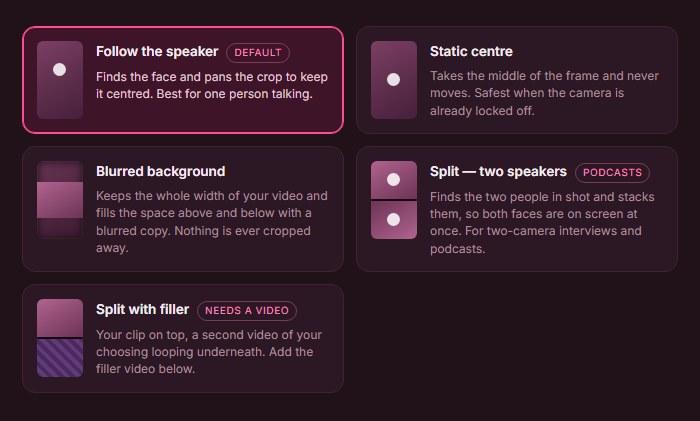
- Built for two speakers. Follow the speaker keeps the crop on whoever is talking, and Split stacks host and guest one above the other.
- Captions in 27 styles, transcribed locally, so a guest’s words are never sent to a transcription service.
- No length limit on the episode, and 1 to 20 clips per run, each 5 to 180 seconds.
- Deletion you can see. A clip that should not exist can be deleted from your own drive, with no copy left on a server.
What still needs the internet
Klyply needs the internet once to activate the licence, and once to download each transcription model the first time you use it. Your episodes are never part of either.
What Klyply costs and where it falls short
Klyply costs $29 for 3 months or $179 for a Lifetime licence, with a 12-month term in between, and there are no per-minute charges however long your episodes are.
A fixed term starts at activation, and you can get a refund within 14 days of purchase as long as the key has not been activated.
- It is a clipper, not a recording studio or a full editor. You still need a way to record and edit the episode.
- It runs on Windows only and renders on your PC’s processor, so a long episode takes longer on an older machine.
- It takes one video file per run, so separate camera files need combining first.
- It does not post clips for you, and has no team seats.
When a cloud tool is still the right choice
A cloud AI clip tool for podcasters is still the right choice when the episode is going public anyway, the guest has agreed, and convenience matters more than where the file sits.
- A remote team. Several people editing one episode from different places is easier in a shared cloud project.
- No Windows PC. On a Mac or a phone, Klyply is not an option.
- Remote guests who cannot record locally. A cloud studio is often the only practical way to get a clean recording.
- Public, low-stakes episodes. A weekly chat show with no embargo has little to lose from an upload.
Even then, read the AI settings once, and switch off what you do not need.
Podcast privacy FAQs
Is there an AI clip tool for podcasters that does not upload episodes?
Yes, local AI clip tools for podcasters exist. Klyply runs on Windows and uploads nothing, and our guide to offline video clipping software lists options for Mac and iPhone too.
Can a recording platform train AI on my podcast?
It depends on the platform’s terms. Riverside’s privacy policy says recordings may be used to train its own AI unless a Business customer has opted out in writing; Descript says it only uses data from users who opted in.
Do I need my guest’s permission to make clips?
Get your guest’s agreement to clips in writing, ideally in a release that names short clips, editing and AI processing. It costs little and prevents most disputes.
How do I keep an unreleased podcast episode from leaking?
Keep as few copies as possible: record and edit locally where you can, clip locally, and share review links only with the people who need them. Every upload is one more copy.
Is a podcast about health or faith special category data?
A guest’s own health details or religious beliefs, shared on your show, fall within the UK GDPR’s special categories as the ICO lists them. Treat those recordings with extra care, and take advice if your show is built on them.
Does Klyply send my podcast to an AI service?
No, Klyply transcribes and analyses episodes on your own PC. The only internet use is activating the licence and downloading transcription models.
Final thoughts
Choosing an AI clip tool for podcasters with private episodes starts before the clipper: with where you record, where you edit, and what your guest agreed to.
For a public weekly show, a cloud workflow with its AI settings checked is fine.
For unreleased interviews, embargoed launches or sensitive stories, keep the episode local and use Klyply to find, frame and caption the clips on your own PC, so the only things that leave are the ones you publish.
Whichever you choose, write down what each tool does with your guests’ recordings. Your guests will ask eventually, and the answer should not be a guess.