Opus Clip Pricing Explained: What Each Plan Costs per Minute of Video
Opus Clip pricing explained: Free, Starter, Pro and Business, what a minute of video costs on each plan, how credits roll over and expire, refunds, and when a one-time licence like Klyply costs less.

Opus Clip pricing is a credit system: every plan buys a number of credits, and one credit processes one minute of the video you import.
That makes the plan price only half the answer. What you actually pay depends on how many minutes of footage you clip each month, and whether you pay monthly or yearly.
This guide explains each plan, what a minute of video really costs on each one, what four common workloads cost per month, and the rules on rollover, cancellation and refunds that the pricing page does not spell out.
The short answer: Opus Clip pricing starts at $15 a month for Starter and $29 a month for Pro, or $174 a year for Pro. Pro on yearly billing is the cheapest way to buy credits, at under 5 cents a minute.
If you clip more than about five hours of footage a month, or would rather not pay by the minute at all, a one-time tool such as Klyply works out cheaper from the second year.
Key takeaways
- Opus Clip charges 1 credit per minute of imported video, rounded down for videos longer than a minute.
- Starter costs about 10 cents a minute, Pro monthly just under 10 cents, and Pro yearly under 5 cents.
- Monthly credits last 60 days and yearly credits last 12 months, and neither is refunded when you cancel.
- A weekly one-hour podcast needs about 260 credits a month, more than Starter’s 150.
- Klyply’s $179 Lifetime licence has no credits, so its cost does not grow with the minutes you clip.
Opus Clip pricing plans at a glance
Opus Clip pricing has four plans: Free at $0, Starter at $15 a month, Pro at $29 a month or $174 a year, and Business at a custom price.
The figures below come from Opus Clip’s pricing page and its plans help article, checked in September 2026.
| Plan | Price | Credits | Key limits |
|---|---|---|---|
| Free | $0 | 60 a month | Watermark, up to 1080p, clips exportable for 3 days |
| Starter | $15 a month, monthly only | 150 a month | No watermark, 9:16 only, media expires after 29 days |
| Pro | $29 a month, or $174 a year | 300 a month, or 3,600 a year | Two seats, 9:16, 1:1 and 16:9, 100GB storage |
| Business | Custom | Custom | API, dedicated storage, team controls |
For how Opus Clip compares with other clippers on these limits, see our Opus Clip alternatives comparison. This guide stays on what Opus Clip itself costs.
What does each Opus Clip plan include beyond credits?
Beyond credits, Opus Clip pricing buys different features on each plan: Starter adds watermark-free exports, and Pro adds editing, more formats, a scheduler and team seats.
- Free. AI clipping and captions with a watermark, exports up to 1080p, no editing, and clips that expire after three days.
- Starter. No watermark, vertical 9:16 exports only, local uploads up to 10GB, captions in 20 or more languages and auto posting.
- Pro. Text and timeline editing, AI B-roll, 9:16, 1:1 and 16:9 exports, a scheduler, Premiere and DaVinci export, dubbing and local uploads up to 30GB.
- Business. Everything in Pro plus dedicated storage, API access and team permissions.
The format limit matters more than it looks. If you post square clips to a feed or landscape clips to YouTube, Starter cannot export them, so Opus Clip pricing for you starts at Pro.
How long a video can you upload?
Opus Clip accepts videos of up to 10 hours, according to its video length article.
A 10-hour stream costs 600 credits in one go. That is two months of Pro’s monthly allowance, or a sixth of a yearly plan, before a single clip is posted.
How do Opus Clip credits work?
Opus Clip credits work by length: processing costs 1 credit per minute of the original video you import, regardless of how many clips come out of it.
Opus Clip’s credits help article sets out the rounding. Videos under a minute are rounded up to one credit, and longer videos are rounded down, so a 4.5 minute video costs 4 credits.
You can cut the cost with the processing timeframe slider, which clips only part of a video. Publishing to X costs 1 more credit per clip, refunded if the post fails.
Do Opus Clip credits roll over?
Under Opus Clip pricing, credits roll over for one extra month on monthly plans, and last 12 months on yearly plans.
Monthly credits expire 60 days after they arrive. Yearly credits all arrive at once and stay valid for 12 months from purchase.
What happens to credits when you cancel?
When you cancel, remaining Opus Clip credits stay usable until their original expiry date, and then they are gone.
The plans article also says projects become inaccessible three days after a subscription is cancelled, so download anything you want to keep first.
What does a minute of video cost on each Opus Clip plan?
A minute of video costs about 10 cents on Starter, 9.7 cents on Pro monthly and 4.8 cents on Pro yearly, dividing each plan’s price by its credits.
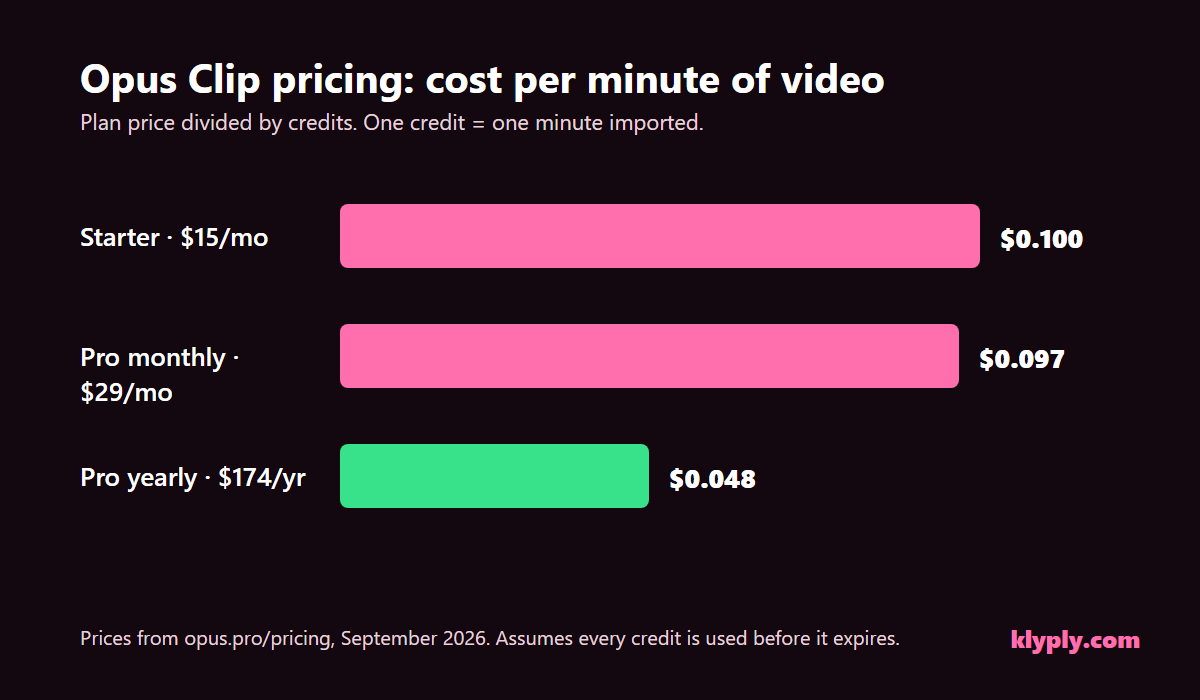
| Plan | Price | Credits | Cost per minute | Cost per hour of footage |
|---|---|---|---|---|
| Starter | $15 a month | 150 | $0.100 | $6.00 |
| Pro, monthly | $29 a month | 300 | $0.097 | $5.80 |
| Pro, yearly | $174 a year | 3,600 | $0.048 | $2.90 |
These figures assume you use every credit. Unused credits that expire raise the real cost per minute, which is the main hidden cost in Opus Clip pricing.
The Free plan’s 60 credits cost nothing, but its clips carry a watermark and stop being exportable after three days.
Opus Clip pricing for common workloads
Opus Clip pricing for a typical creator ranges from free, for an hour of footage a month, to more than Pro’s allowance for anyone clipping a daily stream.
This table uses 4.33 weeks per month and one credit per minute of source video.
| Workload | Minutes a month | Cheapest plan that covers it | What that costs |
|---|---|---|---|
| One 60-minute video a month | 60 | Free, with watermark | $0 |
| Weekly 30-minute YouTube video | about 130 | Starter | $15 a month |
| Weekly 60-minute podcast | about 260 | Pro | $29 a month, or $174 a year |
| Weekly 3-hour livestream | about 780 | Beyond Pro’s 300 a month | Pro plus extra credits, or Business |
The livestream row is where Opus Clip pricing gets hard to predict. Paid users can top up with an Add more credits button, but the pricing page does not list the price of extra credits.
Is Opus Clip cheaper monthly or yearly?
Opus Clip pricing is about half as much per minute on yearly billing: Pro costs $174 for 3,600 credits a year, against $348 for the same credits paid monthly.
The catch is the upfront commitment. Yearly credits arrive at once and expire 12 months later, and the terms do not allow a partial refund if your plans change.
Yearly billing makes sense if you already clip every week and expect to keep going. Starter has no yearly option at all.
Is Opus Clip free?
The free tier of Opus Clip pricing gives 60 credits a month, which is one hour of imported video, but it is limited enough that most regular creators outgrow it quickly.
Free clips carry a watermark, render at up to 1080p, and cannot be exported after three days. Opus Clip’s project storage article says free projects expire three days after creation and trial projects after seven.
Is there an Opus Clip free trial?
Opus Clip offers trials of its paid features, and trial projects expire seven days after creation, according to its project storage article.
Its terms say a trial must be used within the trial period, and you must stop using the paid service before the trial ends to avoid being charged. Set a reminder the day you start one.
Does Opus Clip offer refunds?
Opus Clip pricing includes no refunds: the company does not refund subscription fees already paid, and there is no prorated refund when you cancel partway through a term.
Opus Clip’s terms of service say paid services cannot be ended before the period you paid for, and that subscriptions renew automatically at the then-current rate. The same terms say price changes are announced in advance, so you can cancel before they apply.
That makes a yearly plan a real commitment. Test Opus Clip on the free plan or a single month of Starter before paying for a year.
Which Opus Clip plan should you choose?
The right plan under Opus Clip pricing depends on how many minutes you clip a month and whether you need more than 9:16 video.
- Free suits testing, or one video a month where a watermark is acceptable.
- Starter suits up to 150 minutes a month of vertical-only clips, such as a weekly 30-minute video.
- Pro monthly suits up to 300 minutes, square or landscape exports, and a second seat, while you are still deciding.
- Pro yearly suits a steady weekly workload, at half the cost per minute.
- Business suits teams that need the API, dedicated storage or more minutes than Pro includes.
Opus Clip pricing vs a one-time licence
Compared with a one-time licence, Opus Clip pricing costs less in the first year and more every year after, and only a one-time licence stops counting minutes.
Klyply is a Windows clipper sold as a $179 Lifetime licence or a $29 three-month licence, with unlimited videos and clips on every plan. It transcribes, finds moments, reframes and captions on your own PC.
| Opus Clip Pro, yearly | Klyply Lifetime | |
|---|---|---|
| Year one | $174 | $179 |
| Three years | $522 | $179 |
| Minutes included | 3,600 a year | Unlimited |
| Unused minutes | Expire after 12 months | Nothing to expire |
| Where it runs | Cloud, upload required | Your Windows PC |
| Refunds | No refund of fees paid | Within 14 days while the key is unactivated |
| Platforms | Web, iOS, Android | Windows 10 and 11 only |
Opus Clip is still the better fit if you work on a Mac or in a browser, need team seats or a built-in scheduler, or clip only a few minutes a month. Klyply has no free plan and does not post for you.
For more tools you pay for once, see our guide to one-time purchase clipping software.
How to lower your Opus Clip bill
To lower your Opus Clip bill, import only the part of each video you want clipped, and match your plan to the minutes you actually use.
- Trim before importing. Cut intros, ad reads and dead air, or use the processing timeframe slider.
- Batch into the rollover window. Monthly credits last 60 days, so a quiet month can carry into the next.
- Go yearly only when steady. The per-minute saving is real, but only on credits you use.
- Download before cancelling. Projects become inaccessible three days after cancellation.
- Clip long recordings locally. Hours-long streams are where per-minute pricing costs most.
If you clip other people’s streams for pay, our guide to how to make money clipping videos shows why the cost per minute decides your margin.
Opus Clip pricing FAQs
How much does Opus Clip cost per month?
Opus Clip costs $15 a month for Starter and $29 a month for Pro, or $14.50 a month when Pro is billed yearly at $174, as of September 2026.
How many minutes do you get on Opus Clip Pro?
Opus Clip Pro includes 300 credits a month on monthly billing, or 3,600 a year on yearly billing, and each credit is one minute of imported video.
Do unused Opus Clip credits expire?
Yes, monthly credits expire after 60 days and yearly credits after 12 months, including after you cancel.
Can I get a refund from Opus Clip?
Opus Clip’s terms say it does not refund fees already paid and does not offer prorated refunds for the rest of a term.
Is there an Opus Clip alternative without credits?
Yes, Klyply runs on your Windows PC with unlimited clips and no credits, for $179 once or $29 for three months.
Is Opus Clip worth the price?
Opus Clip is worth it if you clip a steady few hours a month in a browser and value its scheduler and team seats. For long recordings or private footage, a local one-time tool usually costs less.
Final thoughts
Opus Clip pricing is simple on the page and harder in practice, because the real cost depends on minutes, not plans.
For an hour of footage a month, the free plan is enough. For a weekly video or podcast, Pro on yearly billing gives the lowest cost per minute, as long as you use the credits before they expire.
For long streams, daily clipping or footage that should not be uploaded, per-minute pricing works against you. On Windows, Klyply ends the meter with a one-time licence and unlimited clips.