One-Time Purchase Video Clipping Software: 9 Tools That End the Monthly Bill
Most AI clippers are subscriptions because they run on cloud servers. Here are 9 one-time purchase video clipping software options, what "lifetime" really covers, and what three years of subscriptions cost instead.
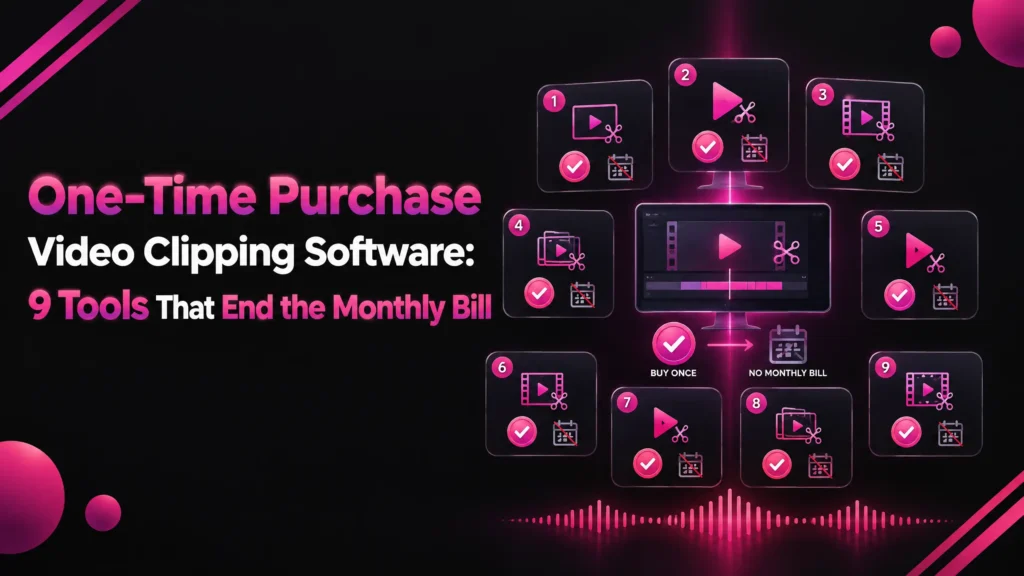
One-time purchase video clipping software is a tool that turns long videos into short clips for a single payment, with no monthly or yearly subscription.
This guide is for creators who are tired of paying every month for AI clipping and want to know what they can buy once instead.
The short answer: very few AI clippers are sold once, because most run on cloud servers that cost money every minute. The ones that are sold once mostly run on your own device.
On a Windows PC, Klyply is the strongest one-time purchase video clipping software: a $179 Lifetime licence, unlimited clips, and nothing uploaded. On an Apple Silicon Mac, Reelify AI’s lifetime deal is the closest match, and on an iPhone, Clipped.
Below you will find what “one-time” really covers, what three years of subscriptions cost, what to check before paying, and nine tools compared.
Every price comes from the company’s own pricing page, store listing or licence, checked in September 2026.
Key takeaways
- Three years of a cloud clipper’s entry yearly plan costs $216 to $522. A one-time licence costs $9.99 to $299.99, depending on the tool and platform.
- Klyply is the best one-time purchase video clipping software for Windows: $179 Lifetime, unlimited clips, and processing on your own PC.
- “Lifetime” rarely means free updates forever. Klyply includes 12 months of updates, Filmora covers one major version, and PowerDirector 2026 excludes new AI features.
- A lifetime deal on a cloud tool, such as Reap on AppSumo, still caps your monthly hours and depends on the company’s servers.
- Video editors like DaVinci Resolve Studio and Final Cut Pro are one-time purchases, but you pick the moments yourself.
What is one-time purchase video clipping software?
One-time purchase video clipping software is clipping software you pay for once and keep using without a recurring charge.
The label covers several different deals, and they are not equal. Knowing which one you are buying matters more than the price.
Perpetual licence, lifetime deal, credit pack or fixed term?
There are four common one-time models, and each keeps a different part of the software for you.
- Perpetual or lifetime licence. You can keep using the version you bought. Updates are usually limited to a period or a major version.
- Lifetime deal. A launch promotion, often sold on AppSumo, that gives lifetime access to a plan. Cloud tools usually keep a monthly usage cap.
- Credit pack. You buy minutes of processing once, and they are used up as you clip.
- Fixed term. A licence for a set period that ends without renewing, so it is not a subscription even though it is not permanent.
Why are most AI clipping tools subscriptions?
Most AI clipping tools are subscriptions because they process your video on their own servers, and that computing cost repeats every time anyone clips.
That is why cloud clippers meter usage. OpusClip’s credits article charges one credit per minute of video imported, and Vizard’s pricing page uses the same rule.
Software that runs on your own computer or phone does not have that cost. Your hardware does the work, so the developer can sell it once.
That is also why nearly every one-time purchase video clipping software option on this list is tied to one platform: Windows, Mac or iPhone.
How much does a clipping subscription cost over three years?
A clipping subscription costs between $216 and $522 over three years on the entry yearly plans of the main cloud tools, as of September 2026.
That is before upgrading for more minutes, and it keeps rising for as long as you clip.
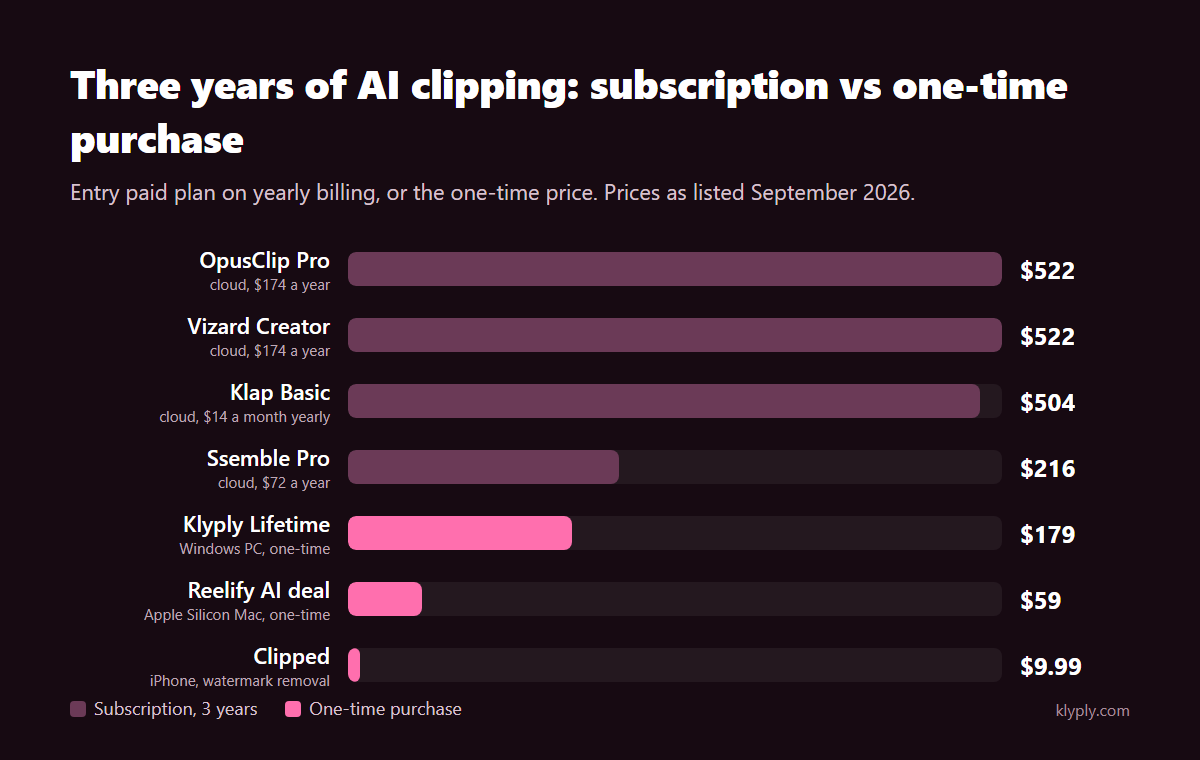
| Tool | Entry paid plan | Cost over 3 years | What it meters |
|---|---|---|---|
| OpusClip Pro | $174 a year | $522 | Minutes imported |
| Vizard Creator | $174 a year | $522 | Minutes of video |
| Spikes Studio PRO+ | $14.09 a month, billed annually | $507 | Minutes of video |
| Klap Basic | $14 a month, billed yearly | $504 | Clips generated |
| Choppity Starter | $14 a month, billed yearly | $504 | Hours of analysis |
| Ssemble Pro | $72 a year | $216 | Videos |
| Klyply Lifetime | $179 once | $179 | Nothing |
Prices come from the pricing pages of OpusClip, Spikes Studio, Klap, Choppity and Ssemble.
One-time purchase video clipping software pays for itself once it costs less than the subscription you would otherwise keep. For most of these tools that happens within the first year or two.
What to check before buying one-time purchase video clipping software
Before buying one-time purchase video clipping software, check six things: how long updates last, hidden credits, where processing happens, which platform it needs, how many computers it covers, and the refund terms.
How long do updates last?
Updates on one-time purchase video clipping software usually last for a set period or one major version, not forever.
Klyply’s licence agreement includes 12 months of updates with a Lifetime licence, after which your installed version keeps working. Filmora’s perpetual plan covers updates within Filmora 15 only.
CyberLink says PowerDirector 2026’s lifetime version provides core editing tools, while new AI features and continuous updates come with the subscription.
Are there hidden AI credits?
Some one-time purchase video clipping software still rations AI features with credits or monthly hours.
Filmora’s perpetual licence includes 1,000 AI credits once, not every month. Reap’s lifetime deal gives a fixed number of clipping hours each month, and Video Clipper sells credits that are used up as you process video.
Where does the processing happen?
Processing happens either on your device or on the company’s servers, and that decides how “lifetime” your purchase really is.
Local one-time purchase video clipping software keeps working even if the company changes plans, as long as your installed version runs. A cloud lifetime deal depends on the servers staying up and the deal terms staying honoured.
Local processing also means your footage is never uploaded, which matters for client work and anything under NDA. Our guide to offline video clipping software covers that side in depth.
Which platform does it need?
Almost every one-time purchase video clipping software option runs on only one platform.
Klyply needs Windows 10 or 11, Reelify AI needs an Apple Silicon Mac, Clipped needs an iPhone, and Final Cut Pro needs a Mac. Filmora’s perpetual licence is sold separately for Windows or Mac.
How many computers does one licence cover?
Most one-time purchase video clipping software covers a single computer per licence, and extra machines cost more.
Klyply’s licence binds the key to the computer you activate it on, up to the activations stated for your plan. Reelify AI’s AppSumo tiers are priced by machine count, from one Mac to 25.
What are the refund terms?
Refund terms for one-time purchase video clipping software vary from none at all to 60 days, so read them before you pay.
Klyply refunds within 14 days while the key is unactivated. Reelify AI’s AppSumo deal has a 60-day money-back guarantee, Reap’s has 30 days, Filmora offers 30 days, and Video Clipper’s credit purchases are non-refundable.
The 9 best one-time purchase video clipping software options
The nine best one-time purchase video clipping software options in 2026 are Klyply, Reelify AI, Clipped, Video Clipper, Reap, DaVinci Resolve Studio, Final Cut Pro, Filmora and PowerDirector 2026.
The first five pick clips for you automatically. The last four are video editors, where you choose the moments yourself.
1. Klyply: one-time purchase AI clipping on a Windows PC
Klyply is a Windows application that turns long videos into short vertical clips entirely on your own PC, sold as a licence rather than a subscription.
It is the one-time purchase video clipping software for Windows users who want AI to find the moments, with no credits, no upload and no monthly bill.
What one payment gets you
A Klyply Lifetime licence costs $179 once and includes unlimited videos and clips.
There is no per-minute meter and no limit on video length. A three-hour recording is one job, and the only cost is processing time on your own hardware.
If you would rather not pay the full price upfront, Klyply also sells a $29 licence for three months and a 12-month term. Both end without renewing.
How Klyply clips a video
Klyply transcribes the audio, scores every candidate moment, reframes the best ones, adds captions and renders the batch, all on your PC.
Moments are scored on hook strength, emotional and concrete language, vocal energy, delivery pace and whether the thought is complete. You choose 1 to 20 clips per video.
It works from a file on your drive or a link from YouTube, Vimeo, X or Twitch. It uses a graphics card if you have one and runs on the CPU otherwise.
Framing, captions and branding
Klyply includes five framing modes, 27 animated caption presets, automatic hook titles and your logo on every clip.
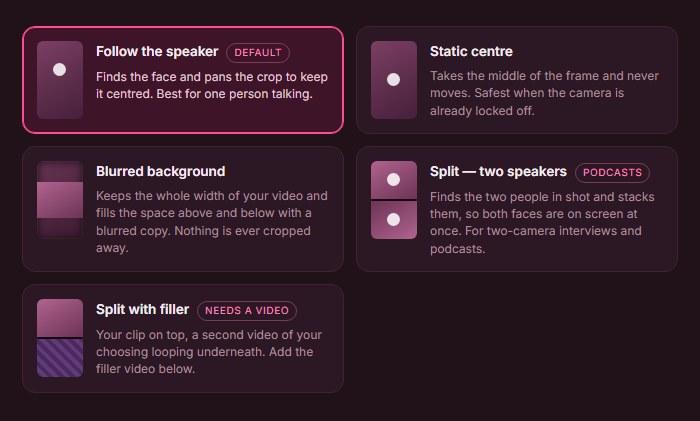
Follow the speaker keeps the crop on the person talking, and Split stacks two people for interviews and podcasts. Exports are MP4 at 9:16, 4:5, 1:1 or 16:9, one shape per render, with no watermark.
What “Lifetime” means for Klyply
Klyply’s Lifetime licence never expires, and it includes 12 months of updates from the date of purchase.
After those 12 months your installed version keeps working, and new versions may need a paid upgrade. The licence covers one computer, up to the activations stated at checkout.
Activation needs the internet once, then Klyply runs offline. Refunds are available within 14 days of purchase while the key is unactivated.
Klyply Lifetime vs a subscription clipper
| OpusClip Pro (yearly) | Klyply Lifetime | |
|---|---|---|
| Price | $174 a year | $179 once |
| Cost over 3 years | $522 | $179 |
| Usage limit | 3,600 credits a year, 1 per minute | Unlimited |
| Where it runs | Cloud servers | Your Windows PC |
| Upload needed | Yes | No |
| Works offline | No | Yes, after activation |
| Updates | While subscribed | 12 months, then the installed version keeps working |
| Team features | 2 seats | None |
For a full breakdown of OpusClip’s credits and limits, see the Opus Clip alternatives comparison.
Where Klyply falls short
Klyply runs on Windows 10 and 11 only and has no free plan.
It has no social scheduler, caption translation or team seats, and long files take as long as your own computer needs.
2. Reelify AI: a lifetime deal for Apple Silicon Macs
Reelify AI is a Mac app that clips long videos on your own computer, sold as a $59 lifetime deal alongside a $15 monthly plan. It is the closest one-time purchase video clipping software to Klyply for Mac users.
Its website says video never leaves your Mac and lists unlimited AI clipping, captions, reframing and dual-crop for multi-speaker content. It needs macOS 15 or later on Apple Silicon.
On AppSumo, the lifetime tiers run from $59 for one Mac to $206 for 25, with a 60-day money-back guarantee and a 60-day activation window.
3. Clipped: pay once on iPhone
Clipped is one-time purchase video clipping software for iPhone: it clips video on the device and removes its watermark with a single $9.99 purchase.
Its App Store listing says every model runs on-device and the app works in airplane mode. It is free to use with a watermark and needs iOS 26 or later.
4. Video Clipper: credit packs that never expire
Video Clipper is a web-based YouTube clipper sold as one-time credit packs, where one credit is one minute of input video and credits never expire.
Video Clipper’s site lists 450 credits for $15, 750 for $25 and 1,500 for $50, with 20 free credits to start. It works from YouTube links and adds captions, vertical reframing and one-click YouTube upload.
It is one-time purchase video clipping software, but not unlimited. Credit purchases are non-refundable, and your video is processed online.
5. Reap: a cloud clipper sold as a lifetime deal
Reap is a cloud AI clipping tool offered as a lifetime deal on AppSumo, with a monthly cap on clipping hours.
Reap’s AppSumo page lists Tier 1 at $79 for 5 hours of clipping and captioning a month with 1080p exports, up to Tier 4 at $789 for 30 hours and 4K.
It includes captions in over 100 languages, dubbing, reframing and scheduling. Processing runs on Reap’s servers, and the deal has a 30-day refund window.
6. DaVinci Resolve Studio: a professional editor for $295
DaVinci Resolve Studio is a professional video editor from Blackmagic Design sold for a one-time $295, with a free version for most basic work.
Blackmagic’s Studio page lists the DaVinci AI Neural Engine, including smart reframing for vertical formats, plus text-based editing and voice isolation.
It is a full editor, not an automatic clipper. The page does not list automatic highlight detection, so you find the best moments yourself.
7. Final Cut Pro: one-time purchase on Mac
Final Cut Pro is Apple’s professional Mac video editor, available as a one-time purchase of $299.99.
Apple’s Final Cut Pro page also offers it through an Apple Creator Studio subscription at $12.99 a month or $129 a year.
It generates captions from spoken audio and reframes video to fit different aspect ratios, but it does not choose clips for you.
8. Filmora: a perpetual licence with one-time AI credits
Filmora is a video editor from Wondershare with a perpetual licence for $79.99, alongside yearly plans.
Filmora’s store says the perpetual licence includes 1,000 AI credits once, 1GB of storage and updates within Filmora 15 only. It is sold separately for Windows and Mac.
The yearly Advanced plan adds 1,000 AI credits every month instead. All plans have a 30-day money-back guarantee.
9. PowerDirector 2026: a lifetime editor without new AI features
PowerDirector 2026 is CyberLink’s video editor sold as a one-time $139.99 purchase for perpetual access.
CyberLink’s store says the lifetime version provides core editing tools, while PowerDirector 365 at $59.99 a year unlocks new AI features, continuous updates and stock assets.
One-time purchase video clipping software compared
This table compares all nine one-time purchase video clipping software options on what they are, where they run, what they cost once, and what the payment actually covers.
| Tool | Type | Platform | Processing | One-time price | What “once” covers |
|---|---|---|---|---|---|
| Klyply | AI clipper | Windows | Local | $179 Lifetime | Unlimited clips, 12 months of updates |
| Reelify AI | AI clipper | Apple Silicon Mac | Local | $59 lifetime deal | Unlimited clipping on 1 Mac |
| Clipped | AI clipper | iPhone | On device | $9.99 | Watermark removal |
| Video Clipper | AI clipper | Web | Cloud | $15 to $50 | 450 to 1,500 minutes, never expire |
| Reap | AI clipper | Web | Cloud | From $79 | 5 to 30 hours a month |
| DaVinci Resolve Studio | Editor | Desktop | Local | $295 | Studio features |
| Final Cut Pro | Editor | Mac | Local | $299.99 | The app on Mac |
| Filmora | Editor | Windows or Mac | Local | $79.99 | Filmora 15 updates, 1,000 AI credits once |
| PowerDirector 2026 | Editor | Desktop | Local | $139.99 | Core editing, no new AI features |
AI clipper or video editor: which should you buy once?
Buy an AI clipper if you want the software to find the best moments for you, and a video editor if you are happy to find them yourself.
An AI clipper reads a long recording, picks the strongest moments, reframes them and adds captions in one pass. That is what saves hours on a weekly podcast.
An editor gives you far more control over colour, sound and effects, but every clip starts with you scrubbing the timeline. Many creators use both: a clipper for the first cut and an editor for the clips that need polish.
When is a subscription still the better choice?
A subscription is still a better choice than one-time purchase video clipping software if you need a free plan to test, work across several devices, share a team workspace, or want new AI features the moment they ship.
- You clip rarely. A few short videos a year may fit inside a cloud tool’s free plan.
- You work from any device. Browser tools run on Mac, Windows, Linux and Chromebooks.
- You work in a team. Shared workspaces and seats are cloud features.
- You want posting built in. Scheduling to TikTok, YouTube and Instagram comes with most cloud clippers.
- Your computer is slow. Cloud servers render long files faster than an old laptop.
One-time purchase video clipping software FAQs
Is there AI clipping software with no subscription?
Yes, Klyply on Windows, Reelify AI on Apple Silicon Macs and Clipped on iPhone all clip video with AI for a one-time payment.
Video Clipper and Reap are also paid once, but Video Clipper’s credits run out and Reap’s lifetime deal caps monthly hours.
What is the best one-time purchase video clipping software?
Klyply is the best one-time purchase video clipping software for Windows, because its $179 Lifetime licence covers unlimited clips and runs entirely on your PC.
On a Mac, Reelify AI’s $59 lifetime deal is the closest equivalent, and on an iPhone, Clipped.
Are lifetime deals on AI tools safe?
Lifetime deals are only as safe as the company behind them, especially for cloud tools that need servers to keep running.
Local software keeps working on your machine regardless. For cloud deals, check the refund window and the monthly usage cap before buying.
Is DaVinci Resolve a one-time purchase?
Yes, DaVinci Resolve Studio is a one-time $295 purchase, and the standard DaVinci Resolve is free.
Can you still buy Final Cut Pro once?
Yes, Final Cut Pro for Mac is still sold as a one-time purchase at $299.99, alongside an Apple Creator Studio subscription.
Can I use OpusClip without a subscription?
Only on its free plan, which gives 60 credits a month with watermarked clips that stop being exportable after three days.
Is Klyply a subscription?
No, Klyply is never a subscription. The Lifetime licence is a single $179 payment, and the 3-month and 12-month licences end without renewing.
Does Klyply work on a Mac?
No, Klyply runs on Windows 10 and 11 only. Mac users looking for a one-time purchase should consider Reelify AI or Final Cut Pro.
Final thoughts
Buying one-time purchase video clipping software makes sense when you clip regularly and would otherwise pay a subscription for years.
The best one-time purchase video clipping software is the one that runs on the device you already own and does not ration its AI with credits.
On Windows, that is Klyply: $179 once, unlimited clips, and your footage never leaves your PC.
On a Mac, look at Reelify AI for automatic clipping or Final Cut Pro for editing. On an iPhone, Clipped.
Whatever you choose, read what “lifetime” covers before you pay. The update terms matter as much as the price.