Choppity Alternative: 7 Best Clippers for When Your Monthly Hours Run Out
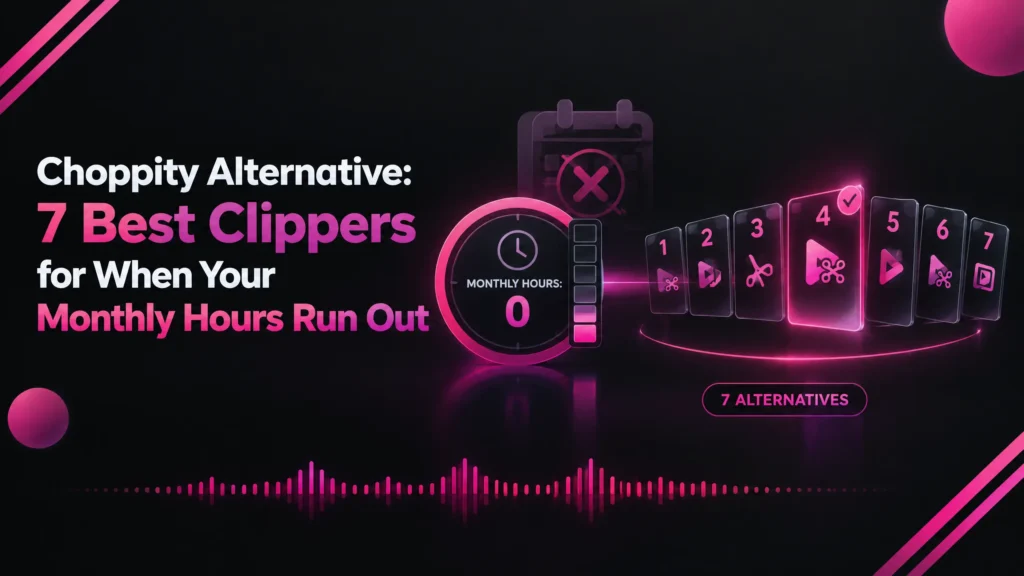
Choppity reads 3 to 5 hours of video a month and resets on the 1st, with uploads capped at 2 hours. Here are the 7 best Choppity alternatives compared on hours, limits and privacy, led by Klyply, which has no hour cap.
A Choppity alternative is an AI clipping tool that turns long videos into short clips without Choppity’s monthly hour allowance, its 2-hour upload limit or its cloud upload.
Choppity is a strong clipper with a transcript editor and built-in scheduling. People start looking for a Choppity alternative when their recordings outgrow the hours on their plan.
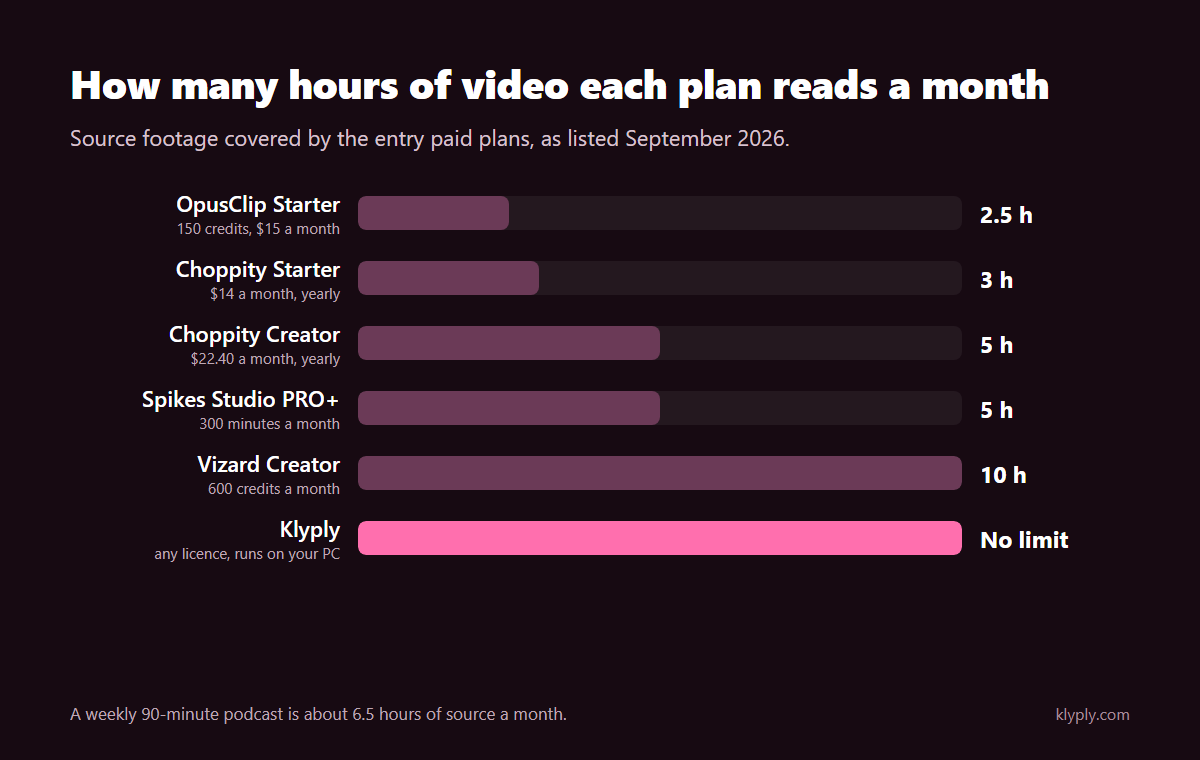
Choppity Starter reads 3 hours of video a month and Creator reads 5. A weekly 90-minute podcast is about 6.5 hours, so it does not fit on either plan.
This guide covers what Choppity costs, where its limits are, how to choose a replacement, and how the seven best Choppity alternatives compare on hours, uploads and privacy.
The short answer: if your recordings are long or your footage must stay private, Klyply is the strongest Choppity alternative. It clips on your own Windows PC with no hour limit at all.
If you want to stay in the cloud, Vizard Creator reads twice as many hours as Choppity Creator. If your team needs Choppity’s unlimited seats, stay where you are.
Every price and limit below comes from each company’s own pricing page, help pages or terms, checked in September 2026.
Key takeaways
- Choppity meters hours of AI video analysis: 1 on Free, 3 on Starter, and 5 on Creator and Team.
- Usage resets on the 1st of every calendar month, and uploads are capped at 10GB and 2 hours.
- Starter keeps projects for 30 days; Creator and Team keep them forever.
- Klyply is the best Choppity alternative for long recordings and private footage: no hour cap, no upload, and a $179 Lifetime licence.
- Vizard Creator reads 10 hours a month, twice Choppity Creator, while Ssemble charges per video instead of per hour.
- Stay on Choppity if you need unlimited team seats, transcript editing and scheduling to LinkedIn and Facebook in one tool.
What is Choppity?
Choppity is a cloud AI video clipper and editor from Mizko Media Pty Ltd in Australia that turns long videos into short clips and schedules them to social platforms.
You upload a file or paste a YouTube, Vimeo or Twitch link, and Choppity processes the video on its servers.
Its comparison page lists ClipAnything AI video search, virality, trust, sales and inspiration scores, transcript-based editing, automatic profanity censoring and captions in 97 languages.
It also lists active speaker tracking with camera splits and zooms, exports in 9:16, 1:1 and 16:9, and scheduling to TikTok, Reels, Shorts, LinkedIn and Facebook.
An Ideas board and content calendar round it out, which makes Choppity closer to a content planner than a pure clipper.
How much does Choppity cost in 2026?
Choppity costs $20 a month for Starter, $32 for Creator and $48 for Team, or $14, $22.40 and $33.60 a month on yearly billing, as of September 2026.
Every plan is metered in hours of AI video analysis rather than credits or clips.
This is what Choppity’s pricing page lists:
| Free | Starter | Creator | Team | |
|---|---|---|---|---|
| Monthly price | $0 | $20 | $32 | $48 |
| Yearly billing, per month | $0 | $14 | $22.40 | $33.60 |
| AI video analysis | 1 hour | 3 hours | 5 hours | 5 hours |
| Cloud storage | 2GB | 40GB | 100GB | 200GB |
| Project storage | 3 days | 30 days | Forever | Forever |
| Seats | 1 | 1 | 1 | Unlimited |
| Social accounts | None | 1 | 3 | 10 |
| API access | No | No | Yes | Yes |
Extra usage comes in Creator packs. The pricing FAQ says one pack adds 0.5 hours of video upload a month and 10GB of cloud storage.
Does Choppity have a free plan?
Yes, Choppity has a free plan with 1 hour of AI video analysis a month and no credit card required.
Free projects are kept for 3 days, and Choppity’s AI clip maker page says free exports include a small Choppity watermark.
What are Choppity’s limits?
Choppity’s main limits are its monthly hour allowance, a 2-hour and 10GB upload cap, 1080p exports, short project storage on Starter, and a required cloud upload.
Most of these only bite when recordings get long, which is exactly when a Choppity alternative starts to make sense.
How many hours of video does Choppity allow?
Choppity allows 3 hours of video a month on Starter and 5 hours on Creator and Team, and usage resets on the 1st of every calendar month.
A weekly 90-minute podcast is about 6.5 hours of source video a month. That is more than any standard Choppity plan, before you add a single webinar or livestream.
Unused hours do not carry over, because the counter goes back to zero each month.
How long can a video be on Choppity?
Choppity accepts MP4, MOV, WebM and MKV files of up to 10GB and up to 2 hours long, according to its AI clip maker page.
A three-hour livestream has to be split before upload, and each part still counts against your monthly hours.
How long does Choppity keep your projects?
Choppity keeps projects for 3 days on Free, 30 days on Starter, and forever on Creator and Team.
If you cancel, access ends at the end of your billing period, so download what you want to keep before then.
What does Choppity do with your footage?
Choppity processes your footage in the cloud and stores personal information in Australia, the United Kingdom and the United States, according to its privacy policy.
The policy says Choppity may use anonymised or aggregated data derived from your content to improve its AI, but not identifiable content without your separate consent. User content is deleted within 30 days of closing your account.
Its terms of use, last updated 12 January 2026, also grant a licence to use your content in commercial or sponsored content that promotes Choppity. For client footage under NDA, read that clause before uploading.
Does Choppity offer refunds?
Yes, Choppity considers refund requests made within 14 days of a payment.
Its pricing FAQ says requests go through a support case and are evaluated. After 14 days it does not refund partial months, but you can cancel at any time.
Choppity review: pros and cons
Choppity’s strengths are transcript editing, unlimited team seats and publishing to five platforms. Its weaknesses are low monthly hours, the 2-hour upload cap and a broad content licence in its terms.
Pros
- Hour-based pricing is easy to predict.
- Edit clips by editing the transcript, with a full timeline as well.
- ClipAnything AI search finds specific moments by prompt.
- Captions in 97 languages and automatic profanity censoring.
- Scheduling to TikTok, Reels, Shorts, LinkedIn and Facebook, plus an Ideas board.
- Unlimited seats on the Team plan, and a 14-day refund window.
Cons
- Only 3 to 5 hours of video a month on standard plans.
- Hours reset monthly, with no rollover.
- Uploads capped at 2 hours and 10GB.
- Exports top out at 1080p.
- Starter deletes projects after 30 days.
- Footage goes to the cloud, and the terms allow promotional use of content.
Why look for a Choppity alternative?
People look for a Choppity alternative for four reasons: they run out of monthly hours, their recordings are longer than 2 hours, their footage cannot be uploaded, or they want to stop paying monthly.
You run out of hours mid-month
Three to five hours a month covers a few interviews, not a weekly long-form show.
Once the hours are gone you wait for the 1st, buy Creator packs at 0.5 hours each, or move to a Choppity alternative with a bigger allowance or none at all.
Your recordings are longer than 2 hours
Livestreams, conference recordings and long podcasts often run past Choppity’s 2-hour upload limit.
Splitting a file works, but the AI then scores each half separately and can miss a moment that only makes sense across the join.
Your footage has to stay private
Client work, internal meetings and unreleased material often cannot be sent to a cloud service in another country.
Choppity’s terms also allow promotional use of uploaded content. A Choppity alternative that runs locally never receives the footage in the first place.
You want to stop paying every month
Choppity Creator costs $268.80 a year on yearly billing, every year you use it.
A Choppity alternative sold as a one-time licence stops costing money after the first payment, which suits creators who clip in bursts.
How to choose a Choppity alternative
Choose a Choppity alternative by first working out how many hours of video you clip a month, then checking the meter, upload limit, processing location and the Choppity features you would give up.
- Your monthly hours. Add up the length of everything you clip in a month. A weekly 90-minute show is about 6.5 hours.
- The meter. Minutes (Opus Clip, Vizard, Spikes Studio), videos (Ssemble), clips (Klap), or no meter (Klyply, Clipped).
- The upload limit. Check the longest video and largest file each tool accepts.
- Cloud or local. Only local tools keep footage on your own device.
- What you would lose. Transcript editing, unlimited seats and LinkedIn scheduling are not in every tool.
The 7 best Choppity alternatives in 2026
The seven best Choppity alternatives in 2026 are Klyply, Vizard, Opus Clip, Ssemble, Klap, Spikes Studio and Clipped.
Klyply and Clipped run on your own device. The other five are cloud tools that meter usage in a different way from Choppity.
1. Klyply: the best Choppity alternative with no hour cap
Klyply is a Windows application that clips long videos into short vertical clips on your own PC, with no monthly hours, no upload and no length limit.
It is the Choppity alternative for creators whose recordings are long, whose footage is private, or who want to pay once.
No hours to count
Klyply has no allowance of any kind: a three-hour livestream is one job, and you can run as many as you like.
The only limit is how long your own computer takes. It uses a graphics card if you have one and the CPU otherwise.
How Klyply finds the clips
Klyply transcribes the recording word by word on your PC, then scores every candidate moment across the full file.
Each moment is rated on hook strength, emotional and concrete language, vocal energy, pace, and whether it ends on a complete thought. Overlapping picks are dropped, and you choose 1 to 20 clips.
Sources can be a file on your drive or a YouTube, Vimeo, X or Twitch link.
Captions and framing
Klyply burns in word-by-word captions in 27 animated presets and reframes each clip around the speaker.
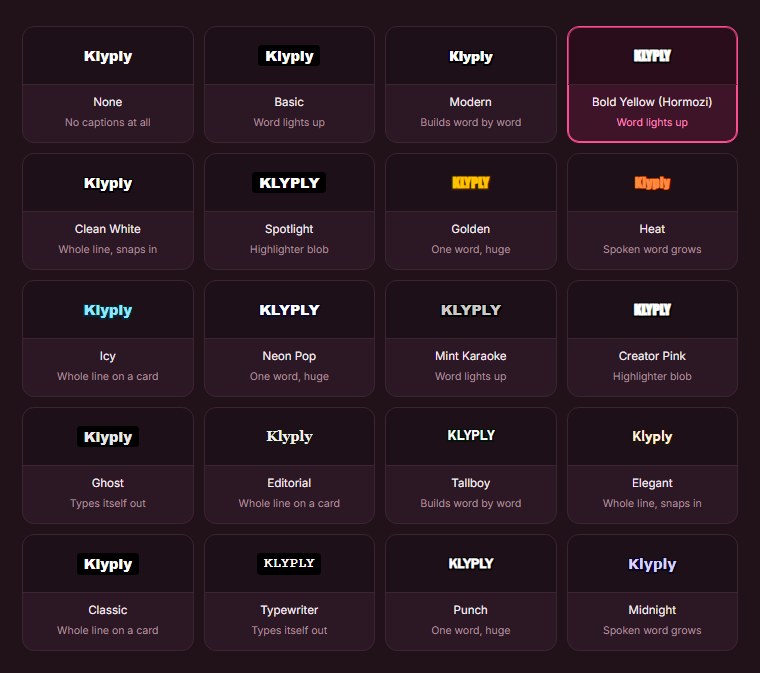
Five framing modes include Follow the speaker and a split screen for two-person interviews. A punch-in zoom of up to 1.6x tightens the shot.
Hook titles are written automatically from each clip’s opening line, and your logo can sit in six positions on every clip.
Files that stay on your drive
Klyply saves MP4 clips at 9:16, 4:5, 1:1 or 16:9 to a folder on your own computer, one shape per render, with no watermark.
There is no project storage limit to watch. Clips stay where you saved them for as long as you keep them.
What Klyply costs
Klyply is a licence, not a subscription: $29 for three months, a 12-month term, or $179 for a Lifetime licence.
Every term includes unlimited videos and clips. The Lifetime licence includes 12 months of updates, after which your installed version keeps working.
Activation needs the internet once, then Klyply works offline. Refunds are available within 14 days of purchase while the key is unactivated, according to the licence agreement.
Klyply vs Choppity
| Choppity | Klyply | |
|---|---|---|
| Where it runs | Choppity’s servers | Your Windows PC |
| Monthly allowance | 1 to 5 hours, resets on the 1st | No limit |
| Longest video | 2 hours, 10GB | No limit |
| Upload needed | Yes | No |
| Project storage | 3 days to forever, by plan | Your own drive |
| Transcript editing | Yes | No |
| Scheduling | TikTok, Reels, Shorts, LinkedIn, Facebook | No |
| Team seats | Unlimited on Team | No |
| Refunds | 14 days, evaluated case by case | 14 days, while unactivated |
| Price | $168 a year for Starter | $29 for 3 months, or $179 once |
Where Klyply falls short
Klyply runs on Windows 10 and 11 only, with no Mac or browser version.
It has no transcript editor, scheduler, team seats or free plan, and a slow laptop takes a while on long files.
2. Vizard: a Choppity alternative with twice the hours
Vizard is a cloud AI clipper and editor whose Creator plan reads 600 minutes of video a month, twice Choppity Creator’s 5 hours.
Vizard’s pricing page lists Creator at $29 a month, or $174 a year, with 4K export, uploads of up to 600 minutes and 30GB, and scheduling for six social accounts.
Business is $39 a month, or $234 a year, with a shared workspace and team members at $5 a month per seat.
Our guide to Vizard alternatives compared on price and refunds goes further into its plans.
3. Opus Clip: a Choppity alternative with deeper AI editing
Opus Clip is a cloud AI clipping tool that charges one credit per minute of video and adds AI B-roll, dubbing and a two-seat workspace on Pro.
Opus Clip’s pricing page lists Starter at $15 a month for 150 credits and Pro at $174 a year for 3,600 credits, with videos of up to 10 hours accepted.
Monthly credits expire after 60 days. The Opus Clip alternatives comparison covers its limits in detail.
4. Ssemble: a Choppity alternative that charges per video
Ssemble is a cloud AI clipping tool that charges one credit per video, not per hour, which makes short videos very cheap.
Ssemble’s pricing page lists Pro at $72 a year for 360 video credits, and each credit covers a segment of up to 20 minutes.
Its help centre caps local uploads at 1GB and 30 minutes and supports talking videos only.
The Ssemble post explains how its 20-minute segment limit works on long recordings.
5. Klap: a Choppity alternative that charges per clip
Klap is a cloud AI clipping tool that meters clips generated rather than hours uploaded, so long source videos do not use up the allowance faster.
Klap’s pricing page lists Basic at $14 a month for 100 clips, Pro at $39 for 300 and Pro+ at $94 for 1,000, billed yearly, with unlimited social accounts.
6. Spikes Studio: a Choppity alternative with 5 hours for less
Spikes Studio is a cloud AI clipping tool whose PRO+ plan reads 300 minutes a month, the same 5 hours as Choppity Creator, for $14.09 a month billed annually.
Spikes Studio’s pricing page includes 1080p exports without a watermark, AI B-roll, music, sound effects and a social scheduler on that plan.
7. Clipped: an on-device Choppity alternative for iPhone
Clipped is an iPhone app that clips video on the device, with no uploads, no monthly hours and a one-time $9.99 purchase to remove its watermark.
Its App Store listing says the app works in airplane mode and requires iOS 26 or later.
Choppity alternatives compared by monthly hours
This table compares Choppity with the seven Choppity alternatives on how much video they read each month, where they run, upload limits and entry price, as of September 2026.
| Tool | Where it runs | Monthly allowance | Longest upload | Free plan | Entry price |
|---|---|---|---|---|---|
| Choppity Starter | Cloud | 3 hours | 2 hours, 10GB | Yes, 1 hour | $14 a month, billed yearly |
| Klyply | Your Windows PC | No limit | No limit | No | $29 for 3 months |
| Vizard Creator | Cloud | 10 hours | 600 minutes, 30GB | Yes, 60 minutes | $174 a year |
| Opus Clip Starter | Cloud | 2.5 hours | 10 hours | Yes, 60 minutes | $15 a month |
| Ssemble Pro | Cloud | 30 videos | 30 minutes, 1GB | Yes | $72 a year |
| Klap Basic | Cloud | 100 clips | Not listed | Not listed | $14 a month, billed yearly |
| Spikes Studio PRO+ | Cloud | 5 hours | Not listed | Demo clips only | $14.09 a month, billed annually |
| Clipped | iPhone | No limit | Not listed | Yes, watermarked | $9.99 once |
When is Choppity still the better choice?
Choppity is still the better choice if you clip a few hours a month, edit by transcript, work in a team, or publish to LinkedIn and Facebook as well as short-form apps.
- Teams. Team includes unlimited seats with user roles, where Vizard charges $5 a month per seat.
- Transcript editing. Cutting clips by editing text is faster than scrubbing a timeline.
- Publishing and planning. Scheduling to five platforms, an Ideas board and a content calendar are built in.
- Languages. Captions in 97 languages.
- Any device. It runs in a browser, where Klyply needs Windows and Clipped needs an iPhone.
How to switch from Choppity
To switch from Choppity, download your clips, cancel before your next billing date, and ask for your content to be deleted if it was sensitive.
- Download your clips. Access ends at the end of your billing period, and Starter projects only last 30 days anyway.
- Save your brand templates. Note fonts, colours and caption styles so you can rebuild them.
- Cancel in account settings. Refunds are only considered within 14 days of a payment.
- Request deletion. Choppity’s terms say you can email hi@choppity.com after deleting your projects, and its privacy policy deletes content within 30 days of account closure.
- Test the Choppity alternative on a recording you already clipped. Compare the moments each tool picks from the same file.
Choppity alternative FAQs
What is the best Choppity alternative?
Klyply is the best Choppity alternative for long recordings and private footage, because it has no monthly hours and clips on your own PC.
Vizard is the best cloud option if you need more hours, and Klap suits creators who publish many clips from each video.
Is there a free Choppity alternative?
Yes, Vizard, Opus Clip and Ssemble have free plans, and Clipped is free on iPhone with a watermark.
Vizard and Opus Clip each give 60 credits a month, which is one hour of video, the same as Choppity’s free plan.
Is Choppity better than Opus Clip?
Choppity is better for teams and transcript editing, while Opus Clip accepts much longer videos.
In a Choppity vs Opus Clip comparison, Choppity caps uploads at 2 hours and Opus Clip accepts up to 10 hours. Choppity Starter reads 3 hours a month and Opus Clip Starter 2.5.
Do Choppity hours roll over?
No, Choppity usage resets to zero on the 1st day of every calendar month.
Is there a Choppity alternative that works offline?
Yes, Klyply works offline on Windows and Clipped works offline on iPhone.
Klyply needs the internet once to activate its licence, then transcribes, clips and renders with no connection.
Is there a Choppity alternative with no subscription?
Yes, Klyply’s Lifetime licence is a single $179 payment, and Clipped removes its watermark for $9.99 once.
For more options, compare clipping software you pay for once on price, updates and platform.
Does Klyply have team seats like Choppity?
No, Klyply is licensed per computer and has no shared workspace. Teams that need seats should stay on Choppity Team.
Final thoughts
Choppity is a well-rounded tool for teams that clip a few hours a month and publish widely.
The best Choppity alternative depends on which limit you keep hitting: hours, upload length, privacy or the monthly bill.
If it is hours or length, Klyply removes both. It reads whole recordings of any length on your PC, keeps footage off the cloud, and costs $179 once.
If you want to stay in the cloud, Vizard doubles the hours and Klap stops counting hours at all.
Add up your monthly hours before you choose. That one number rules most options in or out.