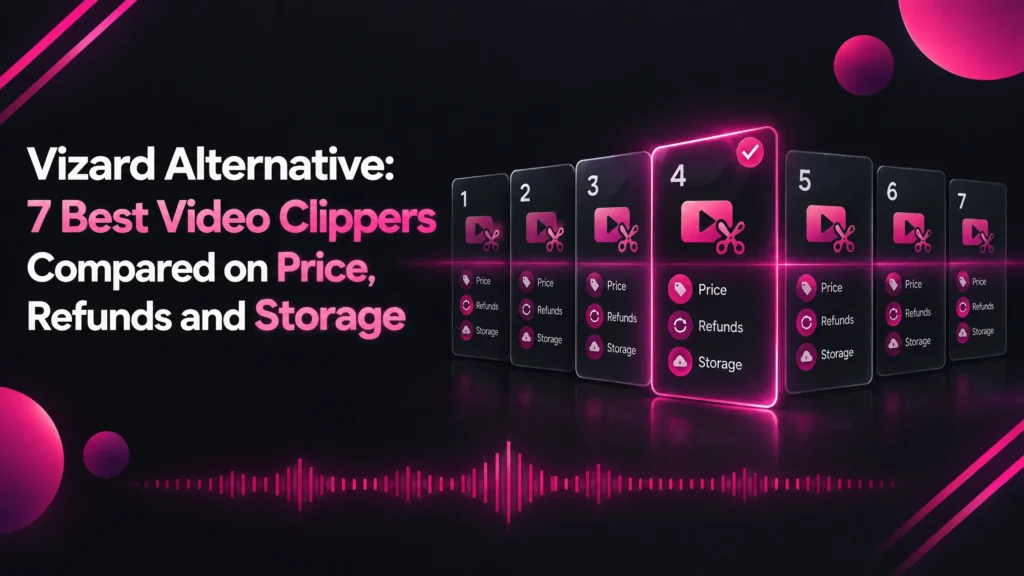
Vizard Alternative: 7 Best Video Clippers Compared on Price, Refunds and Storage
Vizard charges a credit per minute of video, refunds only unused plans and keeps your library while you subscribe. Here are the 7 best Vizard alternatives compared, led by Klyply, which clips whole recordings on your own PC.
A Vizard alternative is an AI clipping tool that turns long videos into short clips without Vizard’s per-minute credits, its subscription-based storage or its cloud upload.
Vizard is a capable clipper with 4K export and a generous Creator plan. People usually start looking for a Vizard alternative when the credit meter, the refund rules or the upload itself becomes the problem.
One Vizard credit is one minute of video. A 90-minute podcast uses 90 of Creator’s 600 monthly credits whether you keep one clip or thirty.
This guide covers what Vizard costs, where its limits are, how to choose a replacement, and how the seven best Vizard alternatives compare.
The short answer: for long recordings and footage that should stay on your own computer, Klyply is the strongest Vizard alternative. It clips whole files on your Windows PC with no credits and no storage plan.
For a cheaper cloud tool on short videos, try Ssemble. For per-clip pricing, try Klap.
If you need 4K, subtitle translation and team seats, Vizard itself is hard to beat. Every price and limit below comes from each company’s own pricing page, help centre or terms, checked in September 2026.
Key takeaways
- Vizard charges one credit per minute of video processed, deducted once per project.
- Creator is $29 a month, or $174 a year, with 600 credits a month. Business is $39 a month, or $234 a year.
- Vizard refunds only within 7 days and only for unused services, and uploading a video counts as use.
- Free projects expire after three days, and Business storage lasts as long as you keep subscribing.
- Klyply is the best Vizard alternative for long recordings and private footage: no upload, no credits, and a $179 Lifetime licence.
- Stay on Vizard if you need 4K exports, subtitle translation, an API or a shared team workspace.
What is Vizard?
Vizard is a cloud AI video editor and clipping tool from Vizard, Corp. that turns long videos into short clips with subtitles, reframing and social posting.
It runs in your browser, and every video is uploaded to Vizard’s servers for processing.
Vizard’s upload help article lists MP4, MOV, 3GP and AVI video files and MP3, WAV and M4A audio files as supported.
Its pricing page lists AI clipping, auto subtitling, subtitle translation, auto reframe, AI emojis, keyword highlights, AI B-rolls, brand templates and direct publishing to social media.
Every plan includes API access at different rate limits. Paid plans add scheduling, and Business adds a shared workspace and a brand kit.
How much does Vizard cost in 2026?
Vizard Creator costs $29 a month, or $174 a year on yearly billing, and Business costs $39 a month, or $234 a year, as of September 2026.
Both paid plans renew automatically and are metered in credits, where one credit is one minute of video.
This is the plan comparison on Vizard’s pricing page:
| Free | Creator | Business | |
|---|---|---|---|
| Price | $0 | $29 a month, or $174 a year | $39 a month, or $234 a year |
| Monthly credits | 60 | From 600 | From 600 |
| Upload length | 60 minutes | 600 minutes | 600 minutes |
| Upload size | 1GB | 30GB | 30GB |
| Export quality | 720p | 4K | 4K |
| Export length | 10 minutes | Any length | Any length |
| Video storage | 3 days | 100GB | As long as you are subscribing |
| Social accounts | 1 | 6 | 20 |
| Team members | No | No | $5 a month per seat |
How do Vizard credits work?
Vizard uses one credit for each minute of video processed, and each project is charged once even if you both clip and transcribe it.
Vizard’s credits article gives the example of a 60-minute upload using 60 credits.
Creator’s 600 monthly credits cover ten hours of source video. A weekly 90-minute podcast uses about 390 of them before any other recording.
Does Vizard have a free plan?
Yes, Vizard has a free plan with 60 credits a month.
Free exports carry a Vizard.ai watermark and are limited to 720p and 10 minutes. Each free project expires after three days, according to Vizard’s free plan article.
What are Vizard’s limits?
Vizard’s main limits are per-minute credits, a strict refund policy, storage tied to your subscription, and a required cloud upload.
Its technical limits are generous on paid plans. The reasons to pick a Vizard alternative are mostly about cost, control and data.
How long can a video be on Vizard?
Paid Vizard plans accept uploads of up to 600 minutes and 30GB, and the free plan accepts 60 minutes and 1GB, according to its pricing page.
Vizard’s upload help article gives a lower limit of 10GB alongside a 10-hour maximum, so check with support before relying on very large files.
Can you get a refund from Vizard?
Vizard only refunds requests made within 7 days of purchase, and only for services you have not used.
Its refund article says uploading data or using the tools counts as use, and a processing fee may be deducted. In practice, testing Vizard once on a paid plan can end your chance of a refund.
How long does Vizard store your videos?
Vizard keeps free projects for three days, gives Creator 100GB of storage, and stores Business videos as long as you are subscribing.
Your library lives on Vizard’s servers under those terms. If you stop paying, download anything you want to keep first.
Does Vizard need your footage uploaded?
Yes, every Vizard project starts with an upload, so the video leaves your computer.
For personal content that is fine. For footage under NDA, internal recordings or unreleased material, it may need sign-off that a hosted tool cannot get, whatever its features.
Vizard review: pros and cons
Vizard’s strengths are 4K export, subtitle translation and strong collaboration features. Its weaknesses are per-minute credits, a short refund window and storage that depends on your subscription.
Pros
- 4K export, and 4K uploads, on paid plans.
- 600 credits a month on Creator, with each project charged once.
- Subtitle translation, SRT transcripts, AI B-rolls, emojis and keyword highlights.
- Scheduling and direct publishing for up to 20 social accounts.
- API access on every plan, including Free.
- A shared workspace, brand kit and team seats on Business.
Cons
- One credit per minute of video, regardless of clips kept.
- Refunds only within 7 days, and only if unused.
- Free exports are 720p, watermarked and 10 minutes at most.
- Free projects expire after three days.
- Team seats cost $5 a month each on top of Business.
- Every video must be uploaded to Vizard’s servers.
Why look for a Vizard alternative?
People look for a Vizard alternative for four reasons: credits on long recordings, the refund policy, storage tied to a subscription, and footage that cannot be uploaded.
Long recordings use credits fast
Vizard charges for minutes you upload, not clips you publish.
A three-hour stream uses 180 credits, almost a third of Creator’s monthly allowance, even if you keep a single clip from it.
A paid test can end your refund
Vizard’s refund policy treats an upload as use of the service.
Anyone who pays and then tests Vizard on real footage should treat the purchase as final. If you want to compare tools first, test each one on its free plan before paying.
Your library depends on your subscription
Business video storage on Vizard lasts as long as you are subscribing.
That is standard for hosted software, but it means your archive is rented. A Vizard alternative that saves clips to your own drive has nothing to expire.
Your footage has to stay private
Client work, internal meetings and unreleased material often cannot go to a third-party cloud service.
For an EU business, uploading video of identifiable people to an outside processor brings data protection paperwork. Only a Vizard alternative that processes video locally avoids the upload entirely.
How to choose a Vizard alternative
Choose a Vizard alternative by first deciding which Vizard features you can live without, then comparing metering, processing location, length limits and refund terms.
- Features you would lose. 4K export, subtitle translation, an API and team workspaces are not in every tool.
- How usage is metered. Per minute (Opus Clip, Spikes Studio), per video (Ssemble), per clip (Klap), per hour of analysis (Choppity), or not at all (Klyply, Clipped).
- Cloud or local processing. Only local tools keep footage on your own device.
- Longest video and file size. Some cloud tools cap uploads at 30 minutes.
- Refund and storage terms. Read them before paying, not after your first upload.
The 7 best Vizard alternatives in 2026
The seven best Vizard alternatives in 2026 are Klyply, Opus Clip, Ssemble, Klap, Choppity, Spikes Studio and Clipped.
Klyply and Clipped process video on your own device. The other five are cloud tools with different pricing models.
1. Klyply: the best Vizard alternative for long recordings and private footage
Klyply is a Windows application that clips long videos into short vertical clips entirely on your own computer.
It is the Vizard alternative for people whose recordings are long, whose footage is confidential, or who would rather own their clip library than rent storage for it.
How a Klyply job runs
Klyply takes a file from your drive, or a YouTube, Vimeo, X or Twitch link, and runs every stage on your PC.
It transcribes the speech word by word, scores the candidate moments, reframes the strongest ones, burns in captions and renders the finished clips.
Its processing screen lists “Cloud upload” as a stage that never runs. It uses a graphics card when one is available and the CPU otherwise, so no special hardware is needed.
Choosing moments without a credit meter
Klyply scores the full recording, however long, instead of charging you by the minute to read it.
Each moment is judged on hook strength, concrete and emotional language, vocal energy, delivery pace, and whether it ends on a complete thought. You pick 1 to 20 clips per video.
Captions that match your brand
Klyply has 27 animated caption presets and lets you set the colour of each part of the caption.
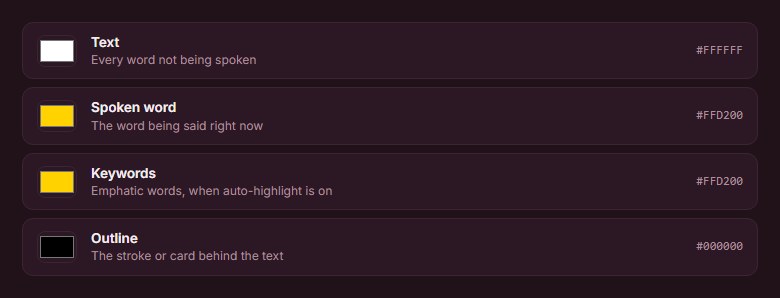
You choose colours for the text, the word being spoken, highlighted keywords, and the outline or card behind the text.
A hook title can be written for each clip from its opening line. Your logo can sit in six positions at 4 to 45 percent of the frame width.
Aspect ratios for every platform
Klyply exports 9:16 for TikTok, Reels and Shorts, 4:5 for the Instagram feed, 1:1 square, and 16:9 for YouTube.

You pick one ratio per render. Output is MP4 at 30 frames per second with no watermark, saved to a folder on your drive.
Framing for interviews and podcasts
Five framing modes handle single speakers, fixed cameras and two-person conversations: Follow the speaker, Static centre, Blurred background, Split for two speakers, and Split with filler.
Face tracking uses the YuNet model, and a punch-in zoom of up to 1.6x tightens the shot.
What Klyply costs
Klyply is sold as a licence: $29 for three months, a 12-month term, or $179 for a Lifetime licence.
Every term includes unlimited videos and clips, and fixed terms start at activation rather than purchase.
Activation needs the internet once, after which Klyply works offline. Refunds are available within 14 days of purchase while the key is unactivated, according to the licence agreement.
Klyply vs Vizard
| Vizard | Klyply | |
|---|---|---|
| Where it runs | Vizard’s servers | Your Windows PC |
| Upload needed | Yes | No |
| Metering | 1 credit per minute | None |
| Cost of a 3-hour stream | 180 credits | Nothing extra |
| Longest upload | 600 minutes on paid plans | No limit |
| Best export | 4K | 1080p |
| Clip storage | 100GB, or while you subscribe | Your own drive |
| Subtitle translation | Yes | No |
| Team workspace | Business | No |
| Refunds | 7 days, unused only | 14 days, while unactivated |
| Works offline | No | Yes, after activation |
| Price | $174 a year for Creator | $29 for 3 months, or $179 once |
Where Klyply falls short
Klyply only runs on Windows 10 and 11, and it exports at 1080p rather than 4K.
It has no subtitle translation, API, scheduler, team workspace or free plan. Long renders take as long as your own hardware needs.
2. Opus Clip: a Vizard alternative with a deeper editor
Opus Clip is a cloud AI clipping tool with the same per-minute credits as Vizard and a larger set of editing and AI features.
Opus Clip’s pricing page lists Starter at $15 a month for 150 credits and Pro at $29 a month, or $174 a year for 3,600 credits.
Pro includes a two-seat team workspace, AI B-roll, dubbing and a scheduler. Its ClipAnything model uses visual, audio and sentiment cues, so it can clip videos with little dialogue.
Monthly credits expire after 60 days, according to its credits article. The Opus Clip comparison on this blog covers it in more depth.
3. Ssemble: a Vizard alternative that charges per video
Ssemble is a cloud AI clipping tool that charges one credit per video, so short videos cost far less than on Vizard’s per-minute plans.
Ssemble’s pricing page lists Pro at $15 a month, or $72 a year for 360 video credits. Each credit covers a segment of up to 20 minutes.
Its help centre caps local uploads at 1GB, 30 minutes and 1080p, and supports talking videos only. It suits short commentary better than long podcasts.
The full Ssemble breakdown explains the 20-minute segment rule and its contradictions.
4. Klap: a Vizard alternative for high clip volume
Klap is a cloud AI clipping tool that charges per clip generated, which suits creators who publish many shorts from each recording.
Klap’s pricing page lists Basic at $14 a month for 100 clips, Pro at $39 for 300 and Pro+ at $94 for 1,000, billed yearly, with unlimited social accounts.
5. Choppity: a Vizard alternative with unlimited team seats
Choppity is a cloud clipping tool that meters hours of AI video analysis, and its Team plan includes unlimited seats instead of charging per member.
Choppity’s pricing page lists Team at $48 a month, or $33.60 a month billed yearly, for five hours of analysis, user roles and a shared workspace.
Starter is $20 a month ($14 yearly) for three hours. The free plan includes one hour of analysis with three-day project retention.
The Choppity alternatives guide covers its hour caps and upload limits in detail.
6. Spikes Studio: a Vizard alternative with low-cost annual minutes
Spikes Studio is a cloud AI clipping tool that meters minutes, with an annual plan that costs less per month than Vizard Creator.
Spikes Studio’s pricing page lists PRO+ at $14.09 a month billed annually, or $32.99 monthly, for 300 minutes a month with 1080p exports, AI B-roll and a scheduler.
7. Clipped: an on-device Vizard alternative for iPhone
Clipped is an iPhone app that clips video on the device, with no uploads and no credits.
Its App Store listing says every model runs on the phone and the app works in airplane mode. It is free with a watermark, and a one-time $9.99 purchase removes it.
Vizard alternatives compared side by side
This table compares Vizard with the seven Vizard alternatives on where they run, what they meter, free plans, best export and entry price, as of September 2026.
| Tool | Where it runs | What is metered | Free plan | Best export listed | Entry price |
|---|---|---|---|---|---|
| Vizard | Cloud | Minutes of video | Yes, 60 credits | 4K | $174 a year |
| Klyply | Your Windows PC | Nothing | No | 1080p | $29 for 3 months |
| Opus Clip | Cloud | Minutes imported | Yes, 60 credits | Highest available on paid plans | $15 a month |
| Ssemble | Cloud | Videos, up to a 20-minute segment | Yes | 1080p | $72 a year |
| Klap | Cloud | Clips generated | Not listed | Not listed | $14 a month, billed yearly |
| Choppity | Cloud | Hours of analysis | Yes, 1 hour | 1080p | $14 a month, billed yearly |
| Spikes Studio | Cloud | Minutes | Demo clips only | 1080p | $14.09 a month, billed yearly |
| Clipped | iPhone, on device | Nothing | Yes, watermarked | Not listed | $9.99 once |
When is Vizard still the better choice?
Vizard is still the better choice if you need 4K exports, subtitle translation, an API or a shared team workspace, or if you work on a Mac or Chromebook.
- 4K output. Creator and Business export in 4K; Klyply stops at 1080p.
- Other languages. Subtitle translation and SRT downloads are included on paid plans.
- Automation. Every plan includes API access.
- Teams and brands. Business adds a shared workspace, brand kit and project sharing.
- Any device. Vizard runs in a browser, where Klyply needs Windows and Clipped needs an iPhone.
How to switch from Vizard
To switch from Vizard, download your clips and transcripts, cancel before the plan renews, and test your new tool on a video you already processed.
- Download your clips. Business storage lasts only as long as you subscribe, and free projects expire after three days.
- Export transcripts. Paid plans can download TXT and SRT files.
- Note your brand settings. Record fonts, colours, templates and outros so you can rebuild them.
- Cancel before renewal. Creator and Business renew automatically at the end of each billing cycle unless cancelled.
- Test the Vizard alternative on a known video. Run the same recording through it and compare the moments it picks.
Vizard alternative FAQs
What is the best Vizard alternative?
Klyply is the best Vizard alternative for long recordings and private footage, because it clips whole files on your own PC with no credits or storage plan.
Opus Clip suits people who want a deeper editor, Ssemble suits short videos on a budget, and Klap suits high clip volume.
Is there a free Vizard alternative?
Yes, Opus Clip, Ssemble and Choppity have free plans, and Clipped is free on iPhone with a watermark.
Opus Clip’s free plan gives 60 credits a month with watermarked clips, and Choppity’s gives one hour of analysis.
Is Vizard better than Opus Clip?
Vizard gives more credits for the same yearly price, while Opus Clip has a deeper editor.
Vizard Creator is $174 a year with 600 credits a month. Opus Clip Pro is also $174 a year, with 3,600 credits for the whole year.
Can I get a refund from Vizard after uploading?
Usually not. Vizard refunds only within 7 days of purchase and only for unused services, and its refund article counts uploading data as use.
Is there a Vizard alternative that works offline?
Yes, Klyply works offline on Windows and Clipped works offline on iPhone.
Klyply needs an internet connection once to activate its licence, then transcribes, clips and renders with no connection.
Is there a Vizard alternative without a subscription?
Yes, Klyply and Clipped both work without a subscription.
Klyply’s Lifetime licence is a single $179 payment, and its fixed terms end without renewing. Clipped charges $9.99 once to remove its watermark.
If paying once matters most, read how to buy clipping software once and what “lifetime” really covers.
Can Klyply export in 4K?
No, Klyply exports at up to 1080p. If 4K output matters to you, Vizard’s paid plans are the better fit.
Final thoughts
Vizard is a well-equipped tool, and if you need 4K, translation or a team workspace, it is worth its price.
The right Vizard alternative is the one that fixes the specific thing Vizard charges you for or holds on to.
If that is minutes of long recordings, a library you have to keep paying to store, or footage that cannot be uploaded, Klyply is the answer. It clips whole files on your PC, keeps every clip on your drive, and costs $179 once for a Lifetime licence.
For a cloud tool with a deeper editor, try Opus Clip.
For cheap short videos, choose Ssemble. For volume, choose Klap.
Test your shortlist on free plans before paying, and use the same recording in each. The clips will make the decision for you.