Video Editing Cost vs an AI Clipper: The Honest Math for 5 Clips a Week
What a video editor costs by the hour and the finished minute, from Upwork, Fiverr and BLS data, the fees on top, and a year of five weekly clips priced five ways against AI clippers.
Video editing cost is what you pay a person, by the hour, the finished minute or the project, to turn raw footage into a finished video.
This guide is for podcasters, creators and small teams deciding whether to pay an editor or an AI clipper to turn long recordings into short clips for Shorts, Reels and TikTok.
It covers video editing cost according to the marketplaces’ own data, the fees added on top, what AI clippers cost, and one worked example priced five ways, with the break-even in hours.
The short answer: for routine clips from talking-head recordings, an AI clipper costs less in a year than an entry-level editor charges in a month or two. Pay an editor for the clips that need story, B-roll or judgement. For the routine batch, Klyply does it for a one-time $179, on your own PC.
Key takeaways
- Upwork’s tier medians for video editors are $10, $40 and $100 an hour, from active contracts. The US median wage for employed film and video editors was $36.10 an hour in May 2025.
- Marketplace fees sit on top of the rate: up to 7.99% on Upwork, and 5.5% plus $3.50 on Fiverr orders under $200.
- Fiverr’s own guide puts editing at 1 to 2 hours per finished minute, so short clips are not cheap just because they are short.
- For five 45-second clips a week, our worked example comes to $2,470 to $4,420 a year with an entry-level freelancer and $9,880 to $17,680 with a mid-tier one, before fees.
- Klyply costs $29 for 3 months or $179 for Lifetime, with no credits and no per-minute charge. An editor is still the better buy for story-driven edits and anything needing B-roll.
How much does a video editor cost?
The video editing cost for a freelancer is about $10 to $100 an hour at the median, depending on experience, according to Upwork’s marketplace data. An employed editor in the US earns a median of $36.10 an hour, according to the Bureau of Labor Statistics.
Video editor hourly rates by experience
Video editor hourly rates fall into three tiers on Upwork, each with its own median.
Upwork’s video editor cost page says its ranges come from active contracts on the marketplace. At the time of writing it lists:
| Tier | Hourly range | Median rate | Upwork’s description |
|---|---|---|---|
| Entry level | Below $30 | $10 | Testing content ideas, getting videos out quickly |
| Mid tier | $31 to $60 | $40 | A consistent video presence |
| Senior | $61 to $150 | $100 | High-impact campaigns |
The same page says editors there typically cost $6 to $25 an hour. That headline figure reflects how many entry-level editors are on the platform, so treat the tier medians as the more useful guide.
What an in-house video editor costs
An in-house video editor in the US earns a median of $75,420 a year, or $36.10 an hour.
The BLS Occupational Outlook Handbook gives that figure for May 2025, with the lowest 10% earning under $40,280 and the highest 10% over $148,550.
That is what the editor takes home before tax, not what the employer pays. Upwork’s page lists the extra costs of an employee: benefits, equipment, software and other employment expenses.
A full-time hire only makes sense with a steady flow of work. A handful of clips a week is a few hours of a full-time editor’s time, not a job.
How video editing cost is priced
Video editing cost is charged in four ways: by the hour, by the minute of finished video, by the project, or on a monthly retainer.
Hourly
Hourly pricing suits work whose length is hard to predict, such as an ongoing channel or a project still changing shape.
Upwork notes that editors there work on either hourly or fixed-price contracts, with hourly better for ongoing editing.
Per minute of finished video
Per-minute pricing charges for each minute of the finished video, not each minute of work, and it is the most common model on Fiverr.
Fiverr’s guide to video editor costs, dated August 2026, lists social media videos from $10 a minute and YouTube videos from $5 a minute. It calls these a low-end baseline.
The same guide says one minute of finished video may take 1 to 2 hours of editing, and a polished three-minute video 6 to 12 hours or more. That ratio is why short clips still cost real money.
Per project and per clip
Per-project pricing fixes one price for a defined deliverable, such as an episode or a pack of clips.
It moves the risk of a slow edit to the editor, so expect the quote to include a margin for it. Agree up front how many revision rounds are included, as Upwork’s page advises.
Retainer
A retainer is a regular payment, usually monthly, that reserves an editor’s time for ongoing work.
Fiverr describes it as a down payment on future services, held until the work is done. It buys priority, which matters if you publish on a fixed schedule.
Marketplace fees on top of the rate
Hiring through a marketplace adds a fee to every payment, so the real video editing cost is higher than the editor’s own rate.
Upwork charges clients on its Basic plan a Client Marketplace Fee of up to 7.99% on all payments to freelancers, or 3% for eligible US clients paying by bank account. The fee is not refundable.
Fiverr’s payment help page sets its service fee at 5.5% of the purchase, plus $3.50 for orders under $200. Small weekly orders feel that flat $3.50 most.
What does an AI clipper cost?
An AI clipper replaces part of the video editing cost with either a monthly or yearly subscription metered in credits, or a licence with no metering at all.
An AI clipper watches the whole recording for you, picks the moments, reframes them to vertical and adds captions. You review the results instead of building each clip on a timeline.
Subscription clippers that charge in credits
Most hosted AI clippers sell credits, and a credit is usually a minute of the video you upload.
Opus Clip is the best-known example. Its pricing page lists, at the time of writing, Starter at $15 a month with 150 credits and Pro at $29 a month or $174 billed yearly, with 300 credits a month.
Its help centre says processing costs 1 credit per minute of the original video imported. A one-hour episode uses 60 credits, whether you keep five clips from it or none.
Our breakdown of Opus Clip pricing per minute works through each plan in detail.
One-time licences with no metering
A licensed clipper charges for the right to use the software, so the cost does not grow with the number of hours you clip.
Klyply works this way: $29 for 3 months or $179 for Lifetime, with a 12-month term in between, and no credits. Our guide to one-time purchase video clipping software compares the other tools sold this way.
Video editing cost vs an AI clipper: a worked example
For a weekly one-hour episode cut into five 45-second clips, a year of clips costs $2,470 or more with a freelance editor and between $116 and $179 with Klyply, in our worked example.
The arithmetic is ours, and these are the assumptions behind it:
- One 60-minute recording a week, for 52 weeks.
- Five clips of about 45 seconds from each, which is 3.75 finished minutes a week.
- An editor spends 1 hour watching the recording to find the moments, plus Fiverr’s 1 to 2 hours per finished minute. That is 4.75 to 8.5 hours a week.
- Rates are Upwork’s tier medians and Fiverr’s per-minute baseline. Prices are as listed at the time of writing.
| Option | How it is priced | One year | Before or after fees |
|---|---|---|---|
| Senior freelancer | $100 an hour, 4.75 to 8.5 hours a week | $24,700 to $44,200 | Before Upwork’s fee |
| Mid-tier freelancer | $40 an hour, 4.75 to 8.5 hours a week | $9,880 to $17,680 | Before Upwork’s fee |
| Entry-level freelancer | $10 an hour, 4.75 to 8.5 hours a week | $2,470 to $4,420 | Before Upwork’s fee |
| Fiverr baseline | $10 a finished minute, one order a week | About $2,239 and up | Including Fiverr’s fee |
| Opus Clip Pro | About 260 credits a month needed, so the 300-credit plan | $174 billed yearly | No fee |
| Klyply Lifetime | One-time licence | $179, then nothing | No fee |
| Klyply 3-month terms | Four terms in a year | $116 | No fee |
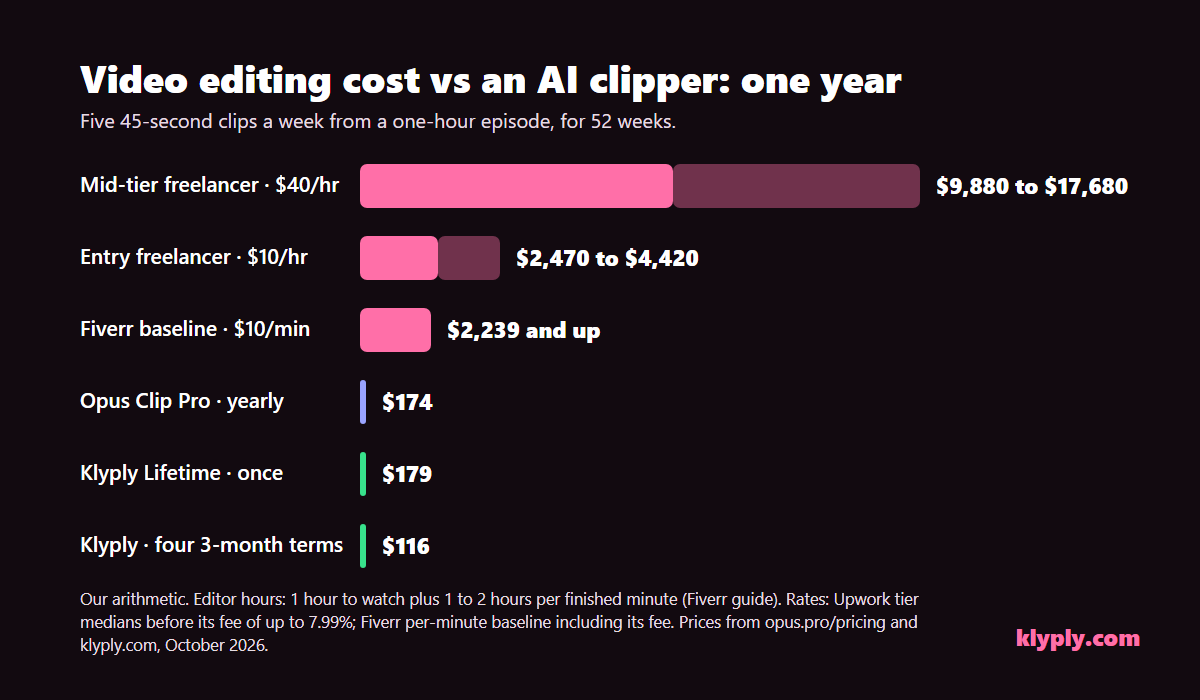
With Upwork’s fee, the entry-level range becomes $2,544 to $4,553 at 3%, or $2,667 to $4,773 at 7.99%.
The editor rows are not wrong to carry a higher video editing cost. They buy a person’s judgement on every clip, which the worked example does not price at all.
The break-even in hours
A $179 Lifetime licence costs the same as 17.9 hours of an entry-level editor at $10, 4.5 hours of a mid-tier editor at $40, or 1.8 hours of a senior editor at $100.
A $29 three-month term is 2.9 hours at $10, or under an hour at $40.
In the worked example an editor spends at least 4.75 hours a week, so even the cheapest editor passes the cost of a Lifetime licence within the first month.
How the picture changes with volume
Video editing cost rises with every clip, credit costs rise with every hour of recording, and a licence stays flat.
Double the clips and the editor’s hours nearly double. Add a second weekly show and a credit plan needs twice the credits, which in Opus Clip’s case is more than the 300-credit plan holds. Klyply costs the same either way.
At very low volume the gap narrows. One clip a month is an hour or two of an editor’s time, and that may be all you need.
The hidden costs on both sides
Neither option’s price is its full cost. The video editing cost of a person includes briefing and waiting time, and an AI clipper costs review time and, if it is hosted, an upload.
What hiring an editor costs beyond the rate
- Briefing. Someone has to explain the style, the audience and which moments matter. That time is yours, every time the brief changes.
- Turnaround. Fiverr says editors charge more for express delivery. A fixed weekly slot is either paid for or waited for.
- Revisions. Upwork advises agreeing in advance how many revision rounds are included and what counts as one.
- Availability. Upwork notes that a freelancer’s capacity varies, and a busy week for them is a missed week for you.
- Handing over footage. The recording goes to another person’s machine, which matters for unreleased or client footage.
What an AI clipper costs beyond the price
- Review. You still watch every clip before it posts, and some will not be worth posting.
- Unused credits. Hosted tools charge for every minute imported, including the minutes that produced nothing usable. Opus Clip’s monthly credits expire after 60 days.
- The upload. A hosted clipper needs the recording on its servers. Our guide to offline video clipping software covers when that is a problem.
- Your own computer. A local clipper like Klyply uses your CPU instead of a server, so a long recording takes longer on an older PC.
When hiring a video editor is the better choice
Hire a video editor when the clip needs creative decisions an AI clipper does not make: story, B-roll, graphics or a brand’s taste.
- Story edits. Rebuilding a clip from moments scattered across an episode, or cutting a trailer, is editing, not clipping.
- B-roll, motion graphics and colour. Upwork lists these as the specialised work that raises editing time. An AI clipper that only reframes and captions cannot add them.
- Ads and launches. A clip that carries paid spend deserves a person’s attention to every frame.
- Footage with no clear speaker. Gameplay, fast cuts and wide event shots give face-tracking little to follow.
- Several formats from one job. An editor can deliver a vertical, square and wide version together. Klyply renders one aspect ratio per run.
- No time to review. If nobody on your side can watch the clips before they post, a trusted editor is doing that job too.
When an AI clipper is the better choice
An AI clipper is the better choice for regular, talking-head recordings where you want many clips quickly and the creative template stays the same.
- Podcasts, interviews and webinars. One or two people talking is exactly what speaker tracking and captions are built for.
- Volume. Five or ten clips per recording is where an editor’s hours add up fastest.
- Speed. The clips are ready when the render finishes, not when an editor has a free slot.
- Testing what works. Cheap clips let you post more and learn which moments land, before paying for polish.
Many creators use both: the clipper for the weekly batch, and an editor for the one clip a month that deserves the extra hours. Our workflow for repurposing a podcast into short clips shows where each fits.
Where Klyply fits in your video editing cost
Klyply is a Windows 10 and 11 app that turns a long recording into 1 to 20 captioned vertical clips on your own PC, for a licence fee instead of an hourly rate or credits.
What Klyply does for the price
Klyply covers the clipping part of the video editing cost in the worked example: watching, picking, framing and captioning.
- Finds the moments. It transcribes the recording on your PC and scores candidate clips, then cuts between 1 and 20 of them, each 5 to 180 seconds long.
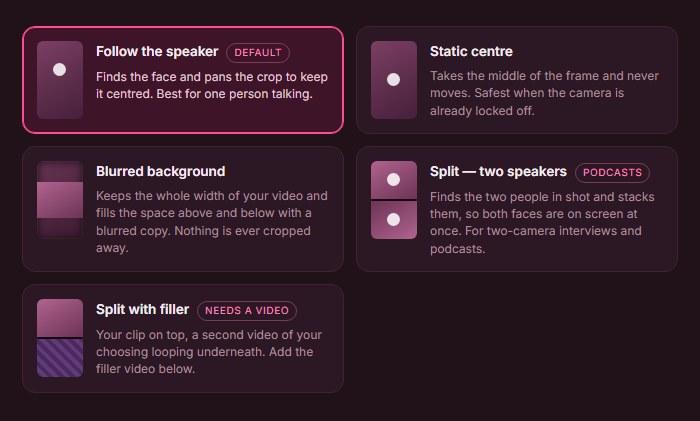
- Frames them for vertical. Follow the speaker keeps the crop on whoever is talking, and Split stacks two speakers for podcasts.
- Captions them. 27 animated caption styles, burned into every clip.
- Brands them. A hook title, your logo, background music and four export shapes: 9:16, 4:5, 1:1 or 16:9.
- Keeps the footage local. Nothing is uploaded, and no watermark is added.
What Klyply costs
Klyply costs $29 for 3 months or $179 for a Lifetime licence, with a 12-month term in between, and none of them is metered.
A fixed term starts when you activate the key, not when you buy it. Activation needs the internet once, and after that Klyply works offline.
You can get a refund within 14 days of purchase as long as the key has not been activated.
Where Klyply falls short of an editor
Klyply is a batch clipper, not an editor, and it does not replace a person for creative work.
- There is no timeline. You set up a run, and Klyply renders the batch.
- It does not add B-roll, motion graphics or colour grading.
- It runs on Windows only and renders on your CPU, so an older PC takes longer.
- Each run produces one aspect ratio.
- There is no free tier and no team seats.
Video editing cost FAQs
What is the cost to hire a video editor for short-form clips?
Short-form video editing cost starts at about $10 per finished minute on Fiverr at the low end, or the editor’s hourly rate times 1 to 2 hours per finished minute. Clips need finding as well as cutting, so add the time to watch the recording.
What is a fair video editor hourly rate?
A fair video editor hourly rate depends on the work: Upwork’s medians are $10 for entry-level, $40 for mid-tier and $100 for senior editors. The US median for employed editors is $36.10.
AI clipper vs video editor: which is cheaper?
Yes, for routine clips an AI clipper is far cheaper: in our worked example, a year of clips costs $116 to $179 with Klyply against $2,470 or more with an entry-level editor. The editor is still worth paying for creative edits.
Can an AI clipper replace a video editor?
An AI clipper replaces the routine part of a video editor’s work: finding moments, reframing to vertical and captioning. It does not replace story editing, B-roll, graphics or brand judgement.
Do I pay fees on top of an editor’s rate?
Yes, marketplace fees add to the video editing cost. Upwork adds up to 7.99% to every payment on its Basic plan, and Fiverr adds 5.5% plus $3.50 to orders under $200.
How many hours does it take to edit a short clip?
Fiverr’s guide puts editing at 1 to 2 hours per finished minute, so a 45-second clip is roughly 45 to 90 minutes of editing, plus the time spent finding it in the recording.
Does Klyply charge per video or per minute?
No, Klyply charges neither per video nor per minute. You pay $29 for 3 months or $179 once for Lifetime, and clip as many recordings as you like.
Can clip editing pay for itself?
Clip editing pays for itself only if the clips earn more than they cost, through growth, sales or payouts. Our guide to making money clipping videos covers how clippers get paid.
Final thoughts
Video editing cost is mostly hours, and short clips take more of them than their length suggests: finding the moment, cutting it, framing it and captioning it.
For flagship clips, ads and story edits, the video editing cost of a person is worth paying. The work is creative, and that is what the rate pays for.
For a regular batch of clips from podcasts, interviews or webinars, Klyply does the routine part for $29 a term or $179 once, on your own PC, with nothing uploaded and no credits to run out of.
For most shows the cheapest good answer is both: the clipper for the weekly batch, and an editor’s hours saved for the clips that deserve them.