Ssemble Alternative: 7 Best AI Clip Makers for Long Videos, 4K and Private Footage
Looking for a Ssemble alternative? Ssemble clips a 20-minute segment per video, caps uploads at 1GB and 30 minutes, and needs your footage on its servers. Here are the 7 best alternatives compared, led by Klyply, which clips whole recordings on your own PC.
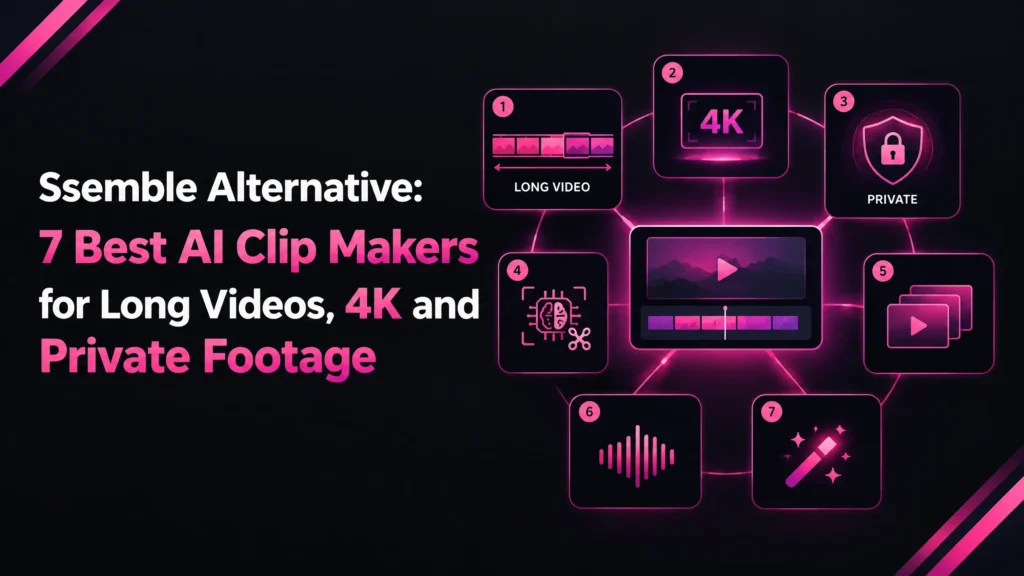
A Ssemble alternative is an AI clipping tool that turns long videos into short vertical clips without Ssemble’s limits: its 20-minute clipping segment, its 1GB and 30-minute upload cap, its 1080p ceiling and its cloud upload.
Ssemble itself is cheap and good at short talking videos. Most people start looking for a Ssemble alternative when their recordings get longer, their footage gets more sensitive, or their content stops being someone talking to camera.
This guide explains what Ssemble costs, where it stops, how to choose a replacement, and how the seven best Ssemble alternatives compare on price, limits and privacy.
The short answer: for long podcasts, interviews and footage that should never be uploaded, Klyply is the strongest Ssemble alternative. It clips the whole recording on your own Windows PC, with no credits and no upload.
For 4K and team workspaces, look at Vizard. For high clip volume, look at Klap.
If your videos are short and you want posting built in, staying on Ssemble is the cheaper choice.
Every price and limit below comes from each company’s own pricing page, help centre or terms, as of September 2026.
Key takeaways
- Ssemble charges one credit per video and clips a segment of up to 20 minutes from each one.
- Local uploads to Ssemble are capped at 1GB, 30 minutes and 1080p, and it only supports talking videos.
- Klyply is the best Ssemble alternative for long recordings and private footage: no upload, no credits, no length limit, and a $179 Lifetime licence.
- Among cloud Ssemble alternatives, OpusClip, Vizard and Spikes Studio charge per minute of video, Klap charges per clip, and Choppity charges per hour of analysis.
- Clipped is the on-device Ssemble alternative for people who work from an iPhone.
- Stay on Ssemble if your videos are under 20 minutes and you want scheduling included.
What is Ssemble?
Ssemble is a browser-based AI clipping tool from Ssemble Inc. in San Francisco that turns long talking videos into short vertical clips with captions for TikTok, YouTube Shorts and Instagram Reels.
It is built for repurposing long videos into short-form content, and it runs in the cloud. Your video is processed on Ssemble’s servers, not on your computer.
You can submit a link from YouTube (long-form videos, not Shorts), Vimeo, Kick or Twitch, or upload a MOV, MP4 or WebM file, according to Ssemble’s help centre.
The AI picks out moments, reframes them to 9:16 vertical video and adds auto-captions, which you can then edit.
Ssemble’s own comparison article also lists sound effects, zoom, transitions, meme hooks, game overlays, calls to action and B-roll from Pexels stock footage.
On top of that it offers multi-language audio based on YouTube’s dubbed tracks, social scheduling and API access. Its main audience is clippers and creators who publish short-form video in volume.
How much does Ssemble cost in 2026?
Ssemble Pro costs $15 a month billed monthly, or $72 a year billed yearly, as of September 2026.
Every plan charges one credit per video rather than per minute, and the higher plans add credits and social accounts.
These are the yearly prices on Ssemble’s pricing page:
| Plan | Price billed yearly | Video credits per year | Social accounts |
|---|---|---|---|
| Pro | $72 | 360 | 1 |
| Expert | $144 | 840 (720 plus 120 bonus) | 3 |
| Business | $288 | 1,800 (1,440 plus 360 bonus) | Unlimited |
| Custom | $480 | 2,600 (2,000 plus 600 bonus) | Unlimited |
The pricing page lists AI Clipping at one credit “per video (20 minutes)”. On a per-minute tool, a 20-minute video costs 20 credits, so for short videos Ssemble is hard to undercut.
Credits reset each billing cycle and do not roll over, according to the FAQ on the same page.
Some of Ssemble’s own pages quote a $7.50 monthly starting price that the pricing page does not show, so check the live page before paying.
Does Ssemble have a free plan?
Yes, Ssemble has a free plan, but its limits are not published on the pricing page.
The pricing FAQ invites you to try the free plan, and Ssemble’s comparison article only describes it as “Limited”. Third-party reviews disagree on the details, so test it yourself.
What are Ssemble’s limits?
Ssemble’s main limits are a 20-minute clipping segment per video, uploads capped at 1GB and 30 minutes, 1080p output, and support for talking videos only.
None of that matters for a ten-minute YouTube commentary. All of it matters for a 90-minute podcast, a Twitch stream or 4K footage, which is where a Ssemble alternative earns its place.
How long can a Ssemble clipping segment be?
Ssemble clips from a segment of up to 20 minutes of each video you submit. The pricing FAQ says you “can select up to a 20-minute segment to create short-form content”.
On a 90-minute episode, that means the AI reads less than a quarter of the recording. You choose which quarter before the tool has found a single moment.
The same FAQ answer then says a 60-minute video allows a segment of at most 10 minutes, which contradicts the 20-minute figure.
If you mainly clip long recordings, ask Ssemble support which rule applies before you buy a yearly plan.
What are Ssemble’s upload limits?
Local uploads to Ssemble are limited to 1GB, 30 minutes and 1080p, according to its help centre.
Clips are generated at 1080p at most, whatever the quality of the source.
A one-hour camera or screen recording usually breaks both the size and the length limit. It has to be trimmed, compressed or put on YouTube first, or clipped with a Ssemble alternative that needs no upload.
What content does Ssemble not support?
Ssemble does not support gaming videos, music videos or videos without faces.
Its help centre names podcasts, educational content, commentaries, reviews and speeches as good fits. Gameplay, music performances and faceless channels need a different tool.
Does Ssemble offer refunds or delete your footage?
Ssemble does not offer refunds, and it does not guarantee complete deletion of your content. Its terms of service, last updated 25 August 2026, say it does not issue refunds for anything purchased.
The same terms say that after account deletion “it may not be possible to completely delete that content” from its records.
Ssemble’s privacy policy lists videos among the data shared with service providers, without naming those providers.
For personal content that is normal. For client footage under NDA or unreleased material, it is a question for whoever signs off on data handling.
Ssemble review: pros and cons
Ssemble’s strengths are cheap per-video pricing, link importing and built-in scheduling. Its weaknesses are the segment and upload limits, the 1080p ceiling and the no-refund policy.
Pros
- One credit per video, so a 20-minute video costs the same as a two-minute one.
- Entry pricing of $72 a year on yearly billing.
- Imports from YouTube, Vimeo, Kick and Twitch by link, with no download step.
- Scheduling and autoposting to TikTok, YouTube and Instagram on every plan.
- Editing extras: sound effects, transitions, hooks, B-roll and game overlays.
- Captions in 39 languages according to its help centre, plus API access.
Cons
- Clips from a maximum 20-minute segment of each video.
- Local uploads capped at 1GB and 30 minutes.
- Exports top out at 1080p.
- Talking videos only: no gaming, music or faceless content.
- Credits reset every billing cycle.
- No refunds, and footage must be uploaded to Ssemble’s servers.
Why look for a Ssemble alternative?
People look for a Ssemble alternative for five reasons: long recordings, non-talking content, 4K, footage that cannot be uploaded, and credits that reset.
Price is rarely one of them, because Ssemble is already cheap.
Your recordings are longer than 20 minutes
Long podcasts, webinars and Twitch VODs hit Ssemble’s limits first. They can only be clipped 20 minutes at a time, and a local file over 30 minutes cannot be uploaded at all.
AI moment detection is most useful across a whole recording, because the best 40 seconds of a long conversation can be anywhere in it.
You clip gaming, music or faceless videos
Gaming, music and faceless videos are outside what Ssemble supports, by its own documentation.
For that content you need a Ssemble alternative whose clipping does not depend on someone talking to camera.
You want 4K exports
Creators who want 4K clips need another tool, since Ssemble outputs 1080p.
For TikTok, Reels and Shorts, 1080p is usually enough. This matters mainly if you publish clips somewhere the extra detail shows.
Your footage cannot be uploaded
Footage under NDA, internal company recordings, client work and unreleased material often cannot be sent to a third-party cloud service.
No hosted Ssemble alternative fixes that, because every cloud tool needs the video on its servers. Only local processing, on your own device, removes the upload.
Your credits reset before you use them
If you clip in bursts, Ssemble’s credits reset every billing cycle and its terms rule out refunds.
A tool with no credits, or a one-time licence, works out better when your output is uneven.
How to choose the right Ssemble alternative
Choose a Ssemble alternative by checking five things in order: where the video is processed, what is metered, the longest video accepted, export quality, and whether you need posting or team features.
The first two decide most cases.
- Where processing happens. Cloud tools need your footage uploaded. Desktop and on-device apps keep it on your machine, and if uploading is not allowed that settles the choice.
- What is metered. Tools charge per minute (OpusClip, Vizard, Spikes Studio), per clip (Klap), per hour of analysis (Choppity), per video (Ssemble), or nothing at all (Klyply, Clipped). Long recordings are expensive on per-minute tools.
- Maximum video length and file size. Check the help centre, not just the pricing page, because that is usually where upload limits are published.
- Export quality and watermark. Free plans commonly add a watermark, lower the resolution or delete projects after a few days.
- Posting, teams and languages. Social scheduling, shared workspaces and caption translation are cloud features that desktop tools do not offer.
The 7 best Ssemble alternatives in 2026
The seven best Ssemble alternatives in 2026 are Klyply, OpusClip, Vizard, Klap, Choppity, Spikes Studio and Clipped.
Five of them are cloud tools with different ways of metering usage. Klyply and Clipped process video on your own device.
1. Klyply: the best Ssemble alternative for long recordings and private footage
Klyply is a Windows application that clips long videos into short vertical clips entirely on your own PC. There is no upload, no credit meter and no limit on video length.
It is the Ssemble alternative built for the cases Ssemble handles worst: long podcasts and interviews, and footage that is not allowed to leave your machine.
How Klyply works
Klyply takes a video file from your drive, or a link from YouTube, Vimeo, X, Twitch or a podcast host, and does every stage of the job on your computer.
Those stages are transcription, moment scoring, reframing, captioning and rendering. Its processing screen even lists “Cloud upload” as a stage, struck through, because that stage never runs.
Transcription is word-level, so captions land on the word being spoken. Klyply uses a graphics card when one is available and the CPU when not, so no GPU is required.
How Klyply picks the best moments
Klyply scores every candidate moment across the whole recording, not a 20-minute segment of it.
Each moment is rated on hook strength, emotional and concrete language, vocal energy, delivery pace, and whether it ends on a complete thought.
Overlapping candidates are suppressed, so ten clips are ten different moments rather than ten cuts of the same 30 seconds. You choose between 1 and 20 clips per video and set their minimum and maximum length.
Speaker tracking and split screen
Klyply has five framing modes: Follow the speaker, Static centre, Blurred background, Split for two speakers, and Split with filler.
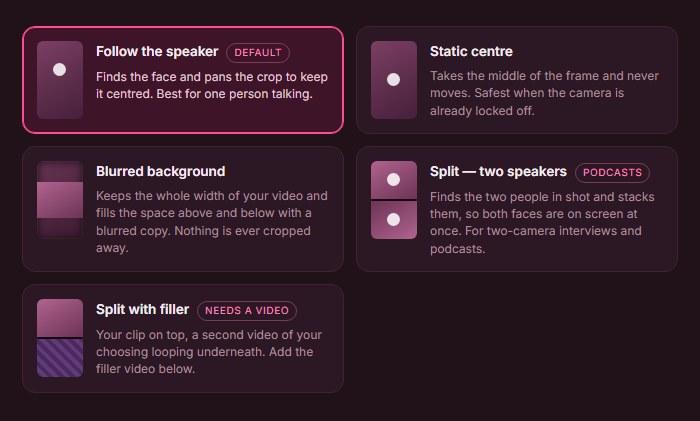
Follow the speaker finds the face and pans the crop to keep it centred. Split stacks two people so both faces stay on screen in a two-camera interview or podcast.
Face detection uses the YuNet model, which holds onto the same person steadily from frame to frame. A punch-in zoom from 1.0x to 1.6x tightens the crop on the subject.
Captions, hooks and branding
Klyply has 27 animated caption presets, from word-by-word highlights to one-word-at-a-time and typewriter styles.
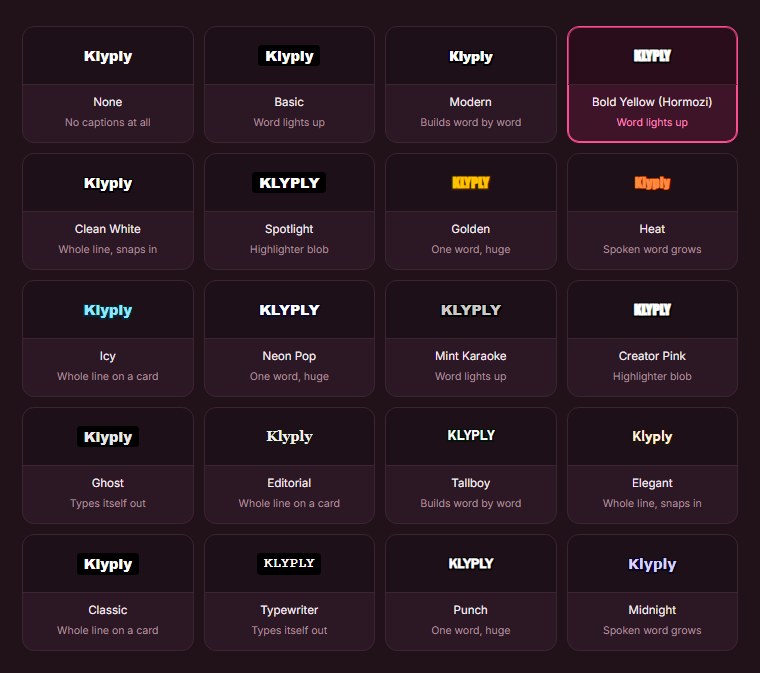
A hook title can be written automatically for each clip from its opening line, or typed once for the whole batch.
Your logo can sit in six positions at 4 to 45 percent of the frame width, with adjustable opacity. Music from your own library is matched to each clip’s energy and ducked under the speech.
For uploaded files, a live preview shows a real frame from your footage with your captions, hook and logo, plus the TikTok or Instagram safe zones. Presets save the whole look, so every batch matches.
Output formats
Klyply exports MP4 at 9:16 (1080×1920), 4:5, 1:1 or 16:9, at 30 frames per second, one shape per render.
There is no watermark on any licence, and finished clips are ordinary files in a folder on your drive.
Klyply pricing
Klyply is sold as a licence, not a subscription: $29 for three months, a 12-month term, or $179 for a Lifetime licence.
Every term includes unlimited videos and clips. A fixed term starts when you activate, not when you buy.
Activation needs the internet once, and after that every job runs offline. Refunds are available within 14 days of purchase while the key is unactivated, according to the licence agreement.
Klyply vs Ssemble at a glance
| Ssemble | Klyply | |
|---|---|---|
| Where it runs | Ssemble’s servers | Your Windows PC |
| Upload required | Yes | No |
| Longest video | 30-minute upload, 20-minute segment | No limit |
| What is metered | One credit per video | Nothing |
| Unused allowance | Resets each billing cycle | No credits to reset |
| Content supported | Talking videos only | Any video, with face tracking when faces are present |
| Caption styles | Auto-captions, editable | 27 animated presets |
| Scheduling | Yes | No |
| Free plan | Yes | No |
| Refunds | None | 14 days, while unactivated |
| Price | From $72 a year | $29 for 3 months, or $179 once |
Where Klyply falls short
Klyply runs on Windows 10 and 11 only, with no Mac build and no browser version.
It renders on your own hardware, so a thin laptop takes a while on a long file. It has no free plan, no social scheduling, no caption translation and no team seats.
2. OpusClip: a cloud Ssemble alternative for large uploads
OpusClip (also written Opus Clip) is a cloud AI clipping tool that accepts uploads of up to 10GB per video and charges one credit per minute of the original video.
It is the best-known name in the category and the tool Ssemble most often compares itself with.
OpusClip’s credit documentation says processing costs “1 credit per minute of the original video imported”. Credits last 60 days on monthly plans and 12 months on yearly plans.
Its pricing page lists a Free plan with a watermark on animated caption templates and three-day storage, then Starter at $15 a month, Pro at $29 a month and Business on request.
Against Ssemble, OpusClip removes the 1GB and 30-minute ceiling but costs far more on long videos: a 90-minute recording uses 90 credits. The OpusClip comparison on this blog goes into more detail.
3. Vizard: a Ssemble alternative with 4K exports and teams
Vizard is a cloud AI clipping tool and video editor that exports in 4K on paid plans and offers a shared team workspace on its Business plan.
According to Vizard’s pricing page, one credit equals one minute of video.
The Free plan gives 60 credits a month, 720p exports, three-day storage and uploads of up to 60 minutes and 1GB.
The Creator plan gives 600 credits a month, no watermark, 4K export, 100GB of storage, scheduling for six social accounts and uploads of up to 30GB. Business adds team members, a brand kit and unlimited storage.
Vizard’s prices were shown with a changing discount at the time of writing, so check the page for the current figure.
The Vizard comparison covers its credits, refund policy and storage in more depth.
4. Klap: a Ssemble alternative for high clip volume
Klap is a cloud AI clipping tool that meters the number of clips you generate, not the length of the video, which suits creators who publish a lot of shorts.
Klap’s pricing page lists Basic at $14 a month for 100 clips, Pro at $39 a month for 300 clips and Pro+ at $94 a month for 1,000 clips, all billed yearly.
Every plan includes unlimited social accounts and analytics. The page does not publish a maximum video length, a free plan or export resolution, so confirm those first.
5. Choppity: a Ssemble alternative with team seats
Choppity is a cloud clipping tool that meters hours of AI video analysis, and its Team plan includes unlimited seats.
On Choppity’s pricing page, the Free plan includes one hour of analysis and three-day project retention.
Starter is $20 a month, or $14 a month billed yearly, for three hours of analysis and 1080p exports. Creator is $32 a month ($22.40 yearly) for five hours, permanent project retention and API access.
Team is $48 a month ($33.60 yearly) for five hours, unlimited seats, user roles and a shared workspace.
See how Choppity’s monthly hours work before choosing it for long recordings.
6. Spikes Studio: a minute-based Ssemble alternative with B-roll
Spikes Studio is a cloud AI clipping tool that meters minutes of video and bundles animated captions, AI B-roll, music, sound effects and a social scheduler into its paid plan.
Spikes Studio’s pricing page lists a Free plan limited to demo clips, videos of up to five minutes, 720p export with a watermark and seven-day storage.
PRO+ is $32.99 a month, or $14.09 a month billed annually, for 300 minutes a month, 1080p without a watermark and 90-day storage.
Enterprise is $115.99 a month, or $56.34 a month annually, for 1,200 minutes and unlimited storage.
7. Clipped: an on-device Ssemble alternative for iPhone
Clipped is an iPhone app that clips video entirely on the device, with no cloud processing, and removes its watermark with a single one-time purchase.
Its App Store listing says every model runs on-device and the app works in airplane mode.
It is free with a watermark on every export, and the Watermark Remover purchase is $9.99. It requires iOS 26 or later and is listed for iPhone only.
Ssemble alternatives compared side by side
This table compares Ssemble with all seven Ssemble alternatives on where they run, what they meter, free plans, export quality and entry price, as of September 2026.
| Tool | Where it runs | What is metered | Free plan | Best export listed | Entry price |
|---|---|---|---|---|---|
| Ssemble | Cloud | Videos, up to a 20-minute segment each | Yes, limits unpublished | 1080p | $72 a year |
| Klyply | Your Windows PC | Nothing | No | 1080p | $29 for 3 months |
| OpusClip | Cloud | Minutes of video imported | Yes | 1080p on Free | $15 a month |
| Vizard | Cloud | Minutes of video uploaded | Yes, 720p | 4K | See pricing page |
| Klap | Cloud | Clips generated | Not listed | Not listed | $14 a month, billed yearly |
| Choppity | Cloud | Hours of AI analysis | Yes, 1 hour | 1080p | $14 a month, billed yearly |
| Spikes Studio | Cloud | Minutes of video | Demo clips only | 1080p | $14.09 a month, billed yearly |
| Clipped | iPhone, on device | Nothing | Yes, watermarked | Not listed | $9.99 once |
When is Ssemble still the better choice?
Ssemble is still the better choice if you clip talking videos under 20 minutes, want scheduling included cheaply, or import mostly from YouTube, Twitch, Kick or Vimeo links.
For that kind of work, few Ssemble alternatives beat 360 videos for $72 a year.
- Short source videos. Per-video pricing is at its best when every video fits inside the 20-minute segment.
- Posting built in. Scheduling and autoposting come with every plan, where Klyply and Clipped hand you files to post yourself.
- Multilingual captions. Ssemble lists 39 caption languages and a dubbed-audio feature that local tools do not offer.
- Any device. Ssemble runs in a browser on Mac, Windows, Linux or a Chromebook.
How to switch from Ssemble
To switch from Ssemble, download the clips you want to keep, cancel before your next renewal, and test your chosen Ssemble alternative before your access ends.
Doing it in that order means you never lose clips or pay for an extra billing cycle.
- Export your clips. Ssemble’s pricing FAQ says your videos stay accessible for export after you cancel, but download anything you want to keep while you still have full access.
- Write down your settings. Note your caption style, fonts, colours and hook format so you can recreate your look.
- Cancel just before renewal. Cancellation takes effect at the end of the billing period, and the terms rule out refunds.
- Test the Ssemble alternative on a recording you already clipped. Running the same episode through Klyply or another tool shows directly whether it finds better moments.
- Ask for deletion if the footage was sensitive. Ssemble’s privacy policy describes deletion requests under US state privacy laws, though its terms say complete deletion may not be possible.
Ssemble alternative FAQs
What is the best Ssemble alternative?
Klyply is the best Ssemble alternative for long recordings and footage that cannot be uploaded, because it clips whole files on your own PC with no credits.
For 4K and teams choose Vizard, for high clip volume Klap, for team seats Choppity, for large cloud uploads OpusClip, and for iPhone Clipped.
Is there a free Ssemble alternative?
Yes, OpusClip, Vizard and Choppity are Ssemble alternatives with free plans, and Clipped is free on iPhone with a watermark.
Each free plan has limits: OpusClip watermarks animated caption templates, Vizard exports at 720p, Choppity allows one hour of analysis, and all three delete projects after three days.
Is Ssemble better than OpusClip?
Ssemble is cheaper than OpusClip for long videos, while OpusClip accepts much larger uploads.
In a Ssemble vs OpusClip comparison on price, Ssemble charges one credit per video and OpusClip one credit per minute. On uploads, Ssemble caps local files at 1GB and 30 minutes, where OpusClip accepts up to 10GB.
How long can a video be on Ssemble?
A local upload to Ssemble can be up to 30 minutes long and 1GB in size, and clips come from a segment of up to 20 minutes.
Longer recordings have to be linked from a supported platform, trimmed or split first.
Can Ssemble clip gaming videos?
No, Ssemble is not suitable for gaming videos. Its help centre says it works with talking videos and lists gaming, music and faceless videos as unsuitable.
Is there a Ssemble alternative that works offline?
Yes, Klyply works offline on Windows and Clipped works offline on iPhone.
Klyply needs an internet connection once to activate its licence, then transcribes, clips and renders with no connection. Clipped’s App Store listing says it works in airplane mode.
Is there a Ssemble alternative with no subscription?
Yes, Klyply and Clipped both work without a subscription.
Klyply’s Lifetime licence is a single payment of $179, and its 3-month and 12-month terms end without renewing. Clipped charges a one-time $9.99 to remove its watermark.
There is a wider list of one-time purchase clipping tools, including Mac and editor options.
Can Klyply clip a two-hour podcast?
Yes, Klyply clips a two-hour podcast as a single job, because it has no limit on video length.
It scores the whole recording for moments. The only cost of a longer file is processing time on your own computer.
Does Klyply run on a Mac?
No, Klyply runs on Windows 10 and 11 only.
There is no Mac build and no browser version, so Mac users should look at the cloud tools above.
Final thoughts
Ssemble is good value for short talking videos, and if that is all you clip, there is no reason to leave.
The right Ssemble alternative is the one that removes the limit you keep hitting.
If that limit is the 20-minute segment, the 30-minute upload cap or the upload itself, Klyply is the strongest Ssemble alternative. It reads the whole recording, keeps it on your PC, and costs $179 once for a Lifetime licence.
If you need 4K or a shared team workspace, Vizard fits better.
For clip volume, choose Klap. For an iPhone-only workflow, Clipped is the Ssemble alternative to try.
Whichever you pick, test it on an episode you have already clipped. The side-by-side result will tell you more than any pricing table.