Sermon Clips for Churches: 7 Steps That Respect Consent and Music Licences
How to turn each Sunday sermon into short clips for social media: consent from people on camera, what worship music licences cover, and seven steps from recording to posting.

Sermon clips are short vertical videos cut from a recorded sermon, usually under three minutes each, posted to YouTube Shorts, Instagram Reels, TikTok and Facebook.
This guide is for church media teams and volunteers deciding how to turn each Sunday’s recording into sermon clips for social media without breaking a licence or someone’s trust.
It covers consent from people on camera, what worship music licences do and do not allow, seven steps from recording to posting, and how a clip maker fits in.
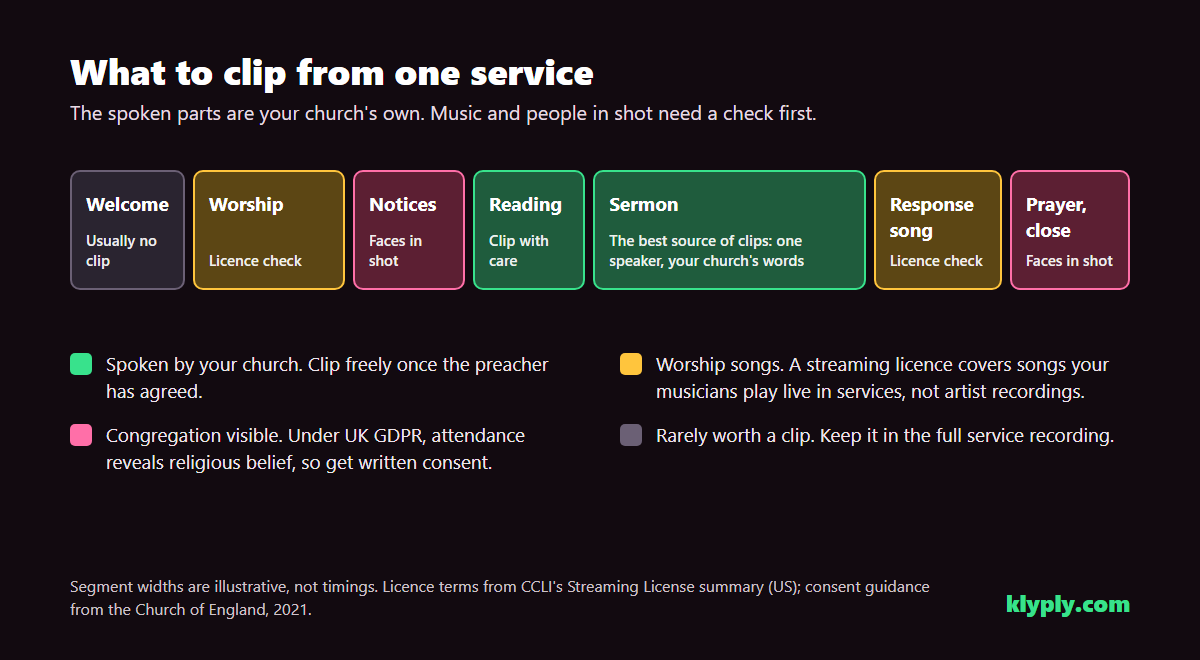
The short answer: clip the spoken sermon, keep the congregation out of shot unless they have agreed in writing, and leave worship songs in the full service recording. To find, frame and caption the clips without uploading the service anywhere, Klyply does it on a Windows PC in the church office.
Key takeaways
- The sermon is the safest part of a service to clip: one speaker, and words that belong to your church.
- The Church of England’s guidance says people visible on camera must give written consent, because attendance at a service reveals religious belief, which is special category data under GDPR.
- CCLI’s streaming licence covers worship songs your own musicians play live in services. It does not cover artist recordings, and it does not stop platform takedowns.
- YouTube Shorts run up to three minutes, and Instagram recommends videos of three minutes or less to people who do not follow you yet.
- Klyply turns a full service recording into 1 to 20 captioned vertical sermon clips that follow the preacher, with nothing uploaded and no length limit on the recording.
What are sermon clips?
Sermon clips are self-contained moments from a sermon, such as one point, one story or one call to respond, reframed for a phone screen and captioned.
They are not trailers for the full message. A good sermon clip makes sense to someone who has never been to your church and never will watch the whole service.
Most churches already record or livestream the service, so the raw material exists every week. Sermon clips for churches are a way of getting more from that recording.
Why churches post sermon clips
Churches post sermon clips because a minute of the message reaches people in the feeds they already scroll, where a full service recording rarely gets watched.
- Reach. Short-form feeds recommend videos to people who do not follow you, which a livestream on your channel page does not.
- The week between Sundays. A clip on Wednesday reminds the congregation of what they heard, and gives them something easy to share.
- A first look. Someone deciding whether to visit sees how your church preaches before they walk in.
- Access. Captioned church video clips reach people who are deaf or hard of hearing, and anyone watching with the sound off.
Before you clip: consent and copyright
Before you post sermon clips, settle three things: consent from anyone visible, the licence for any music in the clip, and the preacher’s agreement.
Most guides to sermon clips skip all three. They are the part that can go wrong in public.
Consent from people on camera
Anyone visible in a sermon clip should have agreed to be filmed and published, and in the UK that agreement needs to be in writing.
The Church of England’s guidance on filming and photography in churches explains why: attendance at a church service reveals religious belief, which is special category data under GDPR. Children under 16 need consent from a parent or guardian.
The same guidance suggests practical measures that suit clipping well:
- Simple signage saying the service is recorded and where it will be shown.
- A film-free area, such as a side aisle or a few rows at the back.
- Cameras pointed away from that area.
Consent can be withdrawn at any time. The guidance says images of that person must then be deleted everywhere they have been stored or published, so keep a list of where each clip went.
Outside the UK the law differs, but the principle holds. A clip that shows a recognisable face in a pew is publishing that person’s presence at your church.
Worship music and licences
A worship song in a sermon clip needs a licence that covers it, and the common church licences cover less than many teams assume.
CCLI’s Streaming License summary for the US lets a church stream and distribute recordings of participating songs played live by its own musicians in church services. It sets out clear limits:
- It does not cover artist or record label recordings, or pre-recorded songs except where the agreement allows.
- It does not cover songs in non-Church Service content, such as a teaching video or special production.
- It does not override the platforms’ own rules or prevent takedown notices, and copyright owners keep the right to place ads on videos containing their songs.
- Each song must be checked against the covered catalogues, and credited with title, writers, copyright notice and licence number.
Whether a 45-second clip posted on its own still counts as a church service is a question for CCLI or your own licensing body, not for a guess.
The simplest answer is to keep songs out of sermon clips. Cut from the spoken message, and start each clip after the band has finished.
The preacher’s agreement and the readings
Agree with each preacher, including guest speakers, that their sermon can be clipped, and where the clips will be posted.
A sentence lifted out of a sermon can mean something different alone. Preachers are more relaxed about clips when they know they can ask for one to be taken down.
Scripture readings are spoken too, but Bible translations carry their own copyright. Check your translation’s permissions before a long reading becomes a clip.
How to make sermon clips in 7 steps
Making sermon clips takes seven steps: record for clipping, start from the original file, find the moments, choose a length, frame the preacher, caption, and publish with a link to the full sermon.
Step 1: Record the sermon so it can be clipped
Record the sermon with one camera on the preacher and audio taken from the sound desk, because a vertical crop needs a clear subject and a clip lives or dies on its sound.
A wide shot of the whole stage leaves the preacher small in the frame. Cropping a vertical clip from that throws away most of the picture, so a 1080p wide shot gives a soft result on a phone.
Either frame the preacher more tightly, or record in 4K so the crop has pixels to spare. Keep the camera pointed away from the congregation, which also solves most of the consent question.
Step 2: Start from the original recording
Clip from the file your camera or streaming software saved, not from a copy downloaded back from YouTube or Facebook.
Platforms compress a livestream for playback. Every crop and re-export after that loses more detail, and the original costs nothing extra to keep.
Step 3: Find the moments worth clipping
The best sermon clips carry one complete idea and open with a sentence that makes sense to a stranger.
- A single point stated plainly. The sentence the preacher repeats is usually the one the sermon is built around.
- A story. A personal illustration has a beginning and an end, which is what a clip needs.
- The application. The moment the sermon turns to what it means on Monday morning.
- A question to the listener. Direct address works on a phone, because it feels personal.
Avoid moments that lean on what came before, such as “as we saw in verse three”. Put the scripture reference in the hook title instead.
Step 4: Choose a length for each platform
Keep sermon clips under three minutes, because that is the limit for YouTube Shorts and the length Instagram recommends for reaching new viewers.
YouTube’s help page on three-minute Shorts says vertical or square videos up to three minutes are treated as Shorts. Instagram’s creator FAQ says it recommends videos of three minutes or less to unconnected audiences.
Within that, length should follow the idea. A one-line truth can be 20 seconds, while a story may need two minutes to land.
Step 5: Frame the preacher for a vertical screen
A vertical sermon clip should keep the preacher’s face in the frame as they move, which means a crop that tracks them rather than a fixed centre cut.
Preachers walk, turn to the screen and step away from the lectern. A fixed crop loses them; face tracking follows.
If the camera is far back, a slight zoom on the crop helps the face fill more of the screen, at the cost of sharpness. Our guide to vertical video safe zones shows where faces and text stay clear of each app’s buttons.
Step 6: Caption every clip
Caption every sermon clip, because many people scroll with the sound off and captions are what make the clip accessible.
The W3C’s guidance on captions for prerecorded video accepts captions burned into the picture as a way to meet the requirement, provided they are accurate.
Accuracy is the hard part in a sermon. Biblical names, place names and book references are exactly the words automatic transcription gets wrong, so read every caption before posting.
Choose a calm caption style. Bold, bouncing captions built for comedy clips can feel wrong under a passage about grief.
Step 7: Publish with a link to the full sermon
Post each clip with a short caption, the scripture reference and a link to the full sermon or your church’s website.
A clip is a doorway. Someone moved by 60 seconds should be able to find the other 35 minutes, and the service times, in one tap.
Post on a steady schedule, such as two or three clips through the week. Our workflow for turning a long recording into short clips covers spacing and where each platform’s clips live.
How to make sermon clips with Klyply
Klyply is a sermon clip maker for Windows 10 and 11 that finds the moments in a full service recording, follows the preacher and burns in captions, all on the church’s own PC.
Nothing is uploaded. The recording, with every face in the congregation, never leaves the computer it was saved on.
The steps in Klyply
- Choose the service recording, or paste a link to it. There is no limit on how long the recording can be.
- Set how many sermon clips you want, from 1 to 20, and how long each may be, from 5 to 180 seconds.
- Add your church’s colours and logo, and pick one of 27 caption styles.
- Add a hook title, such as the scripture reference or the sermon series name.
- Choose Follow the speaker as the framing, and set background music to None.
- Start the render, then watch each clip before it goes out.
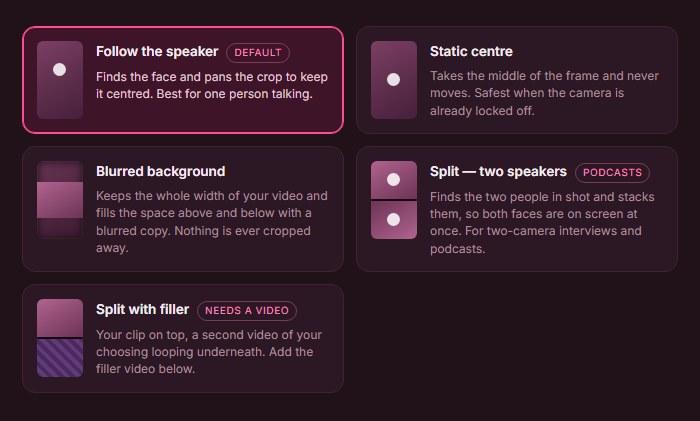
How Klyply handles a sermon recording
Klyply transcribes the whole recording on your PC, scores candidate moments, and cuts the strongest ones into vertical clips.
- Framing. Follow the speaker keeps one face in the crop and never splits the screen. A punch-in zoom from 1.00x to 1.60x tightens the crop on a preacher filmed from the back of the room.
- Captions. Word-by-word captions in 27 styles, from bold to restrained, with your own colours. For names and references, the larger transcription models (Medium for accents and noisy rooms, Large v3 for the most accurate) do better than the default.
- Music. Klyply only adds music from tracks you have added yourself, and None turns it off. Any music it does add is lowered under speech.
- Branding. Your logo, placed and sized once, on every clip in the batch.
Because the service never leaves the PC, a consent mistake stays fixable: a clip that should not exist can be deleted before anyone else has a copy. Our guide to offline video clipping software explains why that matters for sensitive footage.
What Klyply costs and where it falls short
Klyply costs $29 for 3 months or $179 for a Lifetime licence, with a 12-month term in between, and there are no credits or per-minute charges for long services.
A fixed term starts when you activate the key, and you can get a refund within 14 days of purchase as long as the key has not been activated.
Its limits for a church media team:
- It runs on Windows only. A team working on Macs will need something else.
- It renders on the PC’s processor, so a 90-minute service takes longer on an older office computer.
- There is no transcript editor. A misheard name means a re-render with a larger model, not a typed correction.
- It does not post or schedule clips. You upload each finished clip to each platform yourself.
- Each run produces one aspect ratio, and there are no team seats.
Common mistakes with sermon clips
The most common mistakes with sermon clips are about people and music rather than editing, and every one of them is easier to prevent than to undo.
Faces in the background
A clip framed on the preacher can still catch the front row. Check the edges of every frame for faces that are not on your consent list.
A worship song under the opening line
Clips that start while the band is still playing carry a song your licence may not cover in a stand-alone clip. Start every clip after the music has ended.
A line that needs the rest of the sermon
A sentence that depends on the passage or the point before it can mislead on its own. If a clip needs a setup to be fair, include it or choose another moment.
Wrong names in the captions
Automatic captions misspell biblical names and book references more than any other words. Read the captions on every clip before it goes out.
No way back to the full message
A sermon clip with no link leaves an interested viewer nowhere to go. Put the full sermon link and service times in every post.
Sermon clips FAQs
How long should sermon clips be?
Sermon clips should be under three minutes, the Shorts limit and Instagram’s recommendation for new viewers. Let the idea set the length: some land in 20 seconds, stories may need two minutes.
How many clips can you get from one sermon?
The number of clips from one sermon depends on how many self-contained moments it has, not its length. Posting two or three strong ones beats posting ten weak ones.
Do we need permission to post clips with the congregation in them?
Yes, in the UK the Church of England’s guidance says people visible on camera must give written consent, because church attendance reveals religious belief. Elsewhere, check your own data protection rules and ask anyway.
Does a CCLI licence cover worship music in sermon clips?
CCLI’s streaming licence covers songs your musicians play live in services, not artist recordings or non-service content. Whether a stand-alone clip is covered is a question for CCLI, so the safest sermon clips contain no music.
What is the best sermon clip maker?
The best sermon clip maker is the one that fits your team’s computers and your footage rules. Hosted tools need the service uploaded; Klyply runs on a Windows PC with nothing uploaded and no limit on service length.
Can volunteers make sermon clips?
Yes, volunteers can make sermon clips with a clip maker, because the tool handles finding, framing and captioning. The volunteer’s job becomes reviewing each clip for faces, music and caption errors.
Should sermon clips go on YouTube Shorts?
Yes, sermon clips under three minutes post as Shorts, which reach viewers outside your subscribers. Our guide to turning a YouTube video into Shorts covers YouTube’s own tools and rules.
Final thoughts
Good sermon clips for churches start before anyone opens an editor: a camera on the preacher, consent from anyone else in shot, and a decision to leave the music in the full service.
For a church posting one clip a month, a volunteer with a free editor and a careful eye is enough.
For a church that wants a few sermon clips every week without uploading its services anywhere, Klyply finds the moments, follows the preacher and captions every clip on a Windows PC, for a one-time licence.
Either way, the review matters more than the tool. Watch every clip once for faces, music and names before it represents your church.