Vertical Video Safe Zones: Where Captions, Logos and Faces Stay Visible on TikTok, Reels and Shorts
Vertical video safe zones for TikTok, Instagram Reels and YouTube Shorts: what each platform documents, one 950 x 979 px box that works on all three, and where captions, logos and faces should go.
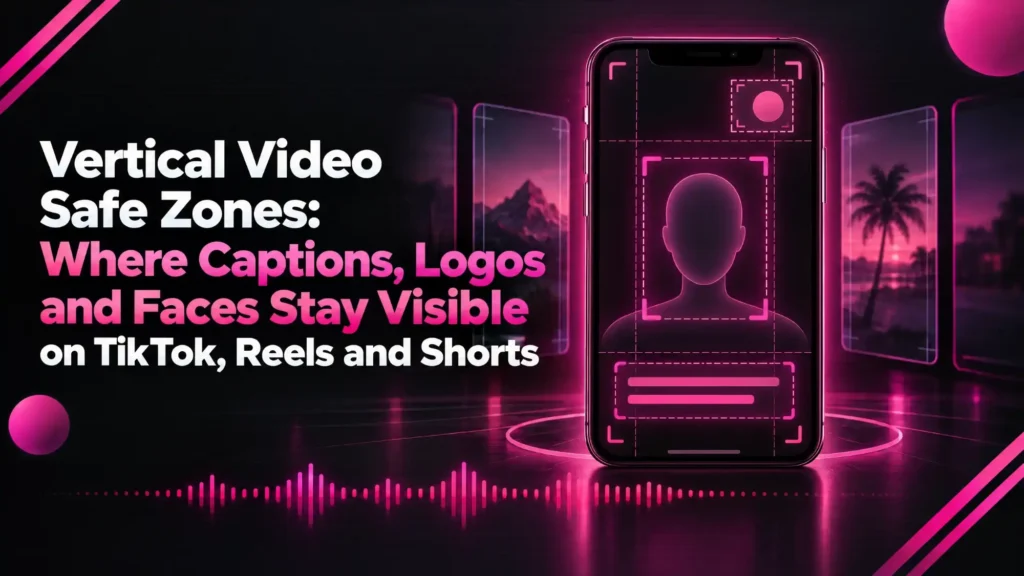
Vertical video safe zones are the parts of a 9:16 frame that stay visible after TikTok, Instagram Reels or YouTube Shorts draw their own buttons, captions and account details on top of your video.
Anything outside them can end up behind a like button, a caption or a call to action. That is how a perfect hook line or a sponsor logo disappears on the one screen that matters.
This guide covers the frame size each platform expects, what each one documents about its safe zone, one pixel box that works across all three, and where captions, logos, hooks and faces should go.
The short answer: on a 1080 × 1920 frame, keep important text, logos and faces at least 269 px from the top, 672 px from the bottom and 65 px from each side. Those margins come from Meta’s Reels guidance, the only platform that publishes percentages, and they clear TikTok’s and YouTube’s buttons in most layouts.
If you make clips with Klyply, its live preview shades these vertical video safe zones for each platform before you render, so you can move captions and your logo out of the way first.
Key takeaways
- All three platforms want vertical 9:16 video. 1080 × 1920 is the common working size, and Meta recommends 1440 × 2560 for Reels ads.
- Meta asks you to leave at least 14% of the top, 35% of the bottom and 6% of each side free of text and logos on Reels ads.
- TikTok and YouTube publish templates and reference images, not percentages. TikTok says its safe zone shrinks as the caption gets longer.
- One box covers all three: x 65 to 1015 and y 269 to 1248 on a 1080 × 1920 frame, a safe area of 950 × 979 px.
- Captions placed in the lower fifth of the frame sit inside the Reels bottom band. Centre them if the clip will run as an ad.
What are vertical video safe zones?
Vertical video safe zones are the central area of the frame that no platform interface element covers, so anything placed there is seen by every viewer.
Short-form apps play video full screen and then layer their own interface over it. The top carries the account name or page tabs, the right edge carries like, comment and share buttons, and the bottom carries the caption, sound and, on ads, a call to action.
Vertical video safe zones exist because those overlays are not part of your file. Your editor shows a clean frame, and the phone shows a busy one.
Why do vertical video safe zones differ between platforms?
Vertical video safe zones differ because each app draws a different interface, and even on one app the covered area changes with the post.
TikTok’s in-feed ad specifications say the safe zone size depends on the video’s dimension, the ad caption length and any add-ons, and that a longer caption means a smaller safe zone.
Ads also carry more interface than organic posts, such as a call-to-action button, so the paid version of a clip loses more of the frame.
What size should vertical video be for TikTok, Reels and Shorts?
Vertical video for TikTok, Reels and Shorts should be 9:16, and 1080 × 1920 pixels is the working size that suits all three.
The platforms document slightly different minimums, recommended sizes and length limits, and vertical video safe zones are measured as a share of that frame.
| TikTok | Instagram Reels | YouTube Shorts | |
|---|---|---|---|
| Aspect ratio | 9:16 recommended | 9:16 | Vertical or square, 9:16 recommended |
| Resolution | Ads at least 540 × 960, shot at 720p or higher | 1440 × 2560 recommended for ads | 1080 × 1920 works; no minimum stated for organic Shorts |
| Length | In-feed ads up to 10 minutes | Up to 20 minutes; over 3 minutes is not recommended to new audiences | Up to 3 minutes counts as a Short |
| Published safe zone | Downloadable templates; varies with caption length | 14% top, 35% bottom, 6% each side | Reference image with a marked safe area |
Sources: TikTok’s in-feed ad specifications and creative best practices, Instagram’s Reels feature page, and YouTube’s help article on three-minute Shorts.
Shorts has one extra rule worth knowing. On YouTube, a Short over one minute with an active copyright claim was blocked outright until September 24, 2026. It may now stay playable, but it only becomes eligible for monetisation once the claim is resolved.
What is the Instagram Reels safe zone?
The Instagram Reels safe zone, the strictest of the published vertical video safe zones, leaves at least 14% of the top, 35% of the bottom and 6% of each side free of text, logos and other important elements.
That guidance is in Meta’s Instagram Reels ad specifications, which also recommend 1440 × 2560 video, allow up to 15 minutes and cap files at 4 GB.
The bottom band is the big one: Meta reserves more than a third of the frame there, where the post caption and the ad’s call to action appear.
Reels safe zone in pixels
In pixels, the Reels safe zone on a 1080 × 1920 frame starts 269 px from the top, ends 672 px from the bottom and sits 65 px in from each side.
| Margin | Share of frame | 1080 × 1920 | 1440 × 2560 |
|---|---|---|---|
| Top | 14% | 269 px | 358 px |
| Bottom | 35% | 672 px | 896 px |
| Each side | 6% | 65 px | 86 px |
| Safe area | 88% × 51% | 950 × 979 px | 1268 × 1306 px |
The pixel values are Meta’s percentages applied to each frame size and rounded to the nearest pixel.
What is the TikTok safe zone?
The TikTok safe zone is the area left clear of the For You feed’s interface, and TikTok defines it with downloadable templates rather than fixed percentages.
TikTok says the zone depends on whether the video is vertical, horizontal or square, how long the caption is, and whether interactive add-ons are attached. A two-line caption covers more of the bottom than a single line.
In practice the TikTok safe zone is squeezed from two directions: the like, comment, share and profile buttons down the right edge, and the username, caption and sound line across the bottom.
What TikTok recommends for text
TikTok recommends 5 to 10 words per second when you put text on screen, in its creative best practices for performance ads.
The same page asks for vertical 9:16 video shot at 720p or higher, with content kept inside the interface safe zone. Short caption lines help twice: they are easier to read and they leave the bottom of the frame free.
What is the YouTube Shorts safe zone?
The YouTube Shorts safe zone is the area not covered by the right-hand button panel, the channel and title text at the bottom, and any ad overlays.
Google’s help page on square and vertical video gives a 1080 × 1920 reference image with a marked safe area for your logo, product and on-screen text. It does not state percentages in words.
The Shorts ads specifications name what covers the video: a right-hand panel with like, dislike, comment and share buttons, a call-to-action card, and an overlay that links to the full video.
Horizontal videos are shown with blurred areas above and below in the Shorts feed. A 16:9 clip therefore shrinks to a thin band, and vertical video safe zones stop mattering because the whole picture is small.
If your source is a horizontal YouTube video, cut it to vertical first. Our guide on turning a YouTube video into Shorts covers the ways to do that.
One vertical video safe zone for all three platforms
One vertical video safe zone works for TikTok, Reels and Shorts: a 950 × 979 px box running from x 65 to 1015 and y 269 to 1248 on a 1080 × 1920 frame.
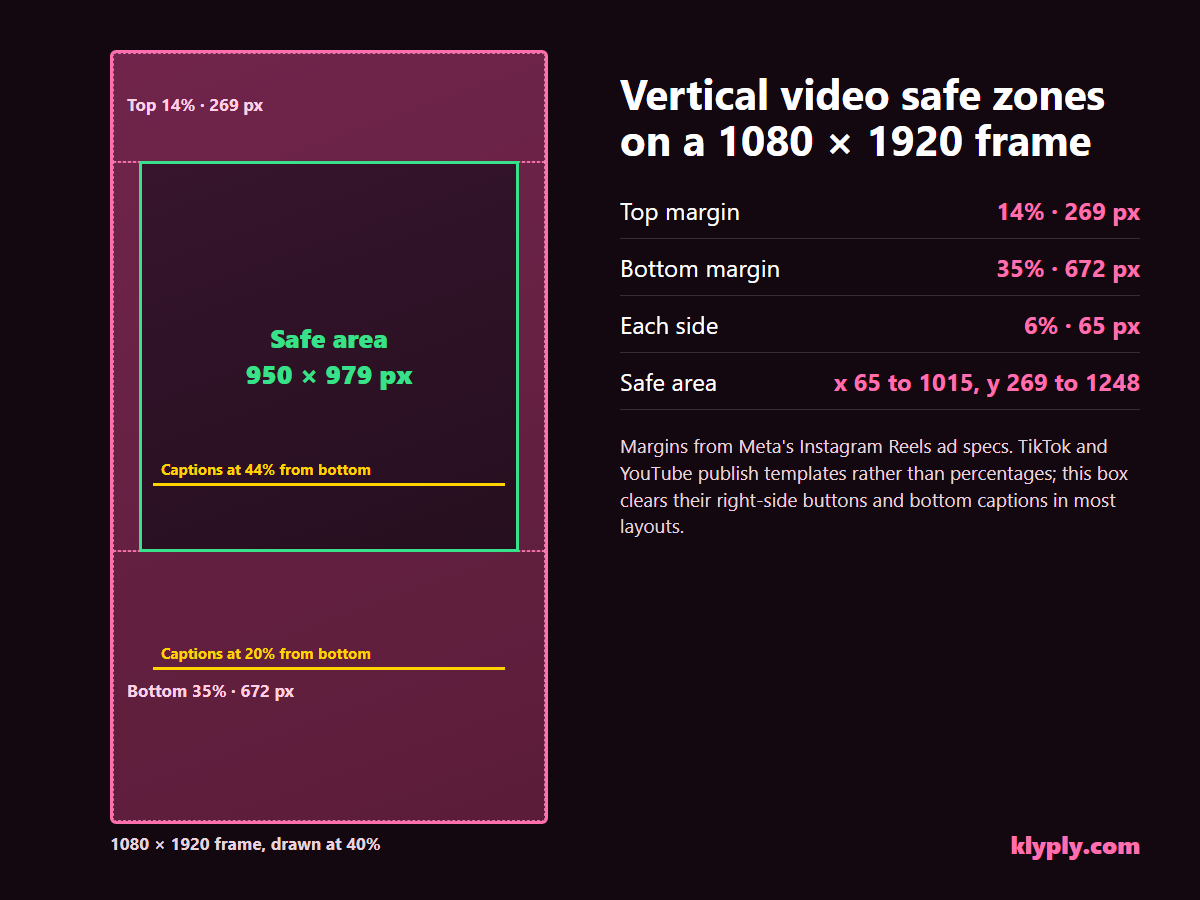
The box uses Meta’s Reels margins because they are the strictest numbers any of the three platforms publishes. A layout that fits inside it keeps clear of the Reels ad interface, and it also stays away from TikTok’s right-hand buttons and the Shorts button panel.
These vertical video safe zones are a planning box, not a guarantee. For paid campaigns, still drop your final frame onto TikTok’s template and Google’s reference image before launch.
Designing one master clip to these vertical video safe zones is what lets you post the same file to all three apps. Re-editing per platform is where most repurposing time goes.
Where should captions go in a vertical video?
Inside vertical video safe zones, captions should sit in the middle band of the frame, roughly between 35% and 55% of the height measured from the bottom.
That keeps them above the Reels bottom band, which ends at 35%, and close to where a viewer’s eyes already are, near the speaker’s face. It matters most in talking-head formats like podcast clips, where the face is what the viewer is watching.
Low captions are a habit carried over from television. On a phone, text placed 20% from the bottom sits inside the area Meta reserves for the Reels caption and call to action.
Burned-in captions or the platform’s auto captions?
Burned-in captions are part of the video and look the same everywhere, while each app’s automatic captions are drawn by the app and follow its own placement.
Burned-in captions are the ones you have to keep inside the vertical video safe zones yourself. Their advantage is control over font, colour, word highlighting and exactly where they sit.
How many words should be on screen at once?
A few words per line is enough on a phone: Klyply’s caption styles show three to six at a time, and TikTok’s ad guidance suggests 5 to 10 words per second overall.
Shorter lines are narrower, so they are less likely to run into the side margins or the right-hand buttons.
Where should logos, hooks and faces go?
Within vertical video safe zones, logos belong just inside the top-left corner of the safe area, hooks in the upper third below the top margin, and faces in the centre of the frame.
- Logo. Place it at least 269 px from the top and 65 px in from the side, well clear of the right-hand buttons lower down.
- Hook title. Put the opening line in the upper third, below the top margin, where it is read first and does not compete with captions lower down.
- Faces. Keep the speaker’s face centred horizontally and above the middle, because the right-hand buttons sit over a face when the crop drifts right.
- Products and prices. Treat them like text: a product held low in the frame disappears behind the bottom band.
How to check vertical video safe zones before you post
To check vertical video safe zones before you post, overlay the platform’s template on your final frame, then watch a private test post on a real phone.
- Export a still of the busiest moment. Pick the frame with the longest caption, the logo and the hook all on screen.
- Lay a safe zone template over it. Use TikTok’s downloadable template, Google’s reference image, or the pixel box above for Reels.
- Move anything that crosses a line. Captions and logos are usually a position change, not a re-edit.
- Post a private or draft version. View it on a phone with the caption you will actually use, since caption length changes the covered area.
- Repeat for ads. An ad adds a call-to-action button, so check the paid version separately from the organic one.
How Klyply keeps clips inside vertical video safe zones
Klyply shows a live vertical preview with the safe zones shaded for TikTok, Instagram, YouTube or LinkedIn, so captions, the hook and your logo can be placed before any clip is rendered.
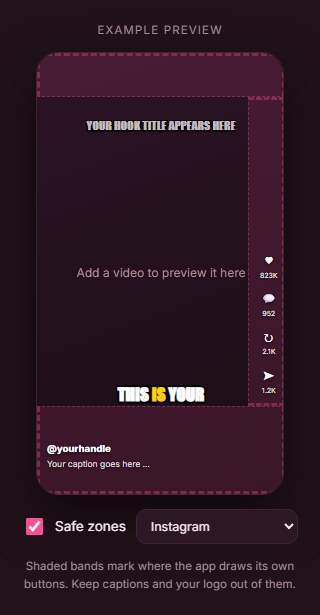
You pick the platform from a menu and the shaded bands change to match. The bands mark roughly where each app draws its buttons, a guide for organic posts rather than a copy of any platform’s ad template.
Caption position in Klyply
Klyply places captions at one of three heights: lower at 20% from the bottom, center at 44%, or upper at 66%.
Most of its 27 caption styles default to lower, which reads well on organic posts. If a clip will run as a Reels ad, switch to center so the text clears Meta’s 35% bottom band.
Framing that keeps faces central
Klyply’s Follow the speaker framing keeps the crop on the person talking, which keeps their face away from the right-hand buttons.
For two people, Split stacks them in two panes. Every clip renders on your own Windows PC, and the same job exports at 9:16, 4:5, 1:1 or 16:9, one shape per render.
Klyply does not post or schedule for you, and its shaded bands do not replace a final check against TikTok’s or Google’s ad templates. If private footage is part of your workflow, our guide to offline video clipping software explains why it never uploads anything.
Common vertical video safe zone mistakes
The most common vertical video safe zone mistake is designing on a clean editor canvas and never viewing the clip with the app’s interface on top.
- Captions in the bottom fifth. They collide with the post caption, sound line and call to action.
- Text hugging the right edge. TikTok and Shorts both run their buttons down that side.
- Long post captions on TikTok. TikTok says a longer caption shrinks the safe zone, so a clip that fit yesterday can be covered today.
- Posting 16:9 to Shorts. The clip is shown with blurred bars and every on-screen word shrinks.
- Using organic margins for ads. Ads add a call-to-action layer, so check them against the ad templates.
- Trusting one platform’s template for all three. Only the strictest margins work everywhere.
Vertical video safe zones FAQs
What is the TikTok safe zone size?
TikTok does not publish one safe zone size, because the covered area changes with the video’s shape, the caption length and any add-ons. Use TikTok’s downloadable templates, or the 950 × 979 px shared box on a 1080 × 1920 frame.
What is the Instagram Reels safe zone in pixels?
On a 1080 × 1920 frame, the Instagram Reels safe zone runs from 269 px below the top to 672 px above the bottom, with 65 px clear on each side. That is Meta’s 14%, 35% and 6% guidance in pixels.
Does YouTube publish a Shorts safe zone?
Yes, as a reference image rather than numbers. Google’s Ads help shows a 1080 × 1920 frame with the safe area marked for logos, products and on-screen text.
Do vertical video safe zones matter for organic posts or only ads?
Vertical video safe zones matter for both, because organic posts also show buttons, the account name and the caption over your video. Ads add a call to action, so their bottom band is larger.
Is 4:5 or 1:1 video safe on Reels and Shorts?
Square video counts as a Short on YouTube, and 4:5 suits the Instagram feed. In full-screen vertical feeds both leave empty space above and below, so 9:16 still uses the screen best.
Can Klyply show vertical video safe zones while I edit?
Yes, Klyply’s live preview shades the safe zones for TikTok, Instagram, YouTube or LinkedIn and shows where captions, the hook and your logo will land before rendering.
Where can I download a safe zone template?
TikTok offers safe zone templates in its in-feed ad specifications, and Google provides a reference image in its vertical video help. For Reels, Meta publishes the margins in its ad specs, which this guide converts to pixels.
Final thoughts
Vertical video safe zones are less about memorising three sets of numbers and more about designing one clip that survives every app’s interface.
For most creators, the shared 950 × 979 px box is enough: text and logos inside it, faces centred, captions in the middle band.
If you run ads, check vertical video safe zones on the final frame against TikTok’s templates and Google’s reference image, and keep Reels captions above the bottom 35%.
If you cut clips from long videos on a Windows PC, Klyply’s live preview shows the shaded zones before you render. For subscription costs compared, see our Opus Clip alternatives comparison and the guide to clipping software you buy once.