Opus Clip Alternative: 7 Best Picks Compared on Credits, Limits and Privacy
Opus Clip charges a credit for every minute of video you import, and the credits expire. Here are the 7 best Opus Clip alternatives compared on pricing, limits and privacy, led by Klyply, which clips whole recordings on your own PC.
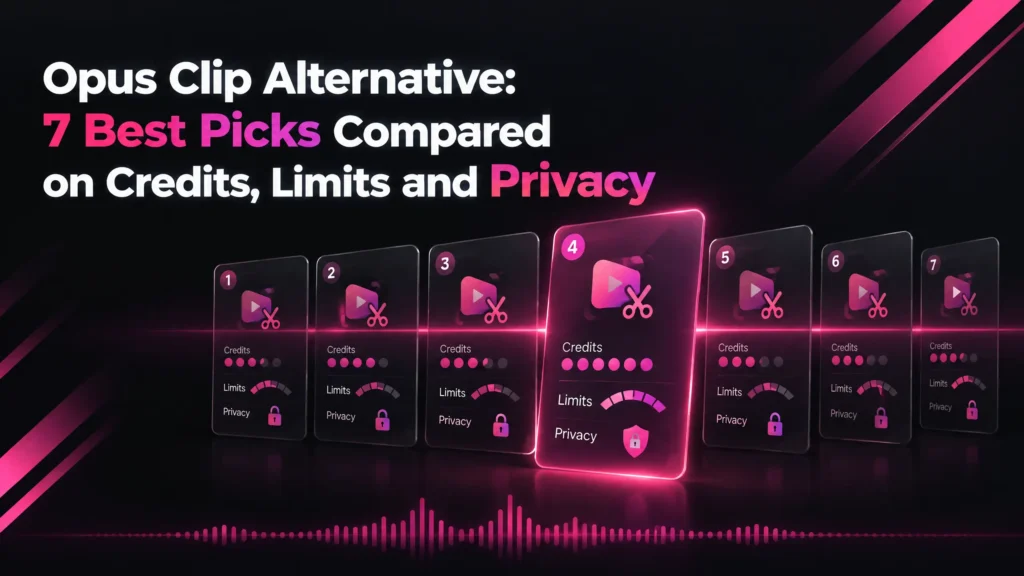
An Opus Clip alternative is an AI clipping tool that turns long videos into short clips without Opus Clip’s per-minute credit meter, its expiring credits or its cloud upload.
Opus Clip is one of the most capable AI clippers available. Most people look for an Opus Clip alternative because of how it bills, not because of the clips it makes.
It charges one credit for every minute of video you import. A two-hour recording costs 120 credits whether you keep one clip or twenty.
This guide covers what Opus Clip costs, where its limits are, how to choose a replacement, and how the seven best Opus Clip alternatives compare.
The short answer: if you record long podcasts or handle footage that should not be uploaded, Klyply is the strongest Opus Clip alternative. It clips whole recordings on your own Windows PC with no credits at all.
If you want a cheaper cloud tool for short videos, look at Ssemble. For 4K exports and team seats, look at Vizard.
Every price and limit below comes from each company’s own pricing page, help centre or terms, checked in September 2026.
Key takeaways
- Opus Clip charges 1 credit per minute of the original video you import, however many clips you keep.
- Starter is $15 a month for 150 credits. Pro is $29 a month, or $174 a year for 3,600 credits.
- Credits expire after 60 days on monthly plans and after 12 months on yearly plans.
- Klyply is the best Opus Clip alternative for long recordings and private footage: no upload, no credits, and a $179 Lifetime licence.
- Ssemble charges per video, Klap per clip and Choppity per hour of analysis, which changes what a long recording costs.
- Stay on Opus Clip if you rely on its editor, AI B-roll, dubbing or team workspace.
What is Opus Clip?
Opus Clip is a cloud AI video clipping tool from OpusClip Inc. in Mountain View, California. It turns long videos into short clips and can publish them to YouTube Shorts, TikTok and Instagram Reels.
Your video is processed on Opus Clip’s servers. You upload a local file or import from sources such as YouTube, Zoom, Rumble, Twitch and Google Drive, according to its help centre introduction.
Its ClipAnything model picks moments using visual, audio and sentiment cues, so it can clip videos with little or no dialogue.
Each clip gets a Virality Score, AI captions and auto reframing. Paid plans add an editor with filler and silence removal.
Pro also includes AI B-roll, video dubbing, a social media scheduler, export to Adobe Premiere Pro and DaVinci Resolve, and a team workspace with two seats.
How much does Opus Clip cost in 2026?
Opus Clip costs $15 a month for Starter and $29 a month for Pro, or $174 a year for Pro on yearly billing, as of September 2026.
Every plan is metered in credits, and one credit is one minute of imported video.
This is what Opus Clip’s pricing page lists:
| Plan | Price | Credits | Storage | Notes |
|---|---|---|---|---|
| Free | $0 | 60 a month | Clips exportable for 3 days | Watermark, up to 1080p, no editing |
| Starter | $15 a month, monthly only | 150 a month | Expires after 29 days | No watermark, 9:16 only |
| Pro | $29 a month, or $174 a year | 3,600 a year on yearly billing | 100GB | Two team seats, 9:16, 1:1 and 16:9 |
| Business | Custom | Custom | Dedicated | API, priority processing |
Opus Clip’s credits article says processing costs “1 credit per minute of the original video imported”.
Credits on monthly plans last 60 days, so one month rolls over. Credits on yearly plans arrive all at once and are valid for 12 months.
For what that works out to per minute of video on each plan, and whether monthly or yearly billing is cheaper, see our breakdown of Opus Clip pricing per minute.
Does Opus Clip have a free plan?
Yes, Opus Clip has a free plan with 60 credits a month, which is one hour of imported video.
Free clips carry a watermark, render at up to 1080p and cannot be edited. After three days they can no longer be exported.
What are Opus Clip’s limits?
Opus Clip’s main limits are the per-minute meter, credits that expire, short storage on cheaper plans, and a required upload of every video.
Its technical limits are generous. The reasons to pick an Opus Clip alternative are mostly about cost and data, not capability.
How are Opus Clip credits used?
Opus Clip uses one credit per minute of the source video, whatever you do with the result.
A 90-minute podcast costs 90 credits. A weekly show of that length uses about 390 credits a month, more than twice Starter’s allowance of 150.
How long can a video be on Opus Clip?
Opus Clip accepts videos of up to 10 hours, according to its video length article.
Local files can be up to 10GB on Free and Starter, and up to 30GB on Pro.
How long does Opus Clip keep your clips?
Opus Clip keeps clips for a limited time on its cheaper plans. Free clips stop being exportable after three days, and Starter media expires after 29 days.
Pro includes 100GB of cloud storage. Opus Clip’s plans article also says projects become inaccessible three days after a subscription is cancelled.
Does Opus Clip offer refunds?
Opus Clip does not refund fees already paid, except where its agreement says otherwise. Its terms of service say paid services cannot be ended before the period you paid for.
The same terms say that after account deletion it may not be possible to completely delete your content from its records. For footage under NDA, that line matters more than any feature.
Opus Clip review: pros and cons
Opus Clip’s strengths are its clip selection, full editor and wide feature set. Its weaknesses are the per-minute meter, expiring credits and short storage on cheaper plans.
Pros
- ClipAnything picks moments from visual, audio and sentiment cues, not only speech.
- A Virality Score ranks every clip.
- Accepts videos of up to 10 hours, and local files of up to 30GB on Pro.
- Captions in 20+ languages, filler and silence removal, AI B-roll and dubbing.
- A social scheduler and a two-seat team workspace on Pro.
- Runs in a browser on any computer.
Cons
- Charges per minute of video imported, not per clip kept.
- Starter’s 150 credits cover two and a half hours of video a month.
- Credits expire after 60 days on monthly plans.
- Free clips are watermarked and expire after three days.
- Starter exports 9:16 only.
- No refunds, and every video is uploaded to Opus Clip’s servers.
Why look for an Opus Clip alternative?
People look for an Opus Clip alternative for four reasons: long recordings cost too many credits, credits expire unused, footage cannot be uploaded, or they do not want a subscription.
Long recordings burn credits
Per-minute pricing charges for what you record, not what you publish.
A three-hour livestream you take one clip from costs three times as much as a one-hour interview you take ten clips from. Trimming the source before upload saves credits, but that is the job the tool is meant to do.
Credits expire before you use them
Opus Clip credits on monthly plans expire after 60 days.
If you clip heavily one month and barely at all the next, part of what you paid for disappears. Yearly credits last 12 months, but you pay for the whole year upfront.
Your footage cannot leave your machine
Client work under NDA, internal meetings, training footage and unreleased product demos often cannot be uploaded to a third-party service.
For a business in the EU, sending video of identifiable people to a US company is a personal data transfer with its own paperwork. No cloud Opus Clip alternative removes that step, because only local processing avoids the upload.
You clip in bursts and want no subscription
A subscription suits steady weekly output. It suits a busy launch month followed by quiet months much less well.
An Opus Clip alternative with a one-time licence costs the same whether you clip every day or twice a quarter.
How to choose an Opus Clip alternative
Choose an Opus Clip alternative by deciding what you want to stop paying for: minutes, uploads, storage or the subscription itself.
Then check these five points on the replacement’s own pricing and help pages.
- How it meters usage. Per minute (Vizard, Spikes Studio), per video (Ssemble), per clip (Klap), per hour of analysis (Choppity), or not at all (Klyply, Clipped).
- Where the video is processed. Cloud tools need an upload. Desktop and on-device apps keep the file where it is.
- The longest video it accepts. Ssemble, for example, caps local uploads at 30 minutes.
- Export quality and watermark on the plan you would actually buy.
- The Opus Clip features you use today. B-roll, dubbing, scheduling and team seats are not in every tool.
The 7 best Opus Clip alternatives in 2026
The seven best Opus Clip alternatives in 2026 are Klyply, Ssemble, Vizard, Klap, Choppity, Spikes Studio and Clipped.
Klyply and Clipped run on your own device. The other five are cloud tools that meter usage differently from Opus Clip.
1. Klyply: the best Opus Clip alternative for long recordings and private footage
Klyply is a Windows application that turns long videos into short vertical clips on your own PC, with no upload and no credits.
As an Opus Clip alternative, it removes the two things Opus Clip charges for most: minutes of video, and space on someone else’s server.
What Klyply does with a recording
Klyply runs the whole pipeline locally: it transcribes the audio, scores every candidate moment, reframes the best ones, adds captions and renders the batch.
You can start from a file on your drive or a link from YouTube, Vimeo, X or Twitch. A two-hour recording is one job, with no per-minute cost.
Transcription is word by word and uses your graphics card if you have one. Without one it runs on the CPU, so no GPU is needed.
Moment scoring across the whole file
Klyply rates every candidate moment on hook strength, emotional and concrete language, vocal energy, pace, and whether the thought is complete by the end.
It drops overlapping picks, so each clip is a different moment. You set 1 to 20 clips per video, plus the minimum and maximum clip length.
Hooks written from each clip
Klyply can put a hook title across the first seconds of every clip, written from that clip’s own opening line.
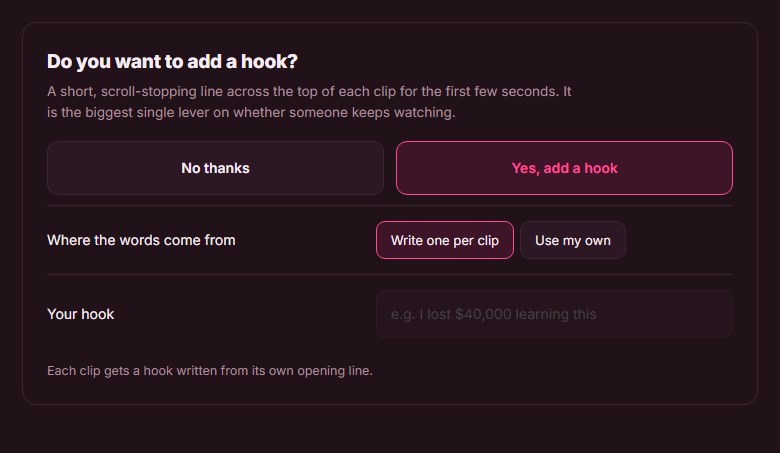
You can also type one hook for the whole batch, or leave hooks off.
A live preview before you render
Before a long render starts, Klyply’s live preview shows a real frame from your uploaded footage with your caption style, hook and logo on top.
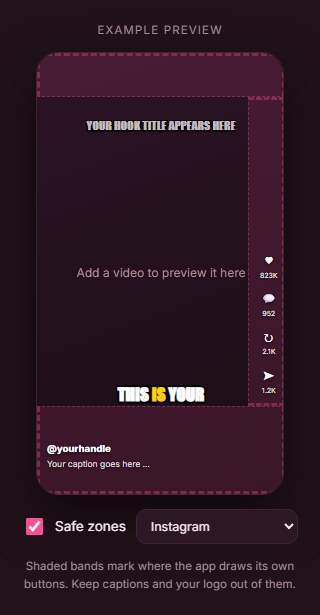
Shaded bands mark where TikTok or Instagram draw their own buttons, so captions and logos stay clear of them.
Framing, captions and branding
Five framing modes cover single speakers, locked-off cameras and two-person interviews: Follow the speaker, Static centre, Blurred background, Split for two speakers, and Split with filler.
There are 27 animated caption presets, three caption positions and a punch-in zoom of up to 1.6x.
Your logo sits in one of six positions at 4 to 45 percent of frame width, and music from your own library is ducked under the speech. Presets save the whole look for the next batch.
Formats and files
Klyply renders MP4 at 9:16, 4:5, 1:1 or 16:9, one shape per render, with no watermark.
Clips land in a folder on your own drive and stay there. There is no storage plan and nothing expires.
What Klyply costs
Klyply is a licence rather than a subscription: $29 for three months, a 12-month term, or a $179 Lifetime licence.
Videos and clips are unlimited on every term, and a term starts when you activate, not when you pay.
Klyply needs the internet once to activate, then works offline. You can get a refund within 14 days of purchase if the key has not been activated, according to the licence agreement.
Klyply vs Opus Clip
| Opus Clip | Klyply | |
|---|---|---|
| Where it runs | Opus Clip’s servers | Your Windows PC |
| Upload needed | Yes | No |
| Metering | 1 credit per minute imported | None |
| Cost of a 2-hour video | 120 credits | Nothing extra |
| Unused credits | Expire after 60 days on monthly plans | No credits |
| Clip storage | 3 days on Free, 29 days on Starter, 100GB on Pro | Your own drive |
| Longest video | 10 hours | No limit |
| Aspect ratios | 9:16 on Starter; 9:16, 1:1 and 16:9 on Pro | 9:16, 4:5, 1:1 and 16:9 |
| Watermark | On Free | None |
| Works offline | No | Yes, after activation |
| Price | $15 a month, or $174 a year for Pro | $29 for 3 months, or $179 once |
Where Klyply falls short
Klyply runs on Windows 10 and 11 only and has no browser version.
It has no free plan, AI B-roll, dubbing, social scheduler or team workspace. Long files also take longer on a slow laptop than on Opus Clip’s servers.
2. Ssemble: a cheaper Opus Clip alternative for short videos
Ssemble is a cloud AI clipping tool that charges one credit per video instead of per minute, which makes it much cheaper than Opus Clip for videos under 20 minutes.
Ssemble’s pricing page lists Pro at $15 a month, or $72 a year for 360 video credits. Each credit covers a segment of up to 20 minutes.
The catch is length. Ssemble’s help centre caps local uploads at 1GB, 30 minutes and 1080p, and it only supports talking videos.
Scheduling to TikTok, YouTube and Instagram and API access are included on every plan.
The Ssemble comparison for long videos covers its segment and upload limits in detail.
3. Vizard: an Opus Clip alternative with 4K exports
Vizard is a cloud AI clipping tool and editor with the same per-minute credits as Opus Clip, but with 4K export and a larger monthly allowance on its Creator plan.
Vizard’s pricing page lists Creator at $29 a month, or $174 a year, with 600 credits a month, 4K export, 100GB of storage and scheduling for six social accounts.
Business is $39 a month, or $234 a year, with a shared workspace and team members at $5 a month per seat.
Vizard’s free plan gives 60 credits a month, 720p export and three-day storage.
For Vizard’s refund rules and storage terms, see the Vizard pricing and refund comparison.
4. Klap: an Opus Clip alternative that charges per clip
Klap is a cloud AI clipping tool that meters clips generated rather than minutes uploaded, so a long recording costs no more than a short one.
Klap’s pricing page lists Basic at $14 a month for 100 clips, Pro at $39 for 300 and Pro+ at $94 for 1,000, all billed yearly.
Every plan includes unlimited social accounts and analytics. That page does not publish a free plan, a length limit or export resolution.
5. Choppity: an Opus Clip alternative for teams
Choppity is a cloud clipping tool that meters hours of AI video analysis and offers unlimited seats on its Team plan.
On Choppity’s pricing page, Starter is $20 a month ($14 yearly) for three hours of analysis and Creator is $32 ($22.40 yearly) for five hours.
Team is $48 a month ($33.60 yearly) with unlimited seats. The free plan includes one hour of analysis with three-day project retention.
The Choppity comparison by monthly hours shows how its allowance compares with every other plan.
6. Spikes Studio: an Opus Clip alternative with cheaper annual minutes
Spikes Studio is a cloud AI clipping tool that meters minutes like Opus Clip, with an annual plan that costs less per month.
Spikes Studio’s pricing page lists PRO+ at $32.99 a month, or $14.09 a month billed annually, for 300 minutes a month with 1080p exports, AI B-roll and a scheduler.
Its free plan is limited to demo clips, videos of up to five minutes and 720p export with a watermark.
7. Clipped: an on-device Opus Clip alternative for iPhone
Clipped is an iPhone app that clips video on the device, with no cloud processing and a one-time purchase instead of credits.
Its App Store listing says the app works in airplane mode and never sends footage anywhere. It is free with a watermark, and removing the watermark costs $9.99 once.
Clipped requires iOS 26 or later and is listed for iPhone only.
Opus Clip alternatives compared side by side
This table compares Opus Clip with the seven Opus Clip alternatives on where they run, how they meter usage, free plans, best export and entry price, as of September 2026.
| Tool | Where it runs | What is metered | Free plan | Best export listed | Entry price |
|---|---|---|---|---|---|
| Opus Clip | Cloud | Minutes imported | Yes, 60 credits | Highest available on paid plans | $15 a month |
| Klyply | Your Windows PC | Nothing | No | 1080p | $29 for 3 months |
| Ssemble | Cloud | Videos, up to a 20-minute segment | Yes | 1080p | $72 a year |
| Vizard | Cloud | Minutes uploaded | Yes, 720p | 4K | $174 a year |
| Klap | Cloud | Clips generated | Not listed | Not listed | $14 a month, billed yearly |
| Choppity | Cloud | Hours of analysis | Yes, 1 hour | 1080p | $14 a month, billed yearly |
| Spikes Studio | Cloud | Minutes | Demo clips only | 1080p | $14.09 a month, billed yearly |
| Clipped | iPhone, on device | Nothing | Yes, watermarked | Not listed | $9.99 once |
When is Opus Clip still the better choice?
Opus Clip is still the better choice if you edit inside the tool, clip content without much dialogue, work in a team, or use a Mac or Chromebook.
- Editing in the tool. Text and timeline editing, filler removal, B-roll and dubbing are built in.
- Videos with little talking. ClipAnything uses visual and sound cues as well as speech.
- Teams. Pro includes a two-seat workspace, and Business adds more.
- Publishing. A scheduler posts to YouTube Shorts, TikTok and Instagram Reels.
- Any device. It runs in a browser, where Klyply needs Windows and Clipped needs an iPhone.
How to switch from Opus Clip
To switch from Opus Clip, download your clips before storage runs out, use up your remaining credits, and cancel before your next billing date.
- Download your clips first. Starter media expires after 29 days, and projects become inaccessible three days after you cancel.
- Spend the credits you have. Monthly credits expire after 60 days, and fees already paid are not refunded.
- Note your brand template. Record fonts, colours and caption style so you can rebuild the look.
- Cancel before renewal. Paid periods cannot be ended early, so time the cancellation to your billing date.
- Test the Opus Clip alternative on a video you already clipped. Comparing the moments each tool chooses is the fastest way to judge quality.
Opus Clip alternative FAQs
What is the best Opus Clip alternative?
Klyply is the best Opus Clip alternative for long recordings and footage that cannot be uploaded, because it clips on your own PC with no credits.
Ssemble is the cheaper cloud option for short videos, Vizard suits 4K and teams, and Klap suits a high volume of clips.
Is there a free Opus Clip alternative?
Yes, Vizard, Ssemble and Choppity have free plans, and Clipped is free on iPhone with a watermark.
Every free plan is limited. Vizard exports at 720p, Choppity allows one hour of analysis, and Ssemble does not publish its free plan limits.
Is Opus Clip worth it in 2026?
Opus Clip is worth it if you clip short-to-medium videos every week and use its editor, B-roll or scheduler.
It is poor value if you record long sessions and keep only a few clips, because you pay for every minute imported.
Why is Opus Clip expensive for podcasts?
Opus Clip is expensive for podcasts because it charges one credit per minute of the full episode.
A weekly 90-minute show uses about 390 credits a month, before you clip anything else.
Do Opus Clip credits roll over?
Opus Clip credits roll over for one month on monthly plans, because they expire after 60 days. Credits on yearly plans are valid for 12 months.
Is there an Opus Clip alternative that works offline?
Yes, Klyply works offline on Windows and Clipped works offline on iPhone.
Klyply needs one internet connection to activate its licence. After that, transcription, clipping and rendering all run without a connection.
Is there an Opus Clip alternative without a subscription?
Yes, Klyply’s Lifetime licence is a one-time payment of $179, and its fixed terms end without renewing.
Clipped also uses a one-time purchase, $9.99 to remove its watermark.
To compare pay-once clippers across Windows, Mac and iPhone, see the guide to clipping software you buy once.
Does Klyply work on a Mac?
No, Klyply runs on Windows 10 and 11 only. Mac users should look at the browser-based tools on this list.
Final thoughts
Opus Clip is a strong product. If you clip short videos weekly and use its editor, it earns its price.
The best Opus Clip alternative is the one that stops charging for what you have too much of.
If that is hours of recording, or footage that cannot leave your machine, Klyply is the right choice. It reads whole recordings on your PC, has no credits to expire, and costs $179 once for a Lifetime licence.
If you want to stay in the cloud, Ssemble is cheaper for short videos, Vizard adds 4K, and Klap charges by the clip.
Run the same episode through your shortlist before committing. The clips each tool picks will settle it faster than any table.