Best Clip Length for TikTok, Shorts and Reels: Every Limit From the Platforms Themselves
Every clip length rule for YouTube Shorts, Instagram Reels, TikTok, Spotify and LinkedIn from their own help pages, the difference between allowed, recommended and paid, and how to choose inside them.
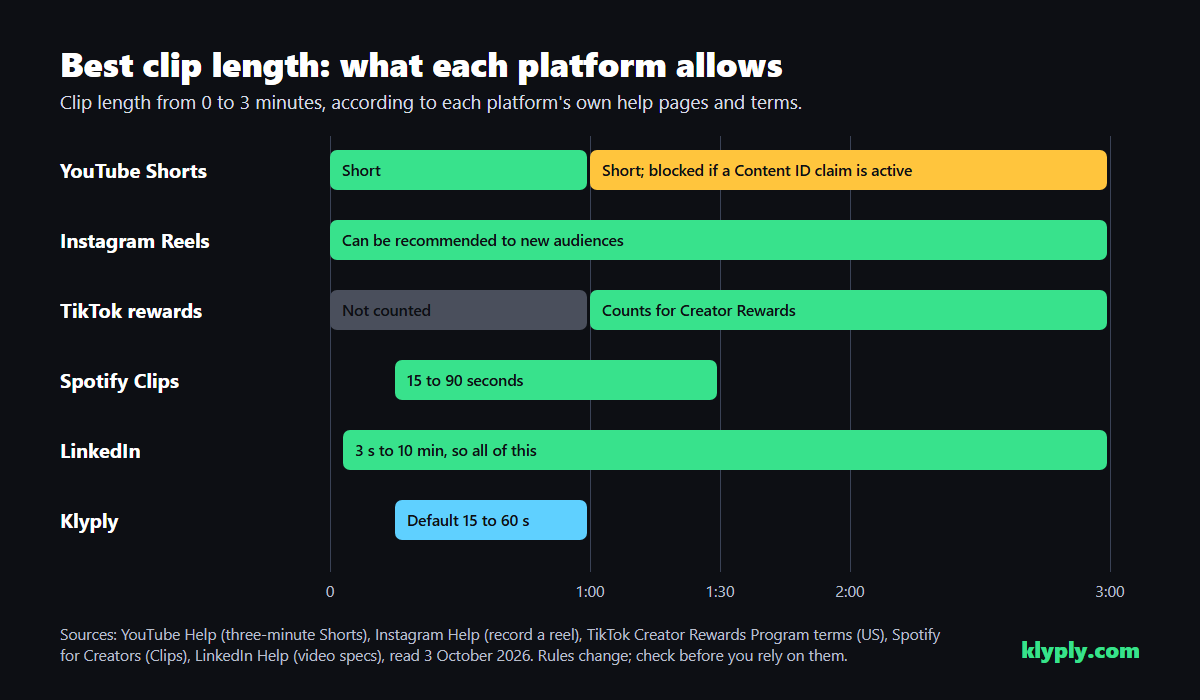
The best clip length is the shortest one that delivers a complete idea, kept inside the limits each platform publishes: up to three minutes for YouTube Shorts and for Reels shown to new viewers, and at least one minute for TikTok videos that earn Creator Rewards.
This guide is for creators and clippers deciding how long to cut clips for TikTok, YouTube Shorts, Instagram Reels, Spotify and LinkedIn.
It lists every length rule from the platforms’ own help pages and terms, explains the difference between what a platform allows, recommends and pays for, and shows how to choose a length inside those limits.
The short answer: none of the platforms publishes an ideal length for organic clips, so let the idea set it. Keep clips under three minutes, cut them over one minute if TikTok payouts matter, and keep claimed music out of any Short longer than a minute. In Klyply you set the range per batch, from 5 to 180 seconds.
Key takeaways
- YouTube treats vertical or square videos up to three minutes as Shorts. Its help page says a Short over one minute with an active Content ID claim is blocked globally until the claim is resolved.
- Instagram lets you make reels up to 20 minutes, but says reels over 3 minutes will not be recommended to new audiences.
- TikTok’s Creator Rewards Program only counts videos of at least one minute.
- Spotify Clips must be 15 to 90 seconds, one per episode, and LinkedIn accepts 3 seconds to 10 minutes.
- Klyply’s default clip range is 15 to 60 seconds, so raise the minimum past a minute when clipping for TikTok rewards.
Best clip length by platform at a glance
The best clip length for each platform starts with its published limits, which differ more than most guides admit.
| Platform | What it allows | What changes with length | Source |
|---|---|---|---|
| YouTube Shorts | Vertical or square, up to 3 minutes | Over 1 minute, an active Content ID claim blocks the Short | YouTube Help |
| Instagram Reels | Up to 20 minutes | Over 3 minutes, not recommended to new audiences | Instagram Help |
| TikTok | Long uploads; in-feed ads up to 10 minutes | Under 1 minute, not counted for Creator Rewards | TikTok terms and ads help |
| Spotify Clips | 15 to 90 seconds, one per episode | Outside that range, not accepted | Spotify for Creators |
| 3 seconds to 10 minutes | No published recommendation | LinkedIn Help |
Allowed, recommended and paid are different numbers
Every platform has up to three length thresholds: the most it will accept, the most it will recommend to strangers, and the least it will pay for. Most length guides blur them into one.
Instagram is the clearest case. It accepts a 20-minute reel, but a 4-minute reel will not reach new viewers. TikTok works the other way: a 45-second clip can reach anyone, but it earns nothing under Creator Rewards.
So the best clip length, or “how long should a short be”, has no single answer. It depends on whether you want reach, payouts, or both.
YouTube Shorts length
YouTube Shorts length can be up to three minutes, and any square or vertical video up to three minutes uploaded since 15 October 2024 is treated as a Short.
YouTube’s help page on three-minute Shorts also sets a rule that matters for clippers. Read on 3 October 2026, it says a Short over one minute with an active Content ID claim of any type is blocked globally: not playable, not recommended and not monetised.
The same page says there is no channel penalty, that you can remove the claimed content or dispute the claim, and that the Short becomes viewable once the claim is resolved. Shorts under one minute are unaffected.
In practice, keep any clip with music or other third-party audio under a minute, or remove the audio. Our guide to turning a YouTube video into Shorts covers the rest of the process.
Instagram Reels length
Instagram Reels length can be up to 20 minutes, but reels over three minutes are not recommended to people who do not already follow you.
Instagram’s help page on recording a reel says you can record one or several clips adding up to 20 minutes, with the note that reels over 3 minutes will not be recommended to new audiences.
For clips meant to find new viewers, three minutes is the practical ceiling on Instagram.
TikTok video length
TikTok video length matters most for payouts: TikTok’s Creator Rewards Program only rewards videos of at least one minute.
The US Creator Rewards Program terms define eligible videos as content with a duration of at least 1 minute, posted publicly. The same terms require at least 10,000 followers and 100,000 video views in the last 30 days to join.
TikTok accepts far longer uploads than any clip needs. Its in-feed ads specs allow non-Spark ads up to 10 minutes, which gives a sense of the scale, though that figure is for ads.
Our guide to making money clipping videos covers Creator Rewards and the other ways clippers get paid.
Spotify Clips length
Spotify Clips must be between 15 and 90 seconds, and each podcast episode can have one.
Spotify for Creators’ guide to Clips sets that range, prefers vertical video, and says clips appear on the show page and may be recommended across Spotify.
LinkedIn video length
LinkedIn accepts videos from 3 seconds to 10 minutes, at aspect ratios from 1:2.4 to 2.4:1.
LinkedIn’s video specifications list those limits with files up to 5 GB. It publishes no recommended length for organic posts.
Why one to three minutes is the most useful band
A clip between one and three minutes is the only length that is a YouTube Short, a Reel that can reach new viewers, and a TikTok that counts for Creator Rewards, all at once.
That makes it the best clip length for posting one file to all three apps when payouts matter. A 70-second clip qualifies everywhere.
It is also the band where YouTube blocks Shorts with active Content ID claims. A one-to-three-minute clip should carry only audio you own: the speaker’s voice, and music you have the rights to or none.
Under one minute is still a good choice for reach. It simply leaves TikTok payouts on the table, and keeps you clear of the YouTube claim rule.
How to choose a clip length inside the limits
Inside the platform limits, the best clip length is the one the idea needs, because none of the platforms publishes an ideal length for organic clips.
Guides that promise one ideal length rarely cite a platform source for organic clips. The platforms’ own guidance is about the opening seconds and about watch time, not a target duration.
- Start where the idea starts. A strong opening line matters more than total length.
- End where it lands. Stop on the sentence that completes the thought, not halfway through the next one.
- Cut the warm-up. “So, yeah, I think” adds seconds and nothing else.
- Check for a second idea. If the clip makes two points, it is probably two clips.
Clip length by content type
The best clip length also depends on the moment, because different kinds of moments need different lengths, so match the clip to what happens in it rather than to a fixed target.
| Moment | Typical length | Why |
|---|---|---|
| A one-line insight or quote | Under 30 seconds | The line is the whole clip; anything more dilutes it |
| A tip or answer | 30 to 60 seconds | Enough for the point and one reason |
| A story | 60 to 120 seconds | Stories need a setup and a turn |
| A list or framework | 60 to 180 seconds | Every item the opening promised has to fit |
| A demo or walkthrough | 60 to 180 seconds | The result has to appear on screen |
These ranges are editorial judgement, not platform data. They are a starting point to test against your own analytics.
For podcast clips specifically, our workflow for repurposing a podcast into short clips covers length alongside guest permission and framing.
How to measure the right length for your audience
Your own analytics are the only reliable guide to the best clip length for your audience, because they show where viewers actually stop watching.
TikTok’s Creator Academy guide to analytics lists retention rate, average watch time and watched full video, and notes that the full-watch rate depends on the video’s length. Look for the drop-off point, then ask whether the clip could have ended there.
On YouTube, the Shorts metric Viewed vs swiped away shows how many people chose to watch at all. That is a test of the opening, not the length, so read the two together.
Compare clips cut from the same recording. If your 90-second stories hold viewers as well as your 30-second tips, your audience is telling you length is not the problem.
Common clip length mistakes
Most clip length mistakes come from treating the limit as the target, or from trusting a rule that has since changed.
Filling the maximum
A three-minute limit is a ceiling, not the best clip length. A 40-second idea stretched to three minutes gives viewers two minutes to leave.
Padding a clip past one minute
Stretching a 50-second clip to 61 seconds for TikTok rewards usually means adding the setup or the wind-down that the clip was better without.
Choose moments that genuinely run over a minute, such as stories and lists, rather than padding short ones.
Music in a long Short
Background music that draws a Content ID claim can block a YouTube Short over one minute, according to YouTube’s help page. Use music you own, or none, in anything longer than a minute.
Following an old length guide
Length rules change, and many guides still repeat old ones. YouTube Shorts were limited to one minute until YouTube began treating videos up to three minutes as Shorts from 15 October 2024.
Check the dates on any length guide, this one included, and confirm the number on the platform’s own help page.
One length for every platform without checking
A two-minute clip that suits Shorts, Reels and TikTok will not upload as a Spotify Clip, which stops at 90 seconds. Check the strictest platform on your list before you set the best clip length for a batch.
Setting clip length in Klyply
Klyply lets you set a minimum and maximum clip length for each batch, anywhere from 5 to 180 seconds, and it picks clips inside those bounds.
- Default range. 15 to 60 seconds. That suits Shorts and Reels, but every default clip is too short for TikTok Creator Rewards.
- For TikTok rewards. Set the minimum to 61 seconds or more, and the maximum to 180 so the same clips still work as Shorts and Reels.
- For Spotify Clips. Keep the maximum at 90 seconds.
- Endings. Klyply’s scorer favours clips that finish on a complete sentence, so clips tend to end where the thought ends rather than at the exact maximum.
Within your bounds, the scorer leans towards clips of about 32 seconds, weighed against the hook, energy and pace of each candidate. Widen the range when you want the stronger moment to win over the closer length.
Klyply adds music only from tracks you add yourself, or none, which keeps one-to-three-minute clips clear of music claims. Captions sit inside the safe areas covered in our guide to vertical video safe zones.
Klyply costs $29 for 3 months or $179 for a Lifetime licence, with a 12-month term in between. It runs on Windows 10 and 11, renders on your own PC with nothing uploaded, and has no per-minute charges however long your recordings are.
Its limits here: the length range applies to the whole batch, not to each clip, and there is no way to trim a finished clip by hand inside the app.
Clip length FAQs
How long should a short be?
A short should be as long as its idea needs and no longer than three minutes, the YouTube Shorts limit and Instagram’s ceiling for reaching new viewers. Over one minute, keep claimed music out of YouTube Shorts.
What is the best length for a TikTok?
The best length for a TikTok depends on your goal: anything that holds attention can reach people, but only videos of at least one minute count for Creator Rewards.
Can YouTube Shorts be longer than one minute?
Yes, YouTube Shorts can be up to three minutes. YouTube’s help page says a Short over one minute with an active Content ID claim is blocked until the claim is resolved.
How long can Instagram Reels be?
Instagram Reels can be up to 20 minutes, but Instagram says reels over 3 minutes are not recommended to new audiences.
Is shorter always better for clips?
No, shorter is not always better. A clip cut too short to finish its point loses viewers at the end instead of the start, and on TikTok anything under a minute earns nothing from Creator Rewards.
Can one clip length work on every platform?
Yes, a clip between one and three minutes with no claimed audio fits YouTube Shorts, Instagram Reels for new viewers, TikTok Creator Rewards and LinkedIn. Spotify Clips need 90 seconds or less.
Final thoughts
The best clip length is set by two things: the platform’s published limits, and how long the idea takes to land.
For reach alone, under a minute is safe everywhere. For TikTok payouts as well, cut between one and three minutes and keep claimed music out of anything headed for YouTube.
For batches of clips from long recordings, Klyply lets you set that range once, from 5 to 180 seconds, and finds clips that end on a complete thought inside it, on your own PC.
These rules change. Check each platform’s help page before you plan a month of clips around a number.